


Area Restore
Mark a small area and turn it into a self-regenerating mining zone — broken blocks drop loot, then come back.
Area Restore
Tired of running back to the mines every time you need more iron? Area Restore lets you pick a small region of blocks and turn it into a self-regenerating mining zone. Break a block, get the drops, and a few seconds later the block reappears — exactly where it was, with exactly the same state.
Features
- Area Selector — a craftable tool. Right-click two corners to mark an area (auto-clamped to a 3×3×3 maximum), then right-click in the air to confirm.
- Source-agnostic regeneration — works with any way of breaking blocks: player hands, pickaxes, Create's Mechanical Drill, TNT, even other mods.
- Configurable delay — change
regenDelayTicksin<world>/serverconfig/arearestore-server.toml. Default 3 seconds, range 0.05s–5min. - Persists everywhere — snapshots are stored at the world level, so the tool can sit in a chest, in your ender chest, on the floor — regeneration keeps going.
- Subtle feedback — selection outline shown only to the holder; a soft chime and particle puff when a block regrows.
Crafting
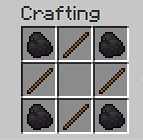
How to use
- Craft the Area Selector.
- Right-click two blocks to define opposite corners.
- Right-click in the air to confirm and start the snapshot.
- Break blocks inside the area — drops fall normally, blocks regenerate after the delay.
- Right-click in the air again to release and stop regeneration.
- Sneak + right-click to fully reset.
Requirements
- Minecraft 1.21.1
- NeoForge 21.1.x (tested on 21.1.222)
- Java 21
License
MIT — fork, modify, include in modpacks freely.
The Area Restore Team
