Introduction
Apex Legends hit feedback mod.
Disclaimer
AI was used extensively during the development of this mod, alongside manual testing and revisions. Issues may still occur with different mod combinations and environments. Please consider this before downloading if you prefer not to use AI-assisted projects.
If you encounter any issues, please leave a comment or join our QQ group. Include your Minecraft version, mod version, mod loader, and logs whenever possible to help us investigate.
Suggestions are also welcome! Your feedback will help guide improvements in future updates.
QQ group: 1095622706
Support the author: Afdian
Features
- Apex-style combat sounds: Armor hit, shield break, flesh hit, and kill confirmation sounds.
- Cumulative damage numbers: Consecutive hits against the same target accumulate damage. The total resets after 1 second without another hit.
- Five armor colors: White, blue, purple, gold, or red armor feedback based on the target’s maximum health.
- Shield break effects: Shield break sounds and shard particles trigger when a target’s health drops from above the configured threshold to that threshold or below.
- TaCZ integration: Supported versions provide ammo sound groups, headshot feedback, and replacement of gun hit feedback sounds.
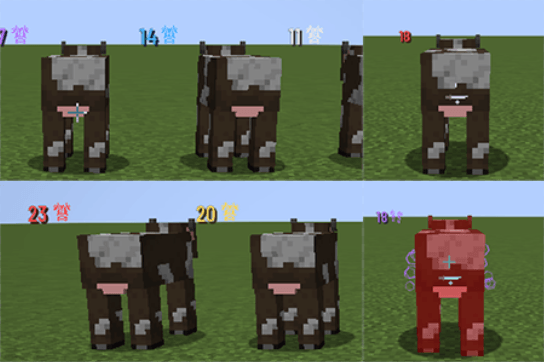
Armor feedback is determined by the target’s health. It does not add an actual shield or change damage dealt.
How to Use
- Choose the JAR matching your Minecraft version and mod loader, then place it in the mods folder.
- For multiplayer, install the mod on both the client and server.
- Configuration files are generated on first run.
Forge / NeoForge
Client settings:
config/apex_sound_effects-client.toml
Server rules — inside the world folder:
serverconfig/apex_sound_effects-server.toml
Fabric
Configuration file:
config/apex_sound_effects.properties
Feedback rules are controlled by the server. After changing server rules, restart the server and reconnect.
Configuration
- Enabled:
true - Disabled:
false
General Settings
Master switch
enabled
Enables or disables hit feedback.
Sound volume
volume
Apex sound volume, from 0 to 1. For example, 0.5 means 50% volume, and 0 mutes the sounds.
Flesh health threshold
fleshRatio
Default: 0.5.
For example, a target with 100 maximum health triggers a shield break when its health drops from above 50 to 50 or below. Subsequent hits count as flesh hits while health remains at or below the threshold.
Armor Colors
Armor color is determined by the target’s maximum health.
White armor upper limit
healthBands.whiteMax
Default: 40.
Blue armor upper limit
healthBands.blueMax
Default: 80.
Purple armor upper limit
healthBands.purpleMax
Default: 120.
Gold armor upper limit
healthBands.goldMax
Default: 160.
Targets above the gold limit use red armor. These four values must be in ascending order.
Target Types
Players
targets.players
Enable feedback when attacking players.
Monsters
targets.monsters
Enable feedback when attacking monsters.
Animals and other non-hostile creatures
targets.animals
Enable feedback when attacking animals and other non-hostile creatures.
Weapon Rules
Weapon mode
weapons.mode
Controls which attacks trigger feedback.
- All player attacks:
ALL - Only TaCZ bullets through supported integration:
TACZ_ONLY - Only matching weapons:
WHITELIST
Weapon whitelist
weapons.whitelist
Used only in WHITELIST mode. An empty whitelist allows no weapons.
Example weapon IDs:
- Vanilla bow:
minecraft:bow - A specific TaCZ gun:
tacz:m4a1
TaCZ Sound Replacement
replaceTaczHitFeedback
Default: true.
Replaces TaCZ hit, headshot, and kill sounds when applicable. Does not affect firing or reload sounds.
Ammo Sound Groups
Ammo groups use ammo IDs.
Light ammo sounds
ammoSounds.lightAmmo
Ammo IDs that use light ammo sound effects.
Heavy ammo sounds
ammoSounds.heavyAmmo
Ammo IDs that use heavy ammo sound effects.
Shotgun sounds
ammoSounds.shotgunAmmo
Ammo IDs that use shotgun sound effects.
Arrow sounds
ammoSounds.arrowAmmo
Ammo IDs that use arrow sound effects.
For example, adding the following ammo ID to the heavy ammo group makes that ammo use heavy ammo sound effects:
example:bullet
Fabric Configuration Differences
Fabric uses different configuration keys for armor thresholds and ammo sound groups.
Armor thresholds
- White armor:
whiteMax - Blue armor:
blueMax - Purple armor:
purpleMax - Gold armor:
goldMax
Ammo sound groups
- Light ammo:
ammo.light - Heavy ammo:
ammo.heavy - Shotgun ammo:
ammo.shotgun - Arrows:
ammo.arrow
ApexSound Team