


Aluminium
- By
Cuts chunk load behind you for real FPS gains. Sodium-friendly; a server-only install also benefits vanilla clients.
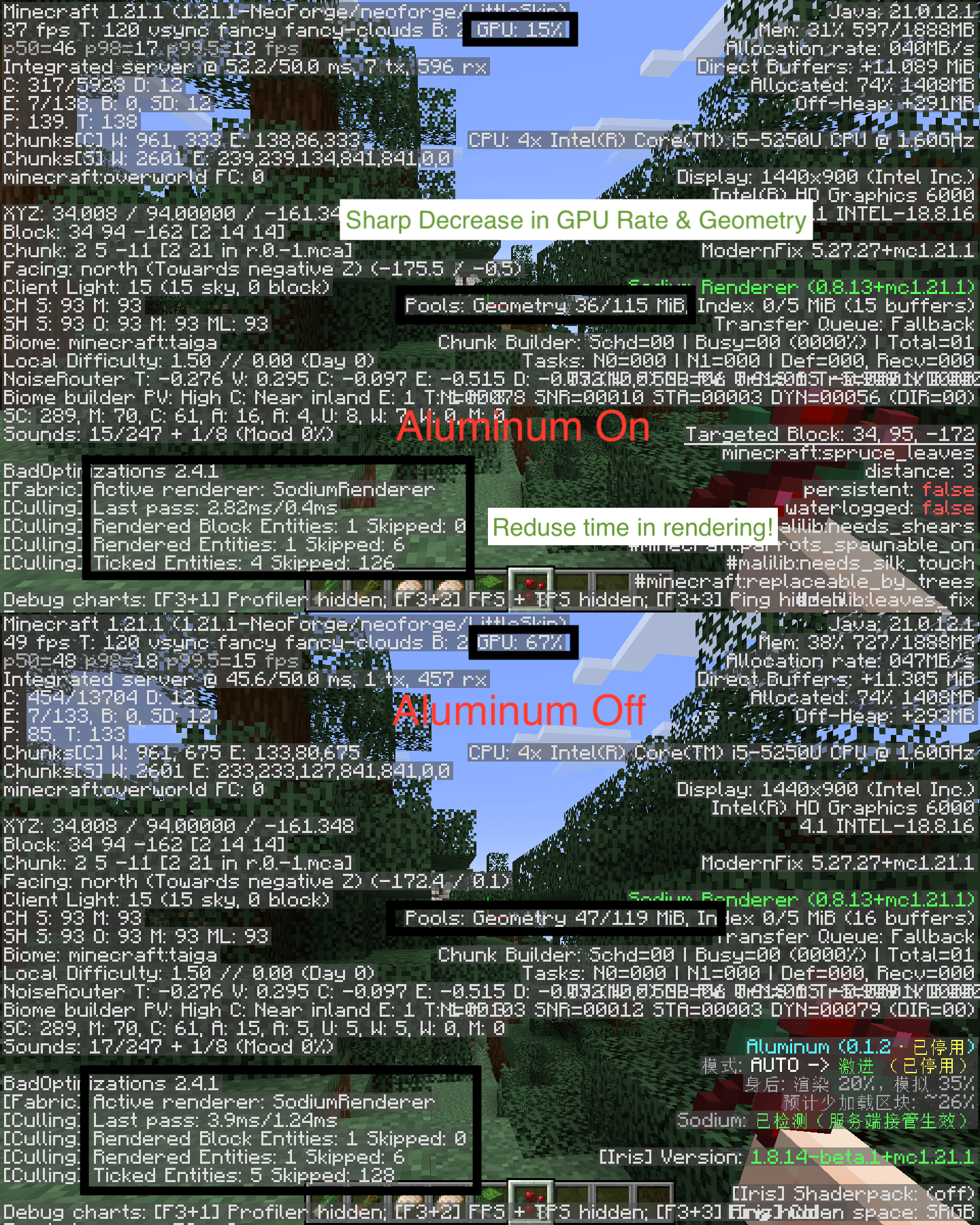
Notice the massive drop in GPU load and chunk rendering time when Aluminum is enabled.
Description
Aluminum(Or Aluminium)
Aluminum dynamically shortens the chunk render and simulation distance directly behind you. What you face stays exactly as it is; the area behind your back keeps only a set share of the forward distance, tapered smoothly by angle so there is no visible cut edge.
Estimated ~20–28% fewer chunks loaded, at zero visual cost where you look.
For servers, please get server.md from my issue pages in Codeberg
Presets
| Preset | Behind you keeps | Est. fewer chunks |
|---|---|---|
| Auto | picked from your CPU cores / RAM | — |
| Soft | 50% | ~20% |
| Balanced | 35% | ~24% |
| Aggressive | 20% | ~28% |
| Ultra-Light | 10% | more |
| Custom | your own 0–100% (two sliders) | — |
Turning around more than 45° can unload the far chunks behind you right away ("Unload on turn", toggleable) so savings kick in faster.
Why it plays nice
- Culling happens at the server chunk-send layer, not in the renderer. Fully compatible with Sodium / Embeddium and any other client-side optimization or shader mod — there is nothing to conflict with.
- A server-only install benefits everyone: put the jar in the server's
mods/and all players gain, including unmodified vanilla clients. Players who do install Aluminum get a settings panel; those who don't just get the win.
Configuration
- With Sodium (Fabric 1.21.1): Video Settings → the Aluminum sidebar tab → Rear View Culling page (applies with Sodium's Apply button).
- Everywhere else: vanilla Video Settings → "Aluminum" entry at the bottom of the screen.
- Config file:
config/aluminum.json—enabled,mode,renderPct,simPct,rotationCull,debugHud. - F3: current preset, rear ratios and estimated savings in the right column, styled like Sodium / Iris.
Server management
config/aluminum.jsonhot-reloads within ~5s — no restart needed.- OP (level 2) commands:
/aluminum status              current config & effective state
/aluminum reload              reload config from disk now
/aluminum enable | disable    master switch
/aluminum mode <preset>       auto | ultra_light | soft | balanced | aggressive | custom
/aluminum render <0-100>      rear render % (switches to Custom)
/aluminum sim <0-100>         rear simulation % (switches to Custom)
Command feedback is localized for modded clients and falls back to English for vanilla clients.
Requirements
Choose one file for your setup (v0.1.1):
| Game version | Loader | Extra dependency | Java |
|---|---|---|---|
| 1.21 / 1.21.1 | Fabric | Fabric API | 21+ |
| 1.20 / 1.20.1 | Fabric | Fabric API | 17+ |
| 1.16.5 | Fabric | Fabric API | 8+ |
| 26.1.2 | Fabric | Fabric API | 25 |
| 1.21.1 | NeoForge | — | 21+ |
| 1.20.1 | Forge | — | 17+ |
Sodium is optional, never required.
Notes
- Rear simulation distance too low pauses block updates / mob spawning in the far rear — keep it ≥35% if you run farms or spawners behind you.
- In multiplayer, culling follows the server's config; the local file only applies in singleplayer / when you host a LAN world.
License & contact
All Rights Reserved · by CollinsLiu · xiaoliu666202101@163.com
中文说明
Aluminum 动态缩短玩家正身后的区块渲染与模拟距离,正前方完全不受影响, 按角度平滑收窄、没有可见切割边,预计少加载约 20%~28% 区块。 裁剪发生在服务器区块下发层,因此与 Sodium / Iris 等渲染优化完全不冲突; 服务器单独安装一份即可让所有玩家受益,包括没装模组的原版客户端。
装了 Sodium 时在视频设置侧栏的 Aluminum 栏调整;没装则在原版视频设置底部的 "Aluminum — 身后视距裁剪设置…"。直接改 config/aluminum.json 亦可,服务器 约 5 秒内自动热重载。OP 可用 /aluminum status|reload|enable|disable|mode|render|sim。
要求:按上表选一个版本——Fabric 1.21.1 / 1.20.1 / 1.16.5 / 26.1.2(均需 Fabric API), NeoForge 1.21.1 与 Forge 1.20.1 无额外前置;Sodium 可选。 协议:All Rights Reserved · 作者 CollinsLiu · 联系邮箱 xiaoliu666202101@163.com
