


Ala Screen
- By
Press F2 and your screenshot becomes a link you can paste anywhere - you see the shot before it is sent.
Curse Maven Snippet
What's new
Ala Screen 0.1.6 - crop before you share
The Mark up panel has a fifth tool: Crop. Drag a frame around the part of the shot you want to show, and everything outside it is dimmed in the preview and left out of the upload. Pull the frame by its corners and sides or drag it to move it; hold Shift for a square.
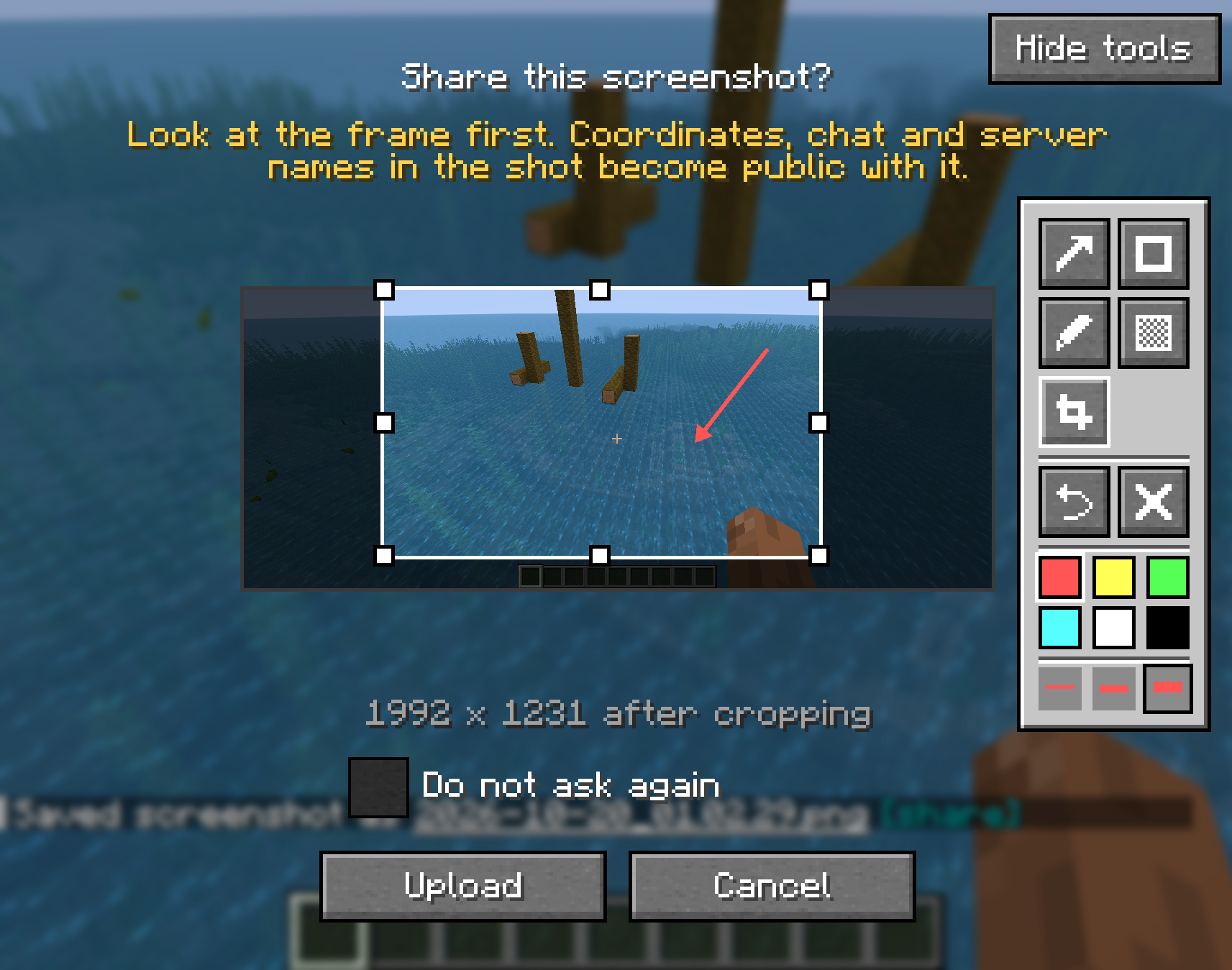
- The crop is cut from the full-resolution shot. On a large monitor, where the whole picture has to be scaled down to fit the upload limit, a cropped part keeps far more of its detail.
- Arrows, frames and cover-ups keep the thickness you saw while drawing them.
- Ctrl+Z undoes a crop the same way it undoes a mark, and the clear button removes both.
- Your original screenshot stays as it was; the edited copy is saved next to it.
Fabric and NeoForge, Minecraft 26.2 and 26.3. The NeoForge file for 26.3 is marked beta, because NeoForge itself is still a beta on 26.3.
All Relations
- All Relations
- Embedded Library
- Optional Dependency
- Required Dependency
- Tool
- Incompatible
- Include
This mod has no related projects