AIO ClientSide – All in One
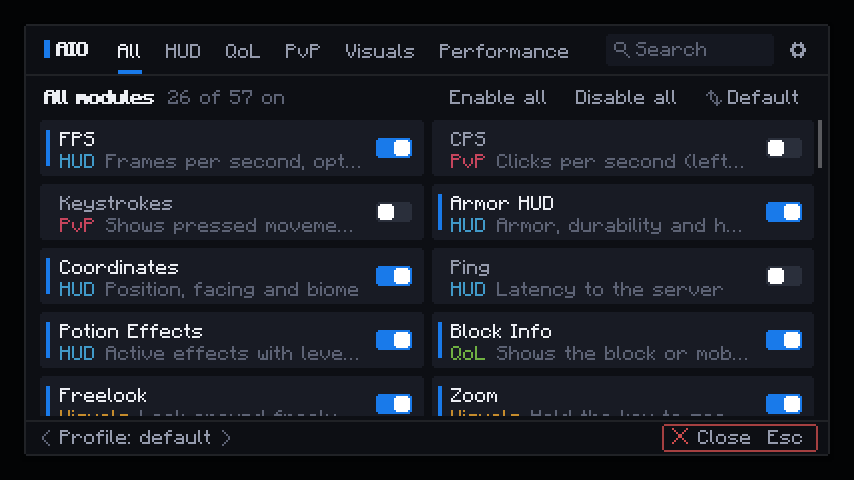
One mod instead of thirty. Zoom, Mouse Tweaks, Armor HUD, waypoints, Crafting Recipes, villager info, chat tools and more are normally spread over a pile of separate mods, each with its own menu, keybinds and updates. AIO ClientSide puts them in one download with one menu, and you can enable only what you want.
- 50+ modules, each on/off on its own.
- One menu, one search, one HUD editor, one config with profiles.
- Already have a favourite mod for something? It has priority. AIO turns only the overlapping module off.
- Client-side only. Requires Fabric API.
Open the menu with Right Shift (or the AIO button in the title and pause menu).
PLEASE SEND ANY BUGS OR FEATURE REQUESTS TO GITHUB !!
What it replaces
| Instead of a separate mod for… |
…use the AIO module |
| FPS / CPS / Keystrokes / Armor HUD |
HUD modules |
| Zoom, Freelook, Freecam, Fullbright |
Camera modules |
| Waypoints, death point, compass |
Navigation modules |
| Look-at info, villager info, food values |
Info modules |
| Item list (recipe browser), mouse tweaks, sorting |
Inventory modules |
| Chat timestamps, copy, chat heads, resizable chat |
Chat modules |
| Entity culling, particle control, XP clumping |
Performance modules |
AIO is its own implementation; it does not contain the code from most of the existing Public mods. (See License)
Features
HUD (freely movable in the built-in HUD editor)
- FPS, CPS, Keystrokes, ArmorHUD, potion effects
- Coordinates, ping, biome, day counter, time/date, server info
- Arrow and totem counters, held item info
- Rainbow, gradient or fixed colours per element
Camera and visuals
- Zoom (with scroll), Freelook, Freecam
- Fullbright, NoFog (clear water and lava), No Hurtcam, No Pumpkin Overlay
- Block outline colour and thickness, light level overlay, dynamic lights
- Particle control (every particle individually), XP orb clumping
Navigation
- Compass (bar or round), waypoints with their own waypoint menu (rename, recolour, add, delete)
- Death points, portal calculator
- Waypoints shared in chat in the Xaero format are recognised and can be added with one click
Info
- Look-at info for blocks and mobs (name, right tool, growth, health, armor, mod)
- Villager info (trades and enchantments)
- Food values with hunger overlay and tooltip
- Item enchantment info, shulker box preview
Inventory and combat
- Item browser with recipes and uses, search (
@mod, $id) and one-click recipe fill
- Mouse tweaks and inventory sorting
- Toggle Sprint, Auto Tool, Auto Sword, Tool Saver (protects nearly broken tools), Elytra swap
Chat
- Timestamps, long history, copy messages, resizable chat box, chat heads, name alerts
Performance
- Entity culling, FPS Optimization, and more. Nothing runs while a module is off
Menu
- Search, profiles, config export/import, custom or rainbow accent colour, full key binding list
Plays nicely with other mods
If another installed mod already provides a feature, that mod wins: AIO turns only the overlapping module off and tells you. A conflict never crashes the game.
Fair play
Some modules (freecam, fullbright, light level, auto tool and others) count as an advantage on some servers. Check your server's rules. The Server compatibility setting can block such modules automatically or on servers you list.
Privacy
Statistics are off by default. On first start you are asked once: Okay shares anonymous usage numbers (no names, IPs, servers, coordinates or chat), No thanks keeps everything local. Changeable anytime in the client settings.
License
Copyright (c) 2026 NicoMods. Released under the MIT License.
Third-party credits:
- Parts of the Freecam module are adapted from Freecam (MIT License).
- The food overlay follows the look of AppleSkin (public domain).
- No code from other mods is included.
"Minecraft" is a trademark of Mojang AB. AIO ClientSide is an unofficial mod, not affiliated with or endorsed by Mojang or Microsoft.