
AeroEngine
- By
AeroEngine / Aero Engineering
AeroEngine is a Create-style add-on mod for NeoForge 1.21.1, focused on aero-engine systems and flight instruments.
This mod allows players to assemble an aero engine in a Create-like way, with fuel supply, control logic, and thrust output, and connect it to physics systems such as Aeronautics / Sable. It also provides a Pilot Helmet HUD system for real-time flight monitoring.
The project is still in development. Blocks, textures, models, recipes, Ponder tutorials, and gameplay mechanics may be adjusted in future versions.
Features
- Modular aero-engine structure
- Basic, afterburning, and vectoring turbofan engines
- Liquid fuel based operation using Aviation Kerosene
- Redstone-controlled power and afterburner
- Create-style multiblock assembly
- Pilot Helmet HUD system
- Coordinate navigation and waypoints
- Ponder tutorial support
- Integration with Aeronautics / Sable
Engine Components
Core Blocks
| Block | Description |
|---|---|
| Engine Fan | Air intake and engine inlet |
| Engine Compressor | Compresses incoming air |
| Engine Combustor | Burns aviation kerosene and uses redstone to control power |
| Engine Turbine | Drives the compressor |
| Engine Exhaust Cone | Basic turbofan tail section with reverse thrust support |
| Engine Afterburner | Afterburning turbofan tail section with redstone-controlled afterburner mode |
| Vector Bearing | Vector thrust control |
Casing & Nozzle
| Block | Description |
|---|---|
| Engine Casing | Encloses the engine core and improves thrust |
| Engine Exhaust Nozzle | Installed at the rear of the engine for additional thrust |
| Copycat Engine Casing | Customizable engine casing appearance, including stairs and slabs |
| Copycat Engine Nozzle | Customizable nozzle appearance, including stairs and slabs |
Transmission
| Block | Description |
|---|---|
| Engine Encased Fluid Pipe | Fluid pipe enclosed in engine casing |
| Engine Encased Shaft | Shaft enclosed in engine casing |
| Engine Gearbox | Power transmission and direction conversion |
Engine Structures
Basic Turbofan Engine
Engine Fan → Engine Compressor → Engine Combustor → Engine Turbine → Engine Exhaust Cone
Afterburning Turbofan Engine
Engine Fan → Engine Compressor → Engine Combustor → Engine Turbine → Engine Afterburner
Vectoring Turbofan Engine
Engine Fan → Engine Compressor → Engine Combustor → Engine Turbine → Vector Bearing
Fuel and Control
Aviation Kerosene
Engines use Aviation Kerosene as fuel, which is supplied to the Engine Combustor through the Create fluid system.
Redstone Control
- Engine Combustor: Shift + Right Click to configure redstone frequency and power step, controlling engine power
- Engine Afterburner: Independent redstone frequency control for toggling afterburner mode
- Engine Exhaust Cone: Redstone-controlled reverse thrust mode
- Vector Bearing: Six-axis redstone signal control for thrust direction
Pilot Helmet
The Pilot Helmet is a wearable HUD system used for real-time flight monitoring.
Features
- Bind up to 12 blocks to the same physical structure
- Supports multiple sensor types: altitude, velocity, attitude, and navigation
- Customizable HUD display content and layout
- Supports renaming, hiding, and direction correction
Sensor Types
| Sensor | Function |
|---|---|
| Altitude Sensor | Altimeter |
| Velocity Sensor | Speed and heading |
| Gimbal Sensor | Pitch and roll |
| Navigation Table | Waypoints and target direction |
Usage
- Hold the Pilot Helmet and Shift + Right Click a readable block to bind it.
- Equip the helmet and press the HUD management key, default
H. - Select a target to rename it, hide it, or configure displayed items.
Materials
| Item | Description |
|---|---|
| Netherite Powder | Alloy raw material |
| Aviation Alloy Ingot | Engine crafting material |
| Aviation Alloy Sheet | Engine crafting material |
| Engine Blade | Fan / turbine component |
| Compressor Component | Compressor crafting component |
| Turbine Component | Turbine crafting component |
| Vector Component | Vector bearing crafting component |
| Coordinate Form | Navigation waypoint configuration |
Ponder Tutorials
AeroEngine provides Ponder tutorials to demonstrate engine core assembly, fuel input, redstone control, casing enclosure, and afterburning turbofan structures.
Currently included:
basic_turbofan_engine— Basic turbofan engine operationafterburning_turbofan_engine— Afterburning turbofan engine operationafterburning_vector_turbofan_engine— Vectoring afterburning turbofan engine operationpilot_helmet— Pilot Helmet binding and configuration
Compatibility
AeroEngine is currently built for Minecraft 1.21.1 + NeoForge. Cross-version Minecraft compatibility usually requires a separate port and cannot be guaranteed simply by expanding the supported version range.
Declared Runtime Ranges
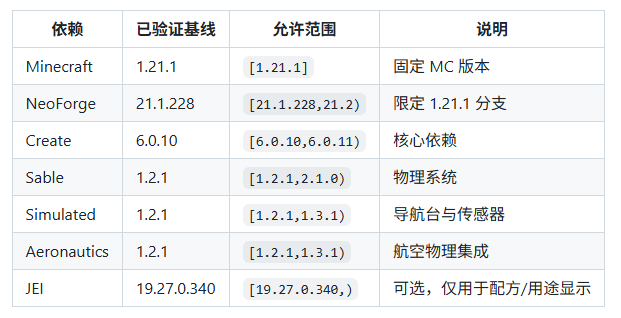
JEI is an optional dependency. When JEI is installed, recipe and usage display will be enabled. Without JEI, the mod should still load normally.
Development Notes
The project is still in early development. Current work mainly includes engine blocks, fluid system, particles, rendering, multiblock validation, and Ponder scenes.
Future improvements will include:
- Survival mode recipes
- Thrust calculation
- Engine sound effects
- Animations
- Balance adjustments
License
This project is licensed under All Rights Reserved.
Copyright (c) 2026 cxw
The compiled mod JAR file may be freely distributed for use in Minecraft, but the source code may not be copied, modified, or redistributed.
AeroEngine Team
