AE2 Crafting Tree Legacy Unofficial
- By
An unofficial fork of Kasumi_Nova's AE2CTL (AE2 Crafting Tree Legacy)
AE2 Crafting Tree Legacy Unofficial
This project is an unofficial fork of Kasumi_Nova's AE2CTL (AE2 Crafting Tree Legacy).
- Changes in this fork:
- Crafting Tree Screenshot: Implemented and completed the unfinished crafting tree screenshot feature from the original mod;
- Flowchart Export: Added a one-click recipe tree flowchart export feature, supporting both SVG (vector) and PNG (high-res raster) formats (left-click to export, right-click to toggle format).
💡 Features & Controls
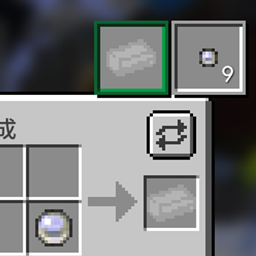
Click the button in the top-right corner of the Crafting Confirmation screen in the AE2 terminal to enter the Crafting Tree view:
| Action / Shortcut | Description |
|---|---|
| Left-click Drag | Pan / move the crafting tree canvas |
| Mouse Wheel | Zoom in / out (0.25x ~ 1.0x) |
| Left-click | Select a node / Click empty space to deselect |
| ↑ / ↓ / ← / → | Navigate smoothly between parent, child, and sibling nodes (viewport auto-centers) |
| Ctrl + ← / → | Quick-jump only between nodes with missing ingredients |
| Missing Only Button | Toggle full crafting tree / show only branches with missing ingredients |
| Flowchart Button | Left-click to export flowchart (saved in .minecraft/screenshots/), Right-click to toggle SVG / PNG format |
| Screenshot Button | Capture a full screenshot of the crafting tree (supports both normal and missing-only views) |
📜 Credits & License
- Original Author: Kasumi_Nova
- License: This project is licensed under the GNU Lesser General Public License v3.0 (LGPL-3.0).
The AE2 Crafting Tree Legacy Unofficial Team