


Advanced Economics
- By
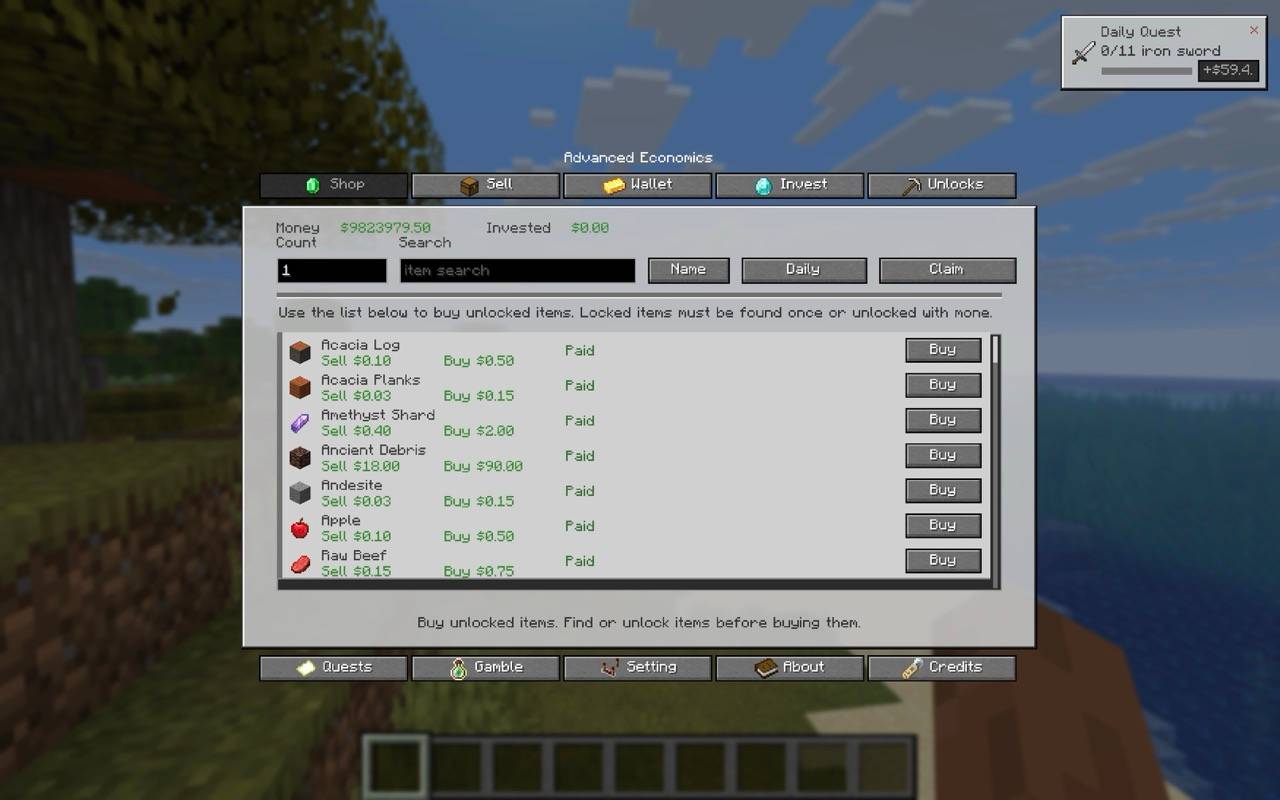
image.jpeg
Description
Advanced Economics
Advanced Economics is a Minecraft economy mod made by xlvr.
It adds a full survival-friendly money system with shops, selling, item unlocks, quests,
professions, banking, gambling, services, insurance, and an in-game economy menu.
Press N in game to open the Advanced Economics menu.
## What The Mod Adds
Advanced Economics gives every player their own money balance and turns survival gameplay into
a server-friendly economy system.
Players can earn money by selling items, completing daily quests, choosing professions,
gambling, trading XP, using bank systems, and interacting with other players through money
transfers and duels.
The mod is useful for:
• Survival servers
• SMP servers
• Economy-based modpacks
• Roleplay servers
• Progression-focused worlds
• Players who want money, shops, and rewards without needing many separate economy mods
• Mod developers looking to build custom economy addons and integrations
## Main Features
• Player wallet balance
• Buy and sell shop system
• Sell items from hand or inventory
• Item unlock system before buying locked items
• Config option to disable the unlock system (have everything already unlocked by default)
• Daily sell deal with bonus value
• Daily quests with money rewards
• Professions with sell bonuses (and detailed in-game hover tooltips)
• Profession quests
• Investments with daily growth
• Fixed-term deposits
• Emergency loans
• Player money transfers
• Money duels
• Item gambling
• Money gambling
• Paid teleporting
• Buy potion effects with money
• Buy and sell XP levels
• Repair items with money
• Disenchant items with money
• Rename items with money
• Death insurance
• Pet selling
• Pet insurance
• Server-side player money storage
• Configurable item prices
• Support for custom/modded item config
• In-game economy GUI (automatically hides and compacts tabs of disabled features)
• GUI scale setting
• Server feature toggles
• Server-safe Developer API for addon integration
## In-Game Menu
Open the economy menu with: N
The keybind can be changed in Minecraft controls.
The menu includes:
• Shop
• Sell
• Wallet
• Invest
• Unlocks
• Quests (Professions)
• Gamble
• Settings
• About
• Credits
The GUI shows your money, invested money, shop items, prices, item unlock status, inventory
counts, quests, and command help. If server administrators disable a feature, its tab will be
completely hidden from the GUI, keeping the interface clean and consolidated.
## Shop And Selling
Players can sell supported items for money and buy unlocked items from the shop.
Buying uses a higher price than selling, so players cannot infinitely buy and sell the same
item for profit.
Items can be unlocked by finding them, paying to unlock them, or using unlock commands.
Alternatively, server owners can disable the unlock system completely in the configuration to
allow buying everything from the start.
Server owners can configure item prices and add modded items.
## Professions
Players can choose a profession to get extra progression and rewards. You can hover your cursor
over the selection buttons in-game to see a detailed description of each profession's bonus
item categories.
Available professions:
• Miner: Sell bonuses on stone, ores, ingots, diamonds, emeralds, and netherite.
• Lumberjack: Sell bonuses on logs, planks, and sticks.
• Farmer: Sell bonuses on agricultural yields (crops, seeds, fruits).
• Fisherman: Sell bonuses on fish, marine items, buckets, and rods.
• Hunter: Sell bonuses on mob drop materials.
Professions can give sell bonuses and profession quests.
## Banking
The banking system lets players use money in different ways:
• Invest money
• Withdraw investments
• Start fixed-term deposits
• Claim matured deposits
• Take emergency loans
• Repay loans
## Gambling And Duels
Players can gamble money or items for a chance to win more.
Players can also start money duels with another player. Both players stake money, and the
winner takes the reward.
## Services
Players can spend money on useful services:
• Teleport to another player
• Buy potion effects
• Buy XP levels
• Sell XP levels
• Repair held item
• Disenchant held item
• Rename held item
## Insurance And Pets
The mod includes extra survival systems:
• Death insurance to reduce death penalties
• Pet insurance
• Selling nearby owned tamed pets
## Commands
Main command: /ae
Help: /ae help
### Money Commands
• /ae money
• /ae money send <player> <amount|all>
• /ae money give <amount>
• /ae money give <player> <amount>
### Shop Commands
• /ae buy <item> [count|all]
• /ae sell [count|all]
• /ae sell <item> [count|all]
• /ae price
• /ae unlock <item|all>
• /ae unlocks
• /ae shop buy <item> [count|all]
• /ae shop sell [count|all]
• /ae shop sell <item> [count|all]
• /ae shop sell-inventory
• /ae shop price
• /ae shop unlock <item|all>
• /ae shop shop unlocks
### Bank Commands
• /ae bank invest <amount|all>
• /ae bank investment
• /ae bank withdraw
• /ae bank deposit start <7|14|30> <amount>
• /ae bank deposit claim
• /ae bank loan take <amount>
• /ae bank loan repay <amount|all>
### Quest Commands
• /ae quest daily
• /ae quest daily claim
• /ae quest daily hide
• /ae quest daily show
### Profession Commands
• /ae profession
• /ae profession choose <miner|lumberjack|farmer|fisherman|hunter>
• /ae profession quest
• /ae profession quest claim
### Gambling Commands
• /ae gamble item
• /ae gamble money <amount>
### Duel Commands
• /ae duel start <player> <amount>
• /ae duel accept
• /ae duel deny
### Service Commands
• /ae service effect <speed|haste>
• /ae service xp buy [levels]
• /ae service xp sell [levels|all]
• /ae service item repair
• /ae service item disenchant
• /ae service item rename <name>
• /ae service teleport <player>
### Insurance And Pet Commands
• /ae insurance buy
• /ae pet sell
• /ae pet insure
### Admin Commands
• /ae admin settings
• /ae admin settings toggle <feature>
• /ae admin money give <amount>
• /ae admin money give <player> <amount>
Admin money commands are intended for creative/admin use.
## Server Owner Info
Advanced Economics stores player economy data server-side per world.
This means balances, unlocks, investments, loans, quests, professions, insurance, and history
belong to the world/server economy.
Server owners can configure prices and add modded items through config files.
### Custom Customizations:
• Disable the Unlock System: Change "disableUnlockSystem": true in player-data.json to have
all shop items unlocked for players from the start.
• Server Toggles: Toggling feature settings off will automatically hide their tabs in the
player's in-game GUI menu.
## Developer API
Version 6 introduces a programmatic Java API for other mod/addon developers:
import com.example.advancedeconomics.api.AdvancedEconomicsAPI;
Available static hooks include:
• Query/modify player wallet balances ( getBalance , setBalance , addMoney , removeMoney )
• Query/modify bank investment values ( getInvestment , setInvestment )
• Check/grant item unlocks ( isItemUnlocked , unlockItemForPlayer )
• Query/set player professions ( getPlayerProfession , setPlayerProfession )
• Force save cycles or send network economy update packets to active players.
## Credits
Made by xlvr***
Advanced Economics Team
