Advanced Accessory System
- By
Allows any item to be placed in the head slot, so you can show off all kinds of ridiculous hats to others—and some hats can do more than just be shown off.
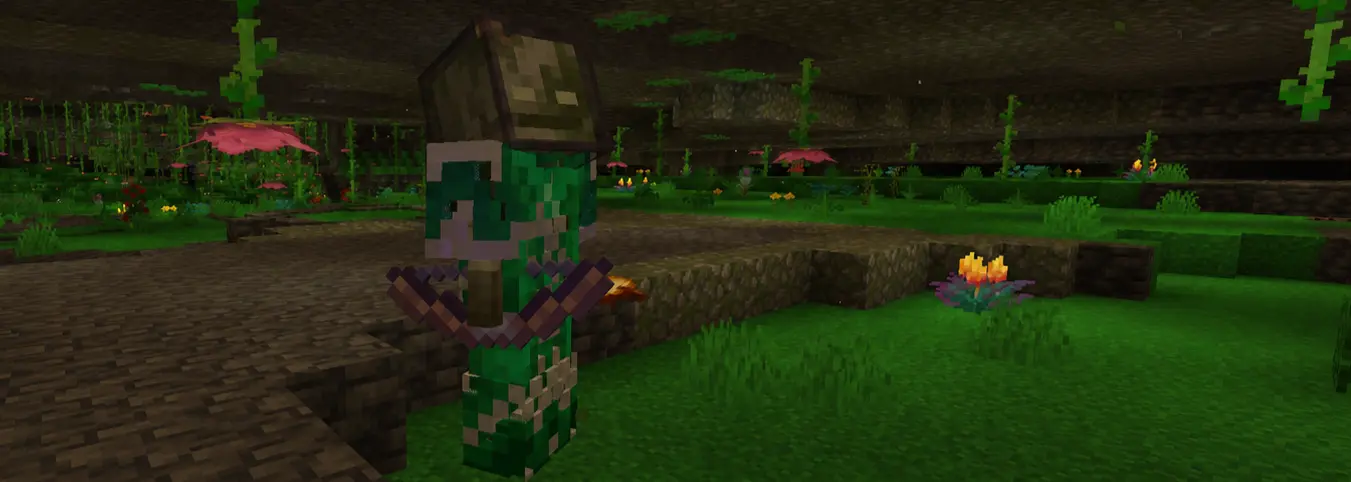 A cave bogged that wears tinted glass on its head because it’s afraid of getting tanned by the sun.
Advanced Accessory System
This Minecraft mod lets you put any item into the helmet slot, and it also adds a few silly but practical extra features.
In vanilla Minecraft, you need commands to obtain other items that can be placed in armor slots. This mod simply removes that restriction as well (currently only for the helmet slot). As for how items look when worn on your head, that still depends on resource packs. Head models that have not been adjusted may look like dropped-item models, or may be embedded directly inside your head.
It is strongly recommended to use this mod together with Cosmetic Armor. That mod adds a cosmetic armor slot for each of the four armor parts, allowing you to wear armor and all sorts of random hats at the same time. (All demonstrations below are shown with that mod installed.)
(This is the Cooking Pot from Farmer's Delight. The displayed model effect is implemented with a custom resource pack.) (No commands used.)
Additional Features
Invisible Armor
Allows you to hide the armor model for the corresponding body part. That's all it does; it does not affect any other armor attributes. This prevents armor from covering up your stylish skin and hats.
You can control which parts you want to hide in the configuration screen.
Shulker Box Hat
When a shulker box is worn on your head, you can press the B key (default) to open it along with your skull, making it very convenient to access the items inside the shulker box.
Other people can also access the items in the shulker box on your head by right-clicking you, so watch out for the people around you.
Hats You Can Sit On
Certified by the Minecraft Hat Association, certain hats have structures that fit most creatures' butts extremely well, making them perfect for transporting mobs.
Stacking is no problem either.
Known issue:
When a player is the passenger, their hitbox size does not change. So when both the passenger and the carrier are players, the carrier's view may be blocked by the passenger's oversized hitbox, making it impossible to interact with the surroundings (and you might accidentally kill the guy on your head).Now, when a player sits on another player's head, their collision box will shrink. However, this does not work for other mobs, such as zombies, skeletons, and so on. Also, a player carrier cannot attack any entity passenger.
Saddle Type
Using a saddle as an example, after you wear it on your head, other players can right-click you and sit on your head.
Saddle-type hats are Saddle and Harness by default. Configure saddle-type hats in AAS_saddle in the configuration file.
If the guy riding on your head refuses to leave, simply take off that hat, and their butt will feel uncomfortable enough that they will have to get down. Boat-type hats work the same way.
Boat Type
Using a boat as an example, after you wear it on your head, allowed entities within 2 blocks (default) will automatically sit on your hat. Only allowed entities in the configuration file can sit on your hat (edit this in the AAS_boat_auto_pick_up object in the configuration file).
Boat-type hats are all vanilla boats and minecarts by default. Configure boat-type hats in AAS_boat in the configuration file.
If someone uses this to harass you, just give them a heavy punch to break their hat. (Boat-type hats only.)
Throwing
Steve's mighty arms can easily swing around tons of gold, so naturally, anything else is no problem. If something is sitting on your hat, you can
- Throw it directly
- Press Left Shift + Q (default) to throw whatever is sitting on your head at a speed of 0.8 blocks/tick (default).
- Charge up first, then throw
- When an entity allows charged throws, you can hold Left Shift (default) to charge. The charging acceleration is 0.08 blocks/tick^2 (default), the charge duration is 40 ticks (default), and the base speed is 0. One second in real life equals 20 ticks, so 0.08 blocks/tick2 is 1.6 blocks/second2.
Configuration
Press Z + C (default) to open the in-game configuration screen, where you can manage most configuration options. The configuration file is located at /config/advanced-accessory-system.json; some settings need to be modified there.
ID Configuration
allowed: An array that stores entity IDs, using player and villager IDs as examples.
{
  "allowed": [
    "minecraft:player",
    "minecraft:villager"
  ]
}
- Wildcards are supported. For example, all vanilla entities and all boats from a certain mod:
{
  "allowed": [
    "minecraft:*"
  ]
}
- excluded: Used to exclude IDs included by wildcard IDs. For example, excluding minecraft:zombie and minecraft:pig from minecraft:*:
{
  "allowed": [
    "minecraft:*"
  ],
  "excluded": {
    "minecraft:*": [
      "minecraft:zombie",
      "minecraft:pig"
    ]
  }
}
Modpack Mode
Set the value of modpack in the configuration file to true to hide configuration-screen items related to parameter settings; set it to false to do the opposite.
Compatibility
- Compatible with Cosmetic Armor
- Requires Collective, malilib, and Mod Menu to be installed
Licensed under the MIT License
The Advanced Accessory System Team