
Smiley OpenAL
- By
1000510115.png
1000510116.png
Description
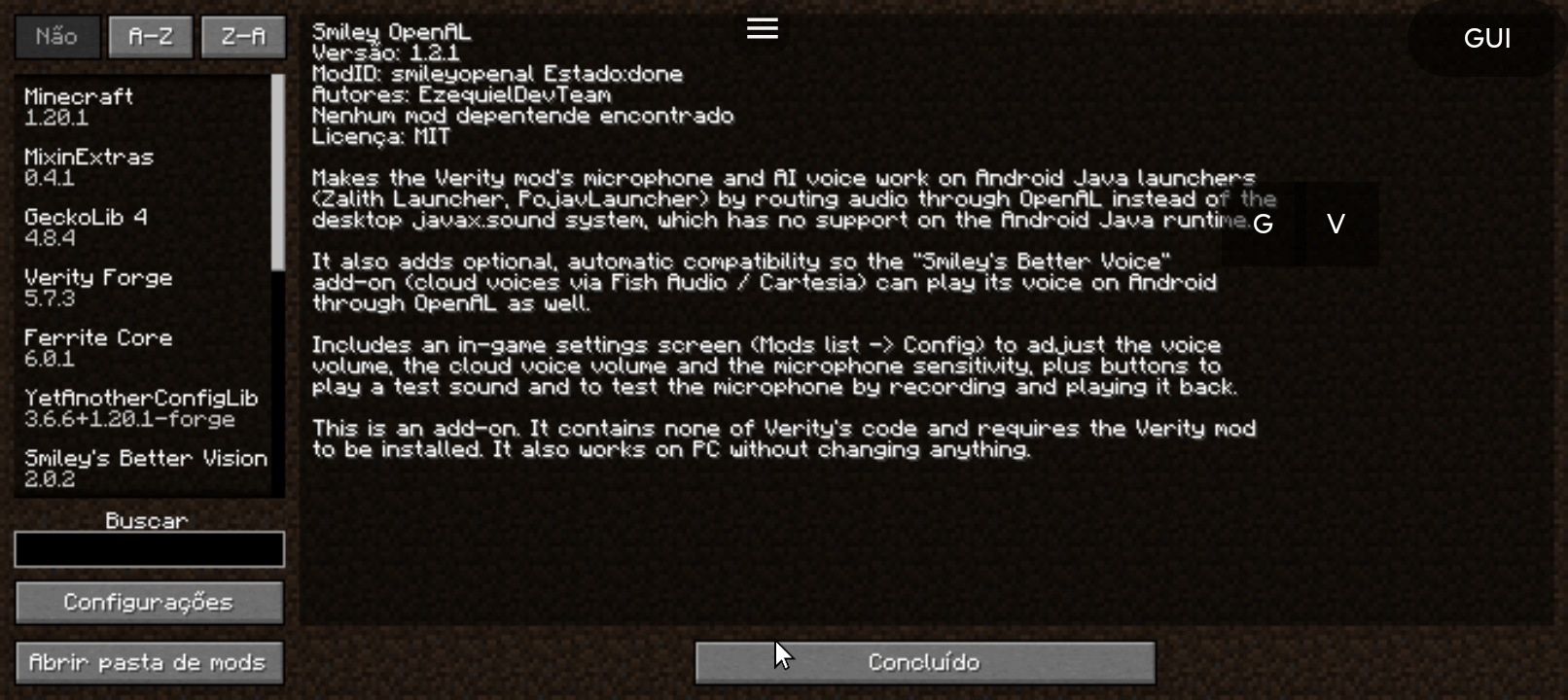
Smiley OpenAL
By EzequielDevTeam
An add-on that makes the Verity JE mod work on Android Java launchers such as
Zalith Launcher and PojavLauncher. It reroutes Verity's microphone and voice
through OpenAL so you can talk to Verity and hear him answer on mobile. It also
works on PC and changes nothing there.
IMPORTANT: this is an add-on, not the Verity mod itself. It contains none of
Verity's code and does not modify or redistribute it. You must install the
original Verity JE separately (see the download link below). This add-on only
adds the audio support that Verity needs to run on Android.
------------------------------------------------------------
REQUIRED AND OPTIONAL MODS (DOWNLOAD LINKS)
- Verity JE (required) - the base mod. You must have it installed.
https://www.curseforge.com/minecraft/mc-mods/verity-je
- Smiley's Better Voice (optional) - adds cloud voices (Fish Audio / Cartesia)
for Verity. Install it if you want those voices to work on Android.
https://www.curseforge.com/minecraft/mc-mods/smileys-better-voice
------------------------------------------------------------
WHAT IT FIXES
Verity JE was built for desktop (Windows, macOS, Linux) and uses the desktop
Java Sound system (javax.sound), which does not exist on the Android Java
runtime. Because of that, on mobile launchers Verity always failed with the
message "No compatible microphones found on this system" and never produced any
voice.
Smiley OpenAL fixes this without touching Verity's files:
- Microphone input is routed through OpenAL, the same audio engine the game
already uses. This lets you talk to Verity on Android launchers.
- Voice output (Text-to-Speech playback) is played through OpenAL instead of
javax.sound, so Verity can actually speak out loud on Android.
On Android, the add-on uses the OpenAL audio path. On PC, nothing changes and
Verity keeps working exactly as it always did. No manual configuration is needed
for this to switch.
------------------------------------------------------------
IN-GAME SETTINGS SCREEN
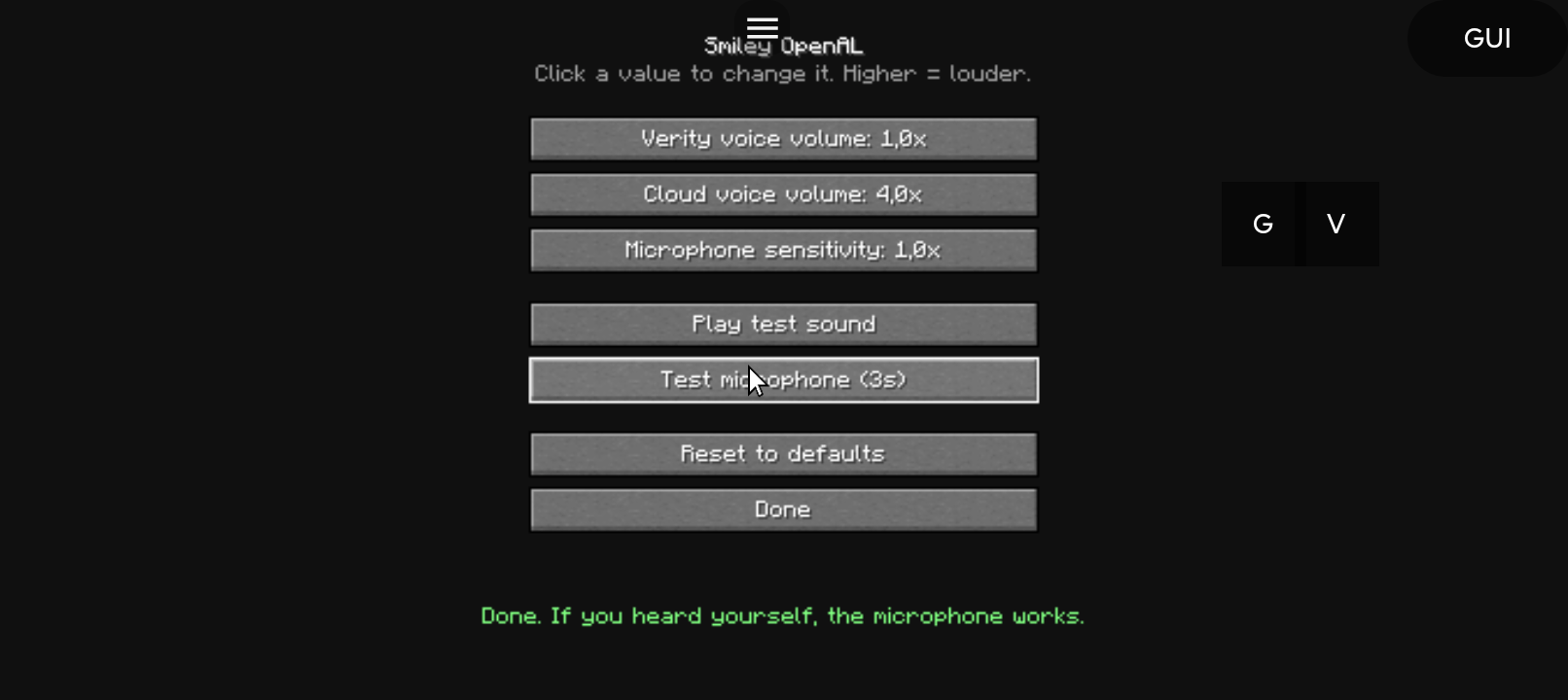
Smiley OpenAL has its own settings screen. Open the Mods list, select
Smiley OpenAL and click Config. Everything can be changed while playing, with no
file editing and no extra config library required.
- Verity voice volume - how loud Verity's own voice plays. On phones the voice
often comes out quiet, so this can be raised well above normal.
- Cloud voice volume - the same, for cloud voices from "Smiley's Better Voice".
- Microphone sensitivity - boosts your captured audio if Verity has trouble
hearing you.
- Play test sound - plays a short tone at the current volume, so you can set
the level without waiting for Verity to speak.
- Test microphone - records three seconds and plays it straight back, so you
can confirm the microphone works and hear how loud you come through. A live
input level meter is shown while it records.
Each value can be set from 0.5x up to 10x. Settings are saved automatically to
config/smileyopenal.properties, and there is a Reset to defaults button.
------------------------------------------------------------
VOICE ADD-ON COMPATIBILITY (SMILEY'S BETTER VOICE)
Smiley OpenAL is also compatible with "Smiley's Better Voice", a separate add-on
by Gabe (Toast5) that gives Verity cloud voices through Fish Audio and Cartesia.
On its own, that add-on plays its audio through the desktop Java Sound system,
so on Android it fails with an error like
"No line matching interface SourceDataLine ..." (shown as a fake
"connection failed, check your internet" message). Smiley OpenAL detects it and
reroutes its voice through OpenAL, so those cloud voices work on Zalith and
PojavLauncher too.
This compatibility is optional and automatic:
- If "Smiley's Better Voice" is installed, its voice starts working on Android.
- If it is not installed, Smiley OpenAL simply ignores it and keeps working
normally with Verity's built-in voice.
Special thanks to Gabe (Toast5), the author of "Smiley's Better Voice", who
kindly gave permission to mention his mod here and to include this Android
compatibility. His mod contains none of my code and mine contains none of his;
Smiley OpenAL only adds the OpenAL playback path so his voices can be heard on
mobile. Please support his mod as well.
------------------------------------------------------------
A NOTE ON OFFLINE VOICE
An earlier version of this add-on bundled the sherpa-onnx aarch64 (arm64-v8a)
native libraries so Verity's offline local voice could load on phones. Those
native files were removed to keep the download clean and lightweight, and
because the cloud voices do not need them.
The Verity team is adding official aarch64 support to the base mod. Once that
ships, Verity's offline local voice will work on Android with no extra files.
For now, use the cloud voice option above.
------------------------------------------------------------
REQUIREMENTS
- Minecraft 1.20.1
- Forge
- Verity JE (required)
- GeckoLib and YetAnotherConfigLib (required by Verity)
- Optional: Smiley's Better Voice (for cloud voices)
------------------------------------------------------------
INSTALLATION AND SETUP
1. Put Verity JE and Smiley OpenAL together in your mods folder.
2. Optionally add "Smiley's Better Voice" if you want the cloud voices.
3. Make sure your launcher (Zalith / Pojav) has microphone permission granted
in the Android system settings.
4. Set up Verity as usual: get a free API key at Groq.com and paste it into
Verity's settings, then follow the in-game setup screen.
That is all. Talk to Verity by voice and he will answer out loud.
------------------------------------------------------------
CREDITS
- Verity JE was created by ThatMob and adapted to Java by VarmiteYT, thatmobyt,
Blockmaster29 and JJack498. The Demon model was made by RoseRocket. All
rights to Verity belong to them. Smiley OpenAL is an independent add-on made
with the creator's permission and includes none of Verity's code.
- Smiley OpenAL by EzequielDevTeam.
- "Smiley's Better Voice" by Gabe (Toast5). Mentioned here and made compatible
on Android with his kind permission. All rights to that add-
on belong to him.
- OpenAL audio handling based on the same approach used by Simple Voice Chat
on Android.
Don't let Google shut down the Android ecosystem.
https://keepandroidopen.org/en/
ENJOY!
by EzequielDevTeam
Smiley OpenAL Team
