Mini Juegos Zodiac
- By
"A fun add-on where you can play King of the Hill, Capture the Flag, Hot Potato, Hide and Seek, Tag, PvP, and Capture the Little Flags."
Captura de pantalla 2026-06-15 011204.png
Captura de pantalla 2026-06-15 011149.png
Captura de pantalla 2026-06-15 011212.png
Captura de pantalla 2026-06-15 011142.png
Captura de pantalla 2026-06-15 011157.png
Description
CAPTURAATRACTOR (MINI GAMES)
This pack includes several minigames with their own menus, team systems, barrel management, and automatic match administration.
Requirements and recommendations
It is recommended to install the Super_mance addon to make the experience more interesting, since this game uses that addon to work together.
You should also take into account the teleport point of each game, since several minigames have predefined locations.
It is also recommended not to enable Keep Inventory, since the flags can be taken back to base faster.
Each minigame has its own menu, and Experimental Mode must be enabled in order to use them.
Main menu
Use the command:
/scriptevent uac:menu
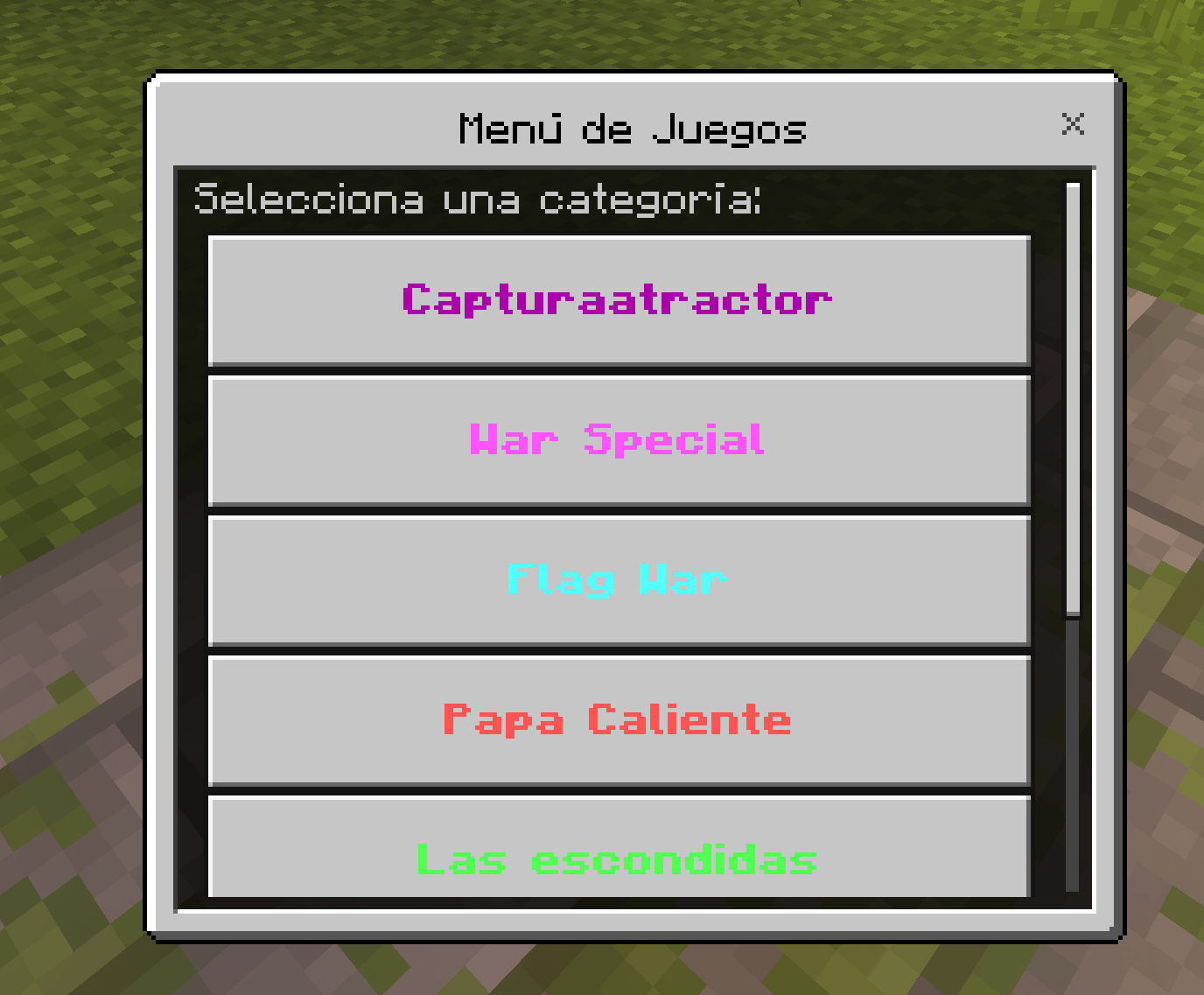
This command opens the main menu, where the following minigames are available:
- Capture Atractor
- War Special (PvP with growth/progression)
- Flag War (capture the flags)
- Hot Potato
- Hide and Seek
- Tag
- Barrel Management
Capture Atractor
For Capture Atractor, it is recommended to use the Tower of Flags map.
When selecting Capture Atractor, the player will be sent to:
-175, 126, 76
There will be the lobby, where a sheet is given to choose a team:
- Red
- Blue
- Yellow
- Green
When clicking, the available teams and the number of players will appear.
Once you choose your team, you will be teleported to the following spawn points:
Respawn
- Blue team:
337, 72, -3 - Red team:
398, 67, 183 - Yellow team:
-124, 65, 126 - Green team:
46, 68, -208
A color tag will be given according to the team you selected, and you will also not be able to damage your teammates. You will also not suffer hunger from saturation.
Each spawn has its own base where you can gather with your teammates.
Once the game starts, players must capture the hills.
Hills
-35, 74, -1115, 75, -65123, 75, 121
Each hill gives 50 points. Once activated, or if it is already active, you only need to stay in the zone until it is captured.
The hills serve as a base for cover, where only the players who captured them can enter.
Once the hills are captured, the next game begins: Capture the Flag, where each team must capture the flags from the opposing teams and bring them to their own flag locations.
Flags
- Blue team:
335, 71, -62 - Red team:
398, 71, 215 - Yellow team:
-257, 66, 171 - Green team:
87, 64, -265
Once each flag is captured, eliminated players will be put into spectator mode.
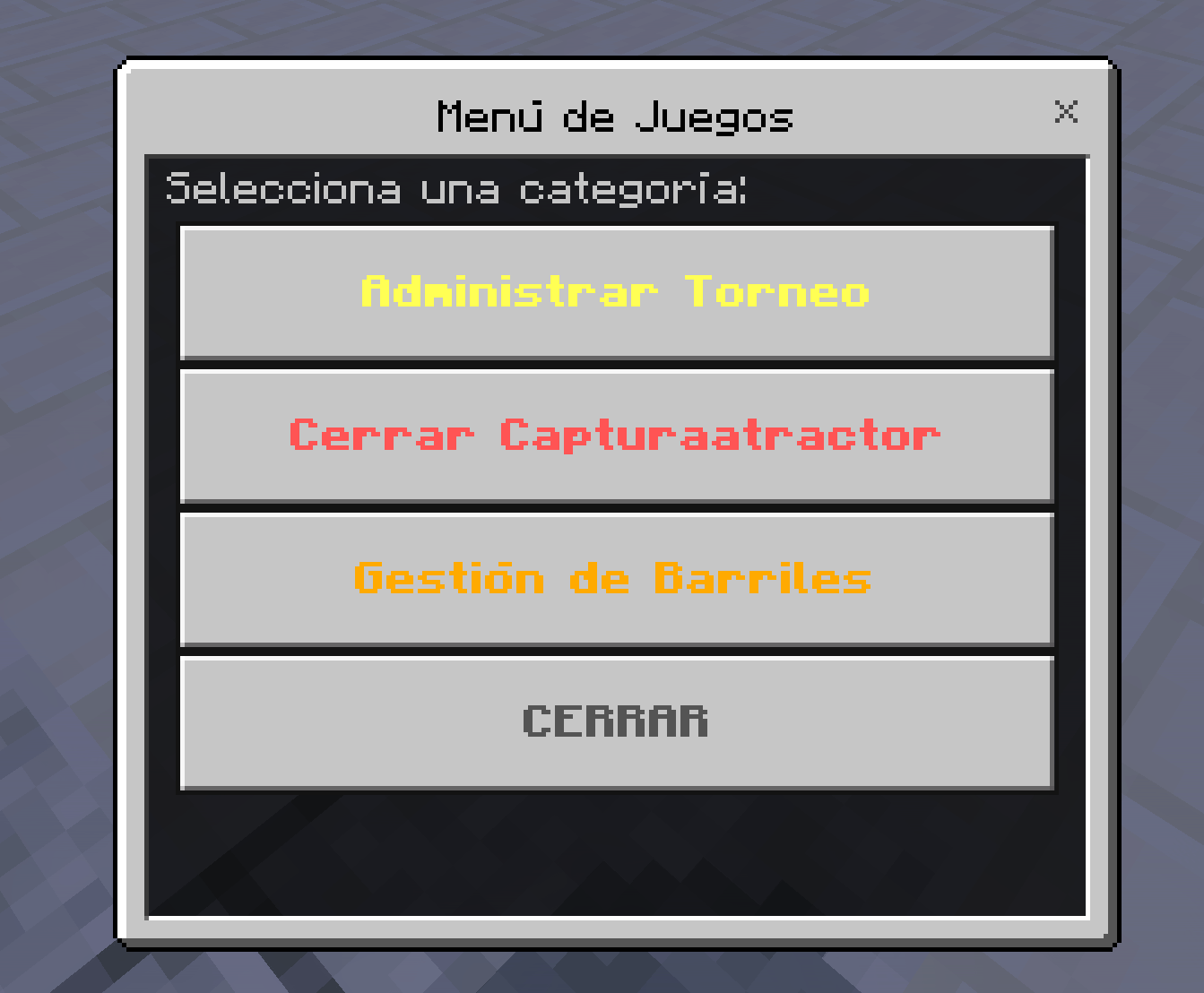
Capture Atractor submenu
The /scriptevent uac:menu command also opens the Capture Atractor menu, where a submenu will include:
- Manage Tournament
- Close Capture Atractor
- Barrel Management
Close Capture Atractor
Closes the game.
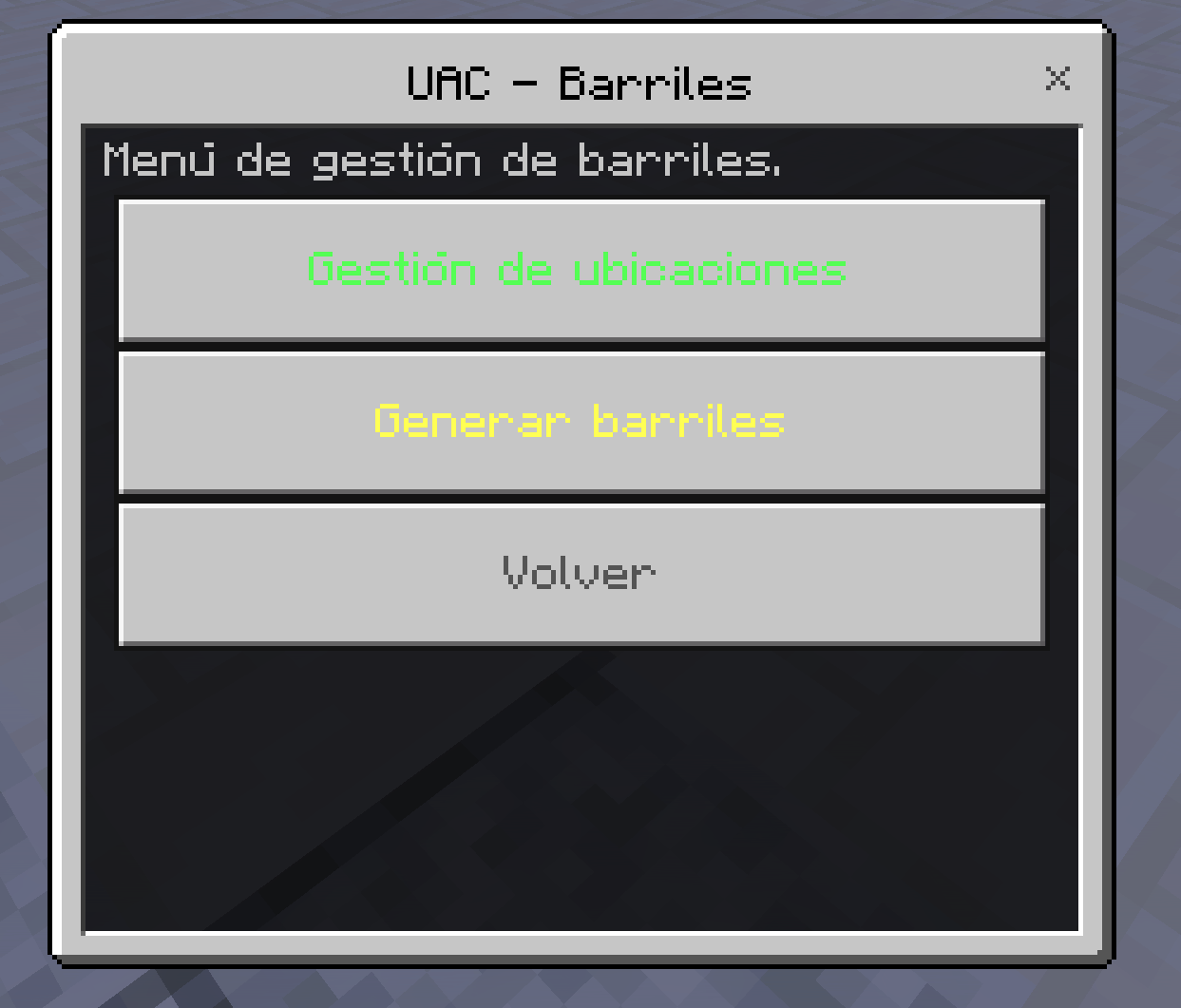
Barrel Management
The barrels will be generated again at random, and you can place the locations where they will spawn.
Inside there are 2 location management buttons:
- Assign location: lets you assign the exact location where the barrel will spawn.
- View saved locations: shows the locations you saved and lets you delete each one individually.
- Delete all locations: removes all saved locations.
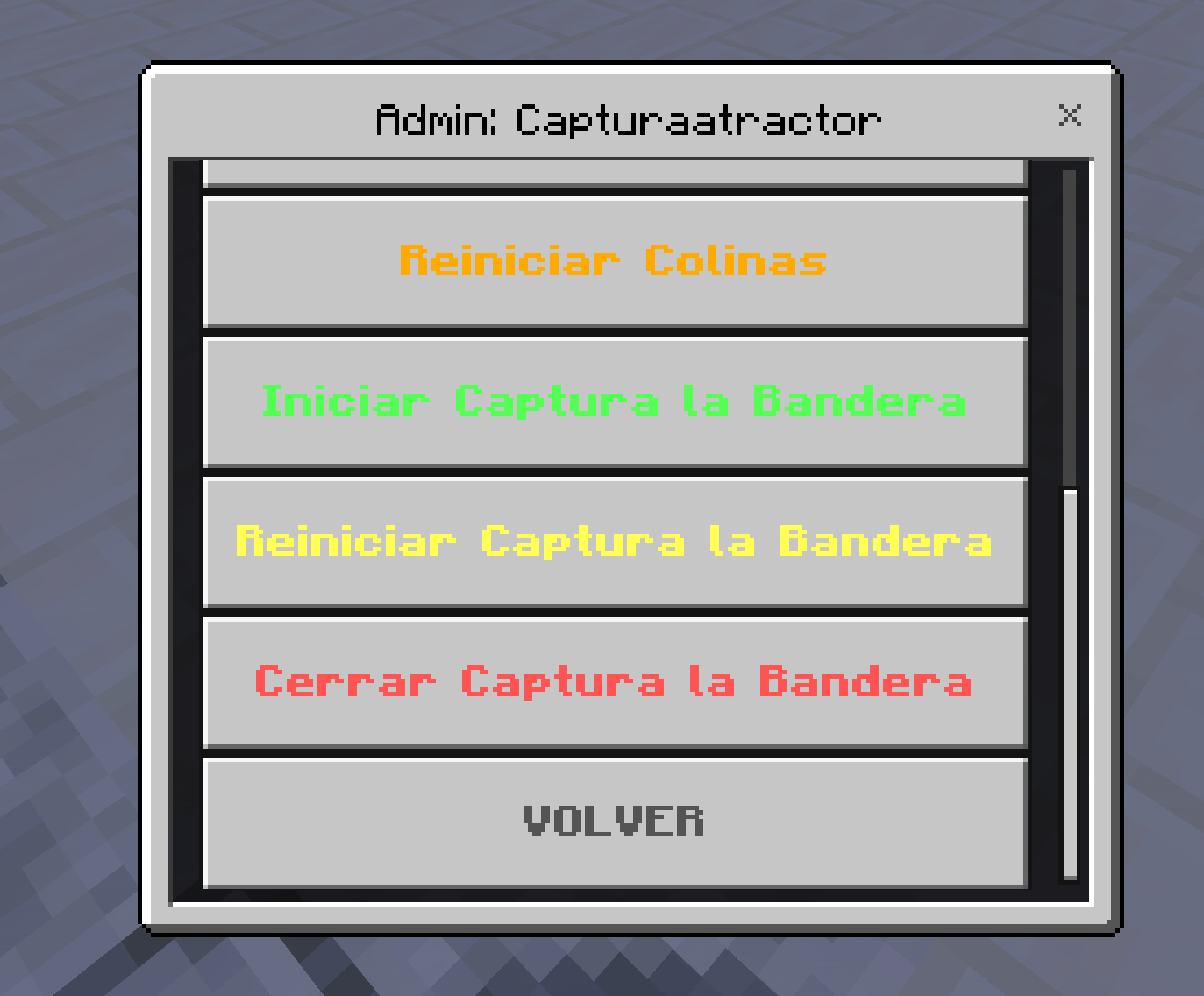
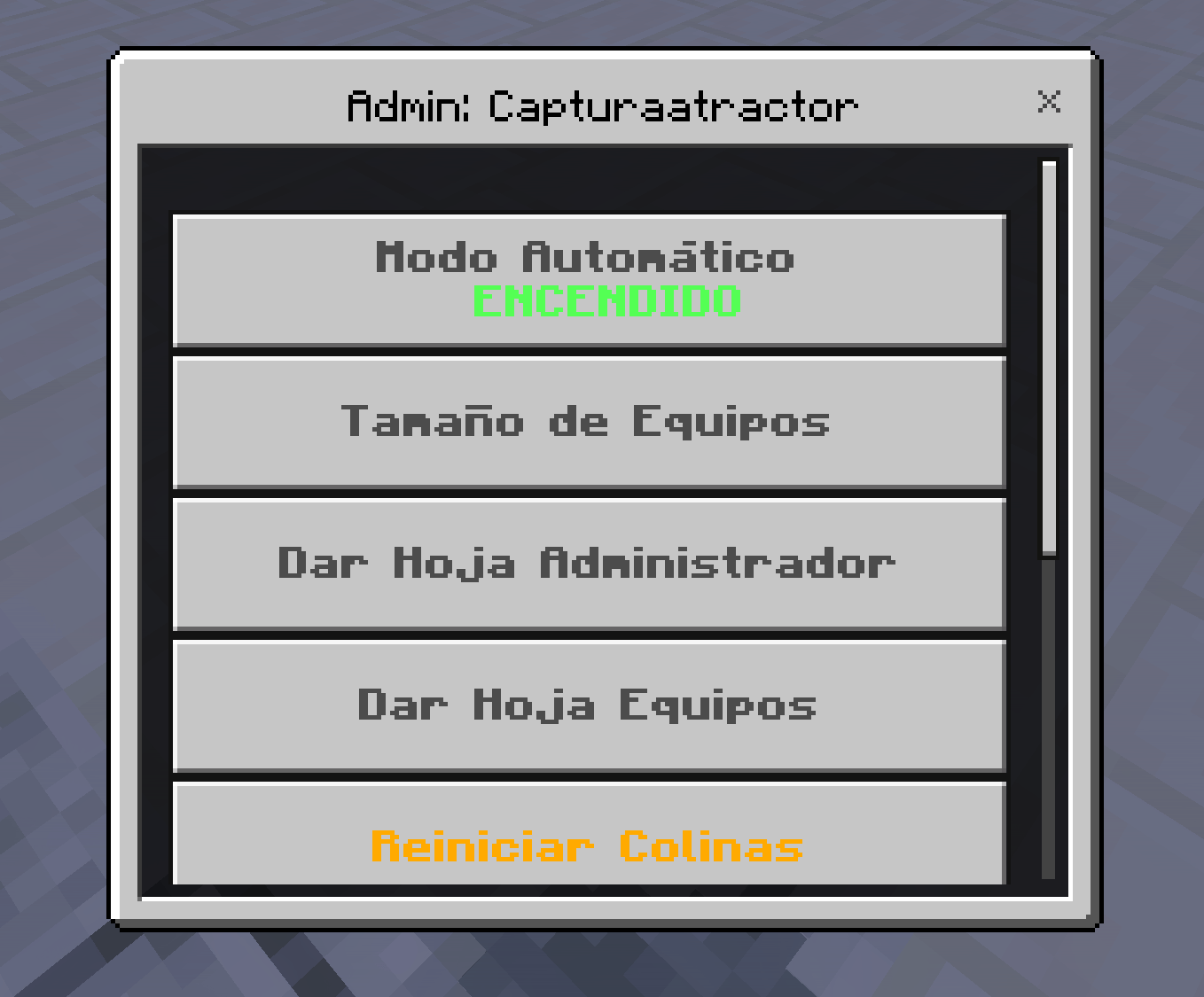
Manage Tournament
This menu includes:
- Automatic mode: press this button and the whole game will repeat and run automatically. It is recommended if you want to run many matches.
- Team size: lets you increase or reduce the number of players per team.
- Give Admin sheet: shows who currently has a team, which players are on each team, and which hills are captured.
- Give Team sheet: this is the same sheet given at the start of the game, but it also allows team changes.
- Reset Hills: resets the hills so they can be captured again.
- Start Capture the Flag: starts the flag capture phase and automatically generates the flags.
- Reset Capture the Flag: resets the flags so you can play Capture the Flag again.
- Close Capture the Flag: removes the flags and stops showing any flag-related data.
War Special
This minigame will send you to:
67, 63, 19
When entering, all players will be set to Adventure Mode, and the game will give them a wooden sword. When you kill a player, you will earn points, and each kill also lets you increase armor, weapons, Super Mance, and unique abilities.
The game consists of 3 rounds per match. If a different player wins a round, then round 4 is created, where the winners of each round will play.
Each round is 18 kills to win, and every time a round starts, the entire inventory is reset.
If a player is losing, the game helps balance the match by giving them items so they can compete with the players who are winning.
Once everyone has won, you must use the Reset All button with the command:
/scriptevent uac:menu
War Special submenu
- Close War Special: completely closes the game.
- Reset All: points and players return to 0 and Adventure Mode.
- Pause Players: stops players from moving so you can fix everything.
- Normal Mode: sends everyone to Adventure Mode without changing points.
- Barrel Management: works with the same system as usual.
The game also includes help to prevent kill aura and abuse, with a system that helps detect players.
Flag War
When selecting the button, you will be sent to:
67, 63, 19
This game requires several things:
- item.zodiac:captura_item
This is where you must bring the little flags. It is the capture zone, and flags are captured automatically when you get close. To remove it, it is recommended to use:/kill @e[type=zodiac:captura]
because you will not be able to interact with it directly. - item.zodiac:bandera_item
These are the little flags you place so they can be captured. They are not items or blocks; they are entities that, when hit, will go into the inventory, since players are in Adventure Mode and cannot break blocks.
It is recommended to place the flags in Creative Mode shortly before starting.
Once everything is ready, use:
/scriptevent uac:menu
This opens the submenu with the following buttons:
- Close Flag War: closes the game and returns to the main menu.
- Start Game: starts the 3-minute timer.
- Reset Game: resets the points.
- Pause Players: stops the players while you fix things.
- Barrel Management: lets you generate barrels.
Hide and Seek
If there are not at least 2 players playing, you will not be able to start.
If more players join later, you must press Start Match.
When the game starts, it will choose 1, 2, or 3 seekers, depending on how many players there are. These players will not be able to see well until the others hide, and they have 15 seconds to hide.
Once the match begins, if the seeker touches someone, that player will go into spectator mode. The game will keep removing players until none are left. If the hiders are not found, they win and the game starts again. Then new seekers are chosen randomly, and everyone is reset to Adventure Mode again, repeating indefinitely.
The seeker will also receive a speed boost, and if they die, nothing happens.
By default, the game will send you to:
103, 15, 40
You will have a submenu to modify everything using:
/scriptevent uac:menu
Hide and Seek submenu
- Close Hide and Seek: closes the game.
- Barrel Management: allows you to generate barrels.
- Manage Hide and Seek: opens another menu with buttons.
Inside Manage Hide and Seek
- Start Match: starts the game if it has not started yet.
- Stop Match: stops the game and prevents it from continuing.
- Assign location: lets you set the location where Hide and Seek will be played, so you can use different maps.
Tag
It works almost the same as Hide and Seek, so it will be removed in the future because it is basically the same.
Hot Potato
A fast-paced game where one player must pass a potato from hand to hand before 15 seconds pass, otherwise they lose and the potato is randomly given to another player.
The game ends when the last potato holder explodes. Players will be eliminated little by little until only 1 remains, and the game will restart indefinitely 5 seconds after the winner is announced.
Hot Potato menu
Manage Hot Potato
- Pause Match: stops the game.
- Restart Match: restarts the game after 5 seconds.
- Assign location: default spawn
103, -15, 40. Here you can set the location where you want the game to be played, so you can use different maps. - Close Hot Potato: closes the minigame.
Barrel Management
- Location management: lets you place the barrel in the desired location.
- Generate barrels: randomly generates barrel content.
VERSION EN ESPAÑOL:
Este paquete incluye varios minijuegos con menús propios, sistemas de equipos, gestión de barriles y funciones automáticas para administrar partidas.
Requisitos y recomendaciones
Se recomienda instalar el addon Super_mance para que la experiencia sea más interesante, ya que este juego utiliza ese addon para funcionar en conjunto.
También se debe tomar en cuenta el TP de cada juego, ya que varios minijuegos tienen ubicaciones predeterminadas.
Se recomienda no activar mantener inventario, ya que las banderas podrán ser llevadas a la base más rápido.
Todos los minijuegos cuentan con sus propios menús y es necesario activar la opción de modo experimental para poder usarlos.
Menú principal
Usa el comando:
/scriptevent uac:menu
Este comando abrirá el menú principal, donde estarán disponibles los siguientes minijuegos:
- Captura Atractor
- War Special (PvP con crecimiento)
- Flag War (captura de banderas)
- Papa Caliente
- Las Escondidas
- Atrapadas
- Gestión de Barriles
Captura Atractor
Para Captura Atractor se recomienda usar el mapa Torre de Banderas.
Al darle a Captura Atractor, el jugador será enviado a las coordenadas:
-175, 126, 76
Ahí estará el lobby, donde se entregará una hoja para elegir equipo:
- Rojo
- Azul
- Amarillo
- Verde
Al hacer clic, aparecerán los equipos disponibles y el número de jugadores.
Una vez elegido el equipo, el jugador será teletransportado a su respectivo spawn:
Respawn
- Equipo Azul:
337, 72, -3 - Equipo Rojo:
398, 67, 183 - Equipo Amarillo:
-124, 65, 126 - Equipo Verde:
46, 68, -208
Al elegir equipo se otorgará una etiqueta de color correspondiente. Además, no se podrá hacer daño a los compañeros de equipo y no se sufrirá hambre por la saturación.
Cada spawn tiene su base para reunirse con los compañeros del equipo.
Colinas
Cuando empiece el juego, los jugadores deberán capturar las colinas:
-35, 74, -1115, 75, -65123, 75, 121
Cada colina otorga 50 puntos. Una vez activada, o si ya está activada, solo será necesario permanecer en la zona hasta capturarla.
Las colinas también servirán como una base de cobertura donde solo podrán entrar los jugadores que la capturaron.
Captura de bandera
Una vez capturadas las colinas, comienza el siguiente juego: Captura la Bandera.
Cada equipo deberá capturar la bandera de los equipos contrarios y llevarla a su propia base.
Banderas
- Equipo Azul:
335, 71, -62 - Equipo Rojo:
398, 71, 215 - Equipo Amarillo:
-257, 66, 171 - Equipo Verde:
87, 64, -265
Una vez que captures cada bandera, los jugadores descalificados pasarán a espectador.
Submenú de Captura Atractor
El comando /scriptevent uac:menu también abrirá el menú de Captura Atractor, donde habrá un submenú con:
- Administrar Torneo
- Cerrar Captura Atractor
- Gestión de Barriles
Cerrar Captura Atractor
Cierra el juego.
Gestión de Barriles
Los barriles se regenerarán de nuevo al azar y podrás colocar las ubicaciones donde se generarán.
Dentro existen 2 botones de gestión de ubicación:
- Asignar ubicación: permite asignar la ubicación exacta donde se generará el barril.
- Ver ubicaciones guardadas: muestra las ubicaciones que hayas guardado y permite eliminar cada una por separado.
- Borrar todas las ubicaciones: elimina todas las ubicaciones guardadas.
Administrar Torneo
Este menú contiene:
- Modo automático: con este botón solo debes presionarlo y todo el juego se repetirá y ejecutará automáticamente. Se recomienda activarlo si quieres hacer muchas partidas.
- Tamaño de equipos: permite aumentar o reducir el número de jugadores por equipo.
- Dar hoja Administrador: muestra en ese momento quiénes tienen equipo, qué jugadores están en cada equipo y qué colinas están capturadas.
- Dar hoja Equipos: es la misma hoja que entrega el juego al inicio, pero también permite cambiar de equipo.
- Reiniciar Colinas: reinicia las colinas para que puedan volver a capturarse.
- Iniciar Captura de la Bandera: inicia la captura de banderas y las genera automáticamente.
- Reiniciar Captura de la Bandera: reinicia las banderas para volver a jugar solo captura de bandera.
- Cerrar Captura de la Bandera: elimina las banderas y deja de mostrar cualquier dato relacionado.
War Special
Este minijuego te enviará a las coordenadas:
67, 63, 19
Al entrar, todos los jugadores entrarán en modo aventura y el juego les dará una espada de madera. Al matar a un jugador generarás puntos y, conforme avances, podrás mejorar armaduras, armas, Super Mance y habilidades únicas.
El juego consta de 3 rondas por partida. Si un jugador diferente gana una ronda, entonces se crea la ronda 4, donde jugarán los ganadores de cada ronda.
Cada ronda es de 18 kills para ganar y, cada vez que inicia una ronda, se reinicia todo el inventario.
Si un jugador va perdiendo, el juego le ayuda a equilibrar la partida dándole cosas para que pueda competir con los que van ganando.
Una vez que todos hayan ganado, deberás usar el botón Reiniciar Todo con el comando:
/scriptevent uac:menu
Submenú de War Special
- Cerrar War Special: cierra el juego completamente.
- Reiniciar Todo: los puntos y los jugadores regresan a 0 y a modo aventura.
- Pausar Jugadores: detiene a los jugadores para que no se muevan mientras arreglas todo.
- Modo Normal: manda a todos a modo aventura sin mover puntos.
- Gestión de Barriles: funciona con el mismo sistema de siempre.
El juego también cuenta con ayuda para evitar kill aura y abusadores, con un sistema que ayuda a detectar jugadores.
Flag War
Al darle al botón, te mandará a la ubicación:
67, 63, 19
Para este juego se necesitan varias cosas:
- item.zodiac:captura_item
Es la zona de captura donde solo al acercarse se captura automáticamente. Para eliminarla, de preferencia usa:/kill @e[type=zodiac:captura]
ya que no la podrás tocar. - item.zodiac:bandera_item
Son las banderitas que colocarás para que capturen. No son ítems ni bloques, son entidades que al golpearlas las tendrás en el inventario, ya que el juego se usa en modo aventura y los jugadores no pueden picar bloques.
De preferencia, se recomienda colocar las banderas en creativo momentos antes.
Al tener todo listo, usa el comando:
/scriptevent uac:menu
Esto abrirá el submenú con los botones:
- Cerrar Flag War: cierra el juego y regresa al menú principal.
- Empezar el juego: inicia el contador de 3 minutos.
- Reiniciar Juego: reinicia los puntos.
- Pausar Jugadores: detiene a los jugadores mientras arreglas las cosas.
- Gestión de Barriles: permite generar barriles.
Escondidas
Si no hay 2 jugadores jugando, no podrás iniciar la partida.
Si más jugadores se unen después, deberás usar Iniciar Partida.
Al empezar el juego, se elegirá 1, 2 o 3 atrapadores, dependiendo de cuántos jugadores haya. Estos jugadores no podrán ver bien hasta que los demás se escondan y tendrán 15 segundos para esconderse.
Cuando empiece la partida y un atrapador toque a alguien, ese jugador pasará a modo espectador. El juego irá descontando jugadores hasta que no quede ninguno.
Si los escondidos no son encontrados, ganan y el juego vuelve a iniciar. Entonces se elegirán aleatoriamente nuevos atrapadores y todos regresarán a modo aventura, repitiéndose indefinidamente.
El jugador que atrapa tendrá aumento de velocidad y, si muere, no pasará nada.
El juego te mandará por defecto a:
103, 15, 40
Y tendrás el submenú para modificar todo con el comando:
/scriptevent uac:menu
Submenú de Escondidas
- Cerrar Escondidas: cierra el juego.
- Gestión de Barriles: permite generar barriles.
- Administrar Escondidas: abre otro menú con botones.
Dentro de Administrar Escondidas
- Iniciar Partida: inicia el juego si aún no ha comenzado.
- Detener partida: detiene el juego y evita que siga ejecutándose.
- Asignar ubicación: permite asignar la ubicación donde se jugará Escondidas, para poder usar distintos mapas.
Atrapadas
Funciona casi igual que Escondidas, por lo que se quitará en el futuro, ya que es lo mismo.
Papa Caliente
Dinámica rápida en la que un jugador deberá pasar una papa de mano en mano antes de cumplir los 15 segundos; de lo contrario, perderá y la papa será repartida a otro jugador aleatoriamente.
El juego termina cuando el último portador de la papa explota. Se irán eliminando poco a poco los jugadores hasta que quede 1, y el juego se reiniciará infinitamente después de 5 segundos de anunciarse el ganador.
Menú de Papa Caliente
Administrar Papa Caliente
- Pausar partida: detiene el juego.
- Reiniciar partida: reinicia el juego después de 5 segundos.
- Asignar ubicación: spawn predeterminado
103, -15, 40. Aquí podrás asignar la ubicación donde quieres que se juegue, para usar distintos mapas. - Cerrar papa caliente: cierra el minijuego.
Gestión de Barriles
- Gestión de ubicaciones: podrás colocar el barril en la ubicación deseada.
- Generar barriles: genera el contenido de los barriles aleatoriamente.
Mini Juegos Zodiac Team