Light Blocks Revealed Datapack
Craft light blocks in survival, pick any light level, and see and adjust them - just like in creative mode.
Light blocks are perfect for hidden lighting, but in survival you can't get them, can't see them and can't change their brightness. This datapack fixes all of that - no mods or plugins needed.
Recipe
Surround a Torch with 8 Glass Panes:
|
|
|
| Glass Pane |
Glass Pane |
Glass Pane |
| Glass Pane |
Torch |
Glass Pane |
| Glass Pane |
Glass Pane |
Glass Pane |
Result: 1 Light Block (light level 15)
Every Light Level
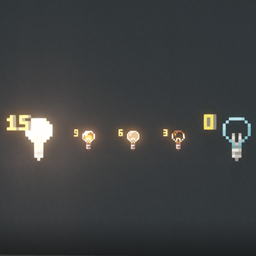
Put a light block into a Stonecutter and choose any of the 16 light levels (0-15). The level is shown right on the item, just like in the creative inventory.
Features
Hold a light block in survival mode and you can:
- See them - every light block within 16 blocks shows up with its light level. Only you see the markers, other players don't.
- Brighten them - right-click a light block (up to 3 blocks away) to raise its light level.
- Dim them - sneak + right-click to lower its light level.
Removing works just like vanilla: place any other block where the light block is. Break that block again and the light block is gone.
Optional extra - break with left-click: turn it on and you can pick light blocks up with a left-click. They drop with the same light level. It's off by default and can be switched on in the clickable settings menu.
In creative mode, Minecraft already does all of this by itself.
Commands (operators only)
| Command |
Effect |
/function lichtbloecke:einstellungen |
Clickable settings menu (breaking and light level on / off) |
/function lichtbloecke:geben {anzahl:16} |
Give light blocks |
/function lichtbloecke:geben_stufe {anzahl:16,stufe:7} |
Give light blocks with light level 0-15 |
/function lichtbloecke:deinstallieren |
Remove everything, then disable the pack |
Installation
Singleplayer
- Select your world -> Edit -> Open World Folder
- Put the ZIP into the
datapacks folder
- Type
/reload in the world
Server
- Put the ZIP into
<world>/datapacks/
- Run
/reload
Requirements: Minecraft Java Edition 26.1 - 26.3
Good to know
- The markers are particles, because that's the only way a datapack can show something to a single player. After you put the light block away, they stay visible for up to 4 seconds.
- A datapack has to search the area block by block, so markers reach 16 blocks. The plugin version reaches 32 and more.
- There is also a plugin version for Paper servers: Light Blocks Revealed.
- Use either the plugin or the datapack - not both at once.