
Iron Farm Counter

Track how many iron golems have died in your iron farm with a simple scoreboard counter. Show, hide, or reset the counter using easy in-game commands.
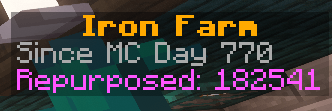
A close-up of the scoreboard showing the iron golem death count and the Minecraft day tracking began.

A close-up of the scoreboard showing the iron golem death count and the Minecraft day tracking began.

Description

Iron Farm Counter

Keep track of your iron farm with a simple scoreboard counter. Iron Farm Counter records iron golem deaths caused by lava, campfires, soul campfires, and continued burning after contact with lava.

Show the counter when you want to check it, hide it for a clear screen, or reset it to start a new count.

What It Counts

  • Deaths from lava
  • Deaths from campfires
  • Deaths from soul campfires
  • Deaths from continued burning after contact with lava, even after the golem leaves the lava

It counts golem deaths from these sources, rather than the number of iron ingots produced.

Commands

  • /trigger golem_show — Show the counter.
  • /trigger golem_hide — Hide the counter.
  • /trigger golem_reset — Reset the count to zero.

Installation

  1. Download the datapack ZIP for your Minecraft version.
  2. Place the ZIP in your world’s datapacks folder without extracting it.
  3. Open the world or run /reload if it is already open.
  4. Use /trigger golem_show to display the counter.

Running /reload requires cheats or operator permissions.

Compatibility

For Minecraft Java Edition. Choose a download marked for your Minecraft version. No mods required.

Find Gaming Granny

Visit gaminggranny.com for more packs, stream information, and community links.

Iron Farm Counter Team

profile avatar
  • 3
    Projects
  • 572
    Downloads

Minecraft streamer & creator sharing datapacks, resource packs, and useful tweaks from my worlds. 💜 Cozy chaos, technical builds & block-game fun.

Donate

More from Gaming_Granny