cobblemon:Starter Kit configurable
fully configurable starter kit for your journey in cobblemon
cobblemon: Starter kit, as the name suggests, makes it so that the first time a player joins to your world, they get items to start their adventure. In its base version, it only adds food, Poké Balls, and a Pokédex, but you can easily add any item from any mod.
Below you’ll find a complete tutorial on how to do it.
INSTALLATION
(cobblemon instaled neded)
(datapack created for neoforge 1.21.1)
put the zip in the data packs folder of your minecraft, you can add it manually every time you create a world in the world options or do it automatically with a datapack loader
CONFIGURATION
to set it up you have to go into the zip file (you can use winrar) or unzip it to edit.
When you enter the zip archive, you can see a folder and a text document. Go into the folder, then go into the next folder called 'kit', and finally go into the 'function' folder.
There is the file you want to edit, you can edit it with Windows Notepad or some application for editing code.
Inside you will find instructions to edit the data pack, but I will also explain it her.
The first 4 lines are basically Minecraft commands (give @s <ItemID>) below them, create another line (it also works above).
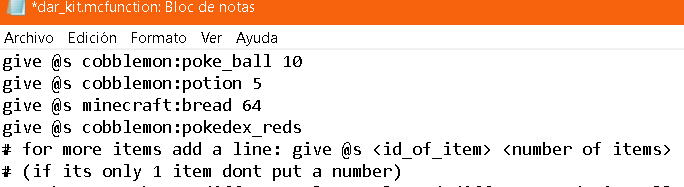
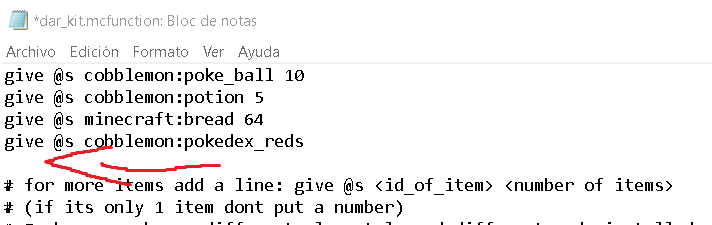
You can add as many items as you want.
You can see the ID of any Minecraft item by pressing F3 + H and hovering your cursor over them in the game.
after adding an object it should look like this.
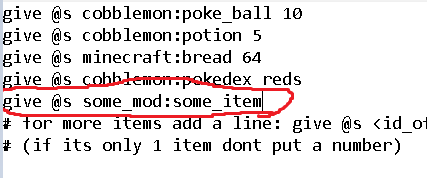
I’ll leave here some examples of starting items that you can add for your players or yourself (For these examples to work, you need to have the mods installed, otherwise the data pack won't work).
give @s sophisticatedbackpacks:backpack
give @s rctmod:trainer_card
give @s waystones:warp_stone
give @s waystones:waystone 3
give @s berrypouch:berry_pouch
give @s brendons_bottlecaps:goldencap
after adding whatever you want, just press the X in the notepad and save, then go ahead and rejoin the zip file (if you separated it) and if you edited it with winrar, keep in mind that it won’t save if you’re playing with this data pack installed (in a zip file).
you can edit it while you play if after unzipping the mod, you put it in a folder (still inside the data packs folder) and keep doing /reload to refresh each change you make.
to get the kit again after you’ve already gotten it, type or copy this command "/advancement revoke @s only kit:primer_ingreso" in the minecraft chat (admin permissions only).
TIP
As a tip in the game, you can type the command /give @s (the item you want) and by pressing ctrl + a you can select the message, then copy it by pressing ctrl + c
Then, when you copy that command into the SATA pack, just remove the "/" symbol.
Keep in mind that all lines that start with "#" don't count as commands, so if you edit the data pack, make sure that only the commands to get items don't have this "#" symbol.
cobblemon:Starter Kit configurable Team