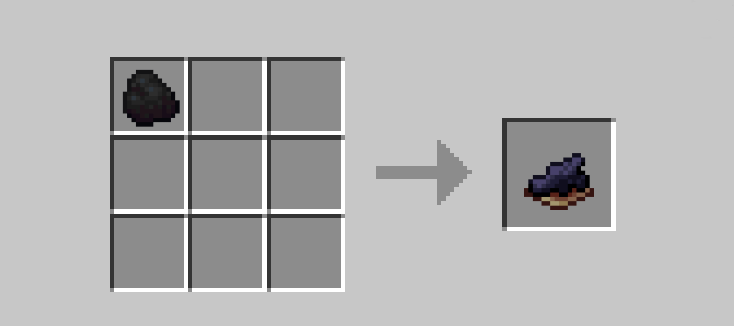
in-game recipe
Description




What kind of datapack is this?
This datapack introduces a small but convenient tweak to your survival experience.
Coal finally gets a little more versatile.
- Got too much coal? Turn it into something useful.
- No ink sacs nearby? No problem.
- Simple, logical, and fits vanilla gameplay.
Test how this tiny addition can make your resource management just a bit smoother
Features
Interactions
- Craft Black Dye using different types of coal:
- Regular Coal
- Charcoal
- Simple crafting recipes that feel natural and balanced
- No need to hunt squids just for dye anymore
Miscellaneous effects
- Fully vanilla-friendly (no new items, only recipes)
- Works in both singleplayer and multiplayer worlds
- Lightweight and performance-friendly
Installation Guide
Step 1: Download the datapack
Download the datapack file(it should be a .zip archive, do not extract it!).
Step 2: Install into the world
First method(new world) 1) Create new world 2) Go to the “More” tab 3) Click "Data Packs" then "Open Pack Folder"
Second method(an existing world) 1) Launch Minecraft 2) Go to Singleplayer 3) Select your world 4) Click Edit → Open World Folder 5) Find the "datapacks" folder
Step 3: Install the datapack
Move the downloaded .zip file into the folder(make sure the file stays zipped)
Extra
If something isn't working, double-check the following:
- Does the data pack version match the Minecraft version?
- Is the data pack installed in the correct folder (not just in .minecraft)?
- Did you re-enter the world after installation?
If any of these are missing, the datapack may not work as expected.
The Coal to Dye Team