Introduction
This datapack makes configuring the Chest Minecart GUI simpler and more convenient. You only need to configure the storage and execute the generation function to quickly create a GUI.
Features
The following feature is supported:
- Click an item to execute a command / switch menus
Storage Structure
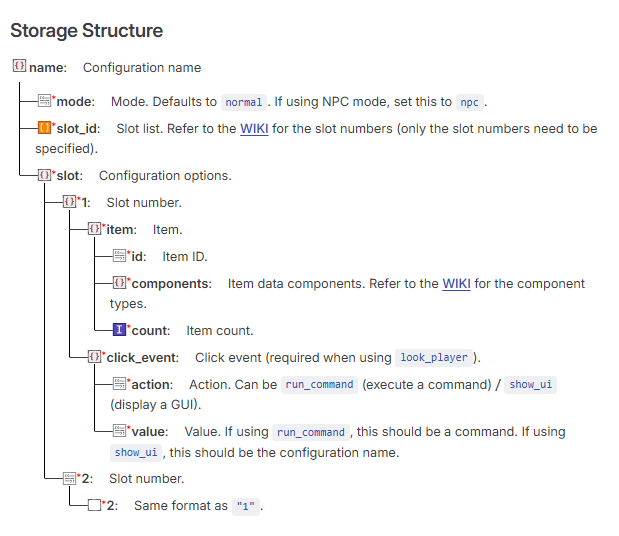
Example Storage
Default configuration
data merge storage windwaves_sea:chest_gui {\
config:{\
    "test":{\
        "mode":"npc",\
        "slot_id":["1"],\
        "slot":{\
                "1":{\
                    "item":{\
                        "id": "minecraft:diamond",\
                        "components":{},\
                        "count": 1 \
                    },\
                    "click_event":{\
                        "action":"show_ui", \
                        "value":"test1" \
                    }\
                }\
        }\
    }\
}\
}
Command Reference
Generate a Chest Minecart GUI
function chest_gui:command/summon {name:"name",x:1,y:1,z:1}
Generates a Chest Minecart GUI. The configuration must be written to storage first. name is the configuration name defined above (and used throughout the following commands). x, y, and z are coordinate values.
Remove a Chest Minecart GUI
function chest_gui:command/remove {name:"name"}
Delete a Configuration (Also Removes the Chest Minecart GUI)
function chest_gui:command/delete_setting {name:"name"}
Download
QQ Group: 117464315
Github: https://github.com/WindWavesSea/Chest-Minecart-GUI/
Modrinth: https://modrinth.com/datapack/chest-minecart-gui/
Credits
Thanks to NOX OBSCURA for providing the minecart opening detection concept.