

![[TaCZ] Search and Recon logo](https://media.forgecdn.net/avatars/thumbnails/1691/410/64/64/639073463128546759.png)
[TaCZ] Search and Recon
- By
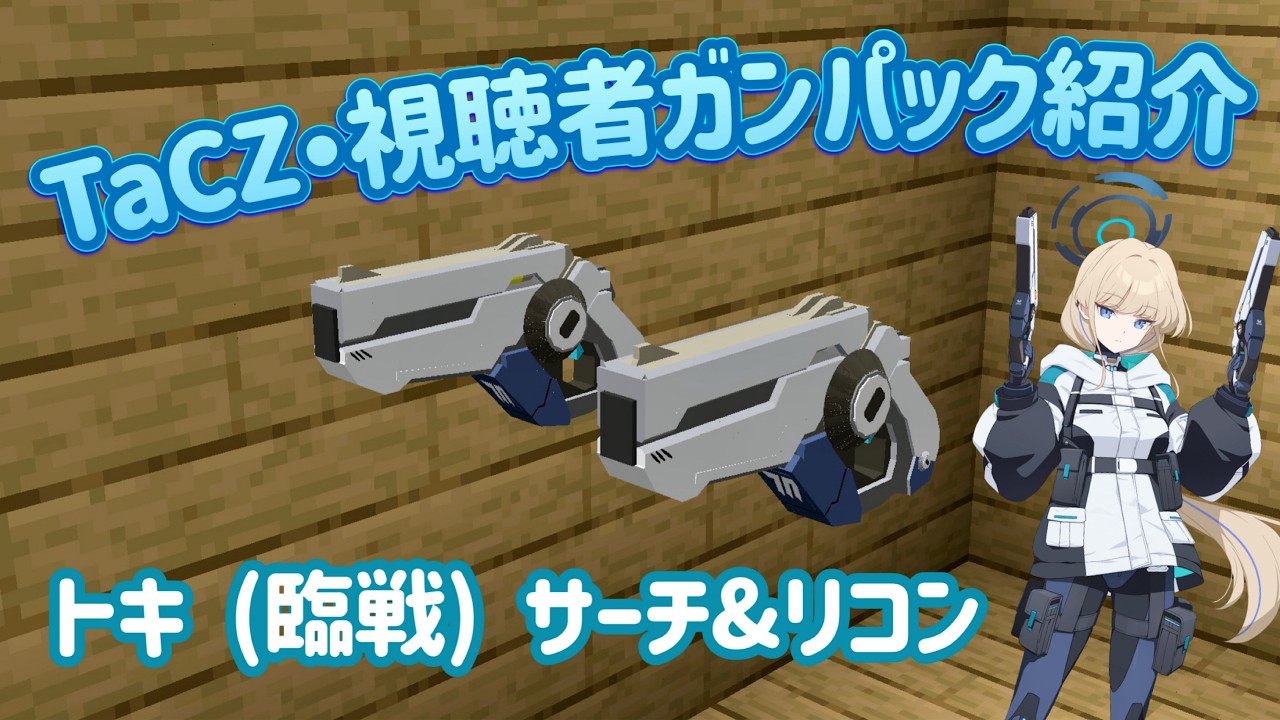
Adds Search & Recon, the unique energy pistols used by Asuma Toki (Battle) in Blue Archive, to TaCZ.
Description
Skyちゃんねる 【-SK tech-]様の動画を参考にさせて頂きました。
ありがとうございます。
Sky先生は他にも様々なブルーアーカイブガンパックを製作していらっしゃいます。
よろしければ、ご視聴ください。
Sky Channel [-SK tech-]
I referenced this video.
Thank you.
Sky-sensei creates various Blue Archive gun packs.
Please feel free to watch.
EN Dec
This pack adds “Search & Recon”, the weapon used by Asuma Toki (Battle) from Blue Archive, to Minecraft via TaCZ.
What kind of gun is it?
A dual pistol setup with a burst mode.
It performs well at close range, and the large magazine capacity makes it viable as a main weapon.
However, its accuracy/spread is intentionally lower.
Features / Notes
This pack uses Lua, so I added custom animations.
I hope you enjoy it!
Bugs
There should be none, but if you find any issues, please report them in the comments.
Installation
Install TaCZ v1.1.4 or higher into your mods folder.
Launch the game once.
After launching, a folder named tacz will be created.
Put this pack as a ZIP file (do not extract) into the tacz folder.
Common issues / FAQ
Q1. The item appears as a black and purple texture (missing texture).
A1. Your TaCZ version may be lower than v1.1.4. Please update TaCZ to the latest version.
Q2. TaCZ is up to date, but it still doesn’t work.
A2. Inside the tacz folder, delete all folders that are NOT compressed (i.e., extracted/unzipped pack folders), then launch the game again.
Q3. Still not fixed.
A3. One of your installed TaCZ gun packs may include a pack made for TaCZ versions below v1.1.4. Identify and remove it, then repeat Q2 and launch again.
JP Dec
Description
本パックは、**『ブルーアーカイブ』に登場する「飛鳥馬トキ(臨戦)」が使用する武器「サーチ&リコン」**を、TaCZ を通じて Minecraft に追加します。
どんな銃か
バーストモードを持つデュアルピストルです。
近距離に強く、弾数も多いため、メイン武器としても運用できます。
一方で、集弾率(精度)は低めに設定しています。
仕様
Lua ファイルを使用しているため、カスタムアニメーションを追加しています。楽しんでもらえれば幸いです。
バグ
おそらく無いと思いますが、もし不具合を発見した場合は コメント欄に報告してください。
導入方法
TaCZ v1.1.4 以上を mods フォルダに導入します。
一度ゲームを起動します。
起動後、tacz フォルダが生成されます。
配布した zip を 解凍せず、そのまま tacz フォルダに入れてください。
よくある不具合(FAQ)
Q1. 導入したのにアイテムが「黒と紫」(欠けテクスチャ)になる
A. TaCZ のバージョンが v1.1.4 未満の可能性があります。TaCZ を最新バージョンに更新してください。
Q2. TaCZ は最新だが、それでも直らない
A. tacz フォルダ内にある 「圧縮されていないフォルダ(解凍済みのパック)」をすべて削除してから起動してください。
Q3. それでも直らない
A. 導入している TaCZ GunPack の中に、v1.1.4 未満向けのパックが混在している可能性があります。該当パックを特定して削除し、Q2 をもう一度実行した上で起動してください。
[TaCZ] Search and Recon Team

![[TaCZ] Dual Wield project image](https://media.forgecdn.net/avatars/thumbnails/2022/594/256/256/639239367595343413.png)
![[TaCZ]CursedGun project image](https://media.forgecdn.net/avatars/thumbnails/1883/163/256/256/639178920548099809.png)
![[TaCZ] Translucent Addon project image](https://media.forgecdn.net/avatars/thumbnails/1822/999/256/256/639151570591631712.png)
![[TaCZ]momoi project image](https://media.forgecdn.net/avatars/thumbnails/1776/384/256/256/639127811579333391.png)