promotional bannermobile promotional banner

[TaCZ] ARIPS Content Expansion Pack

AstralLin's Radical Improvement Plan with a Series of products Pack for TaCZ

ARIP Series Guns and Attachments Pack


Remember to check README!


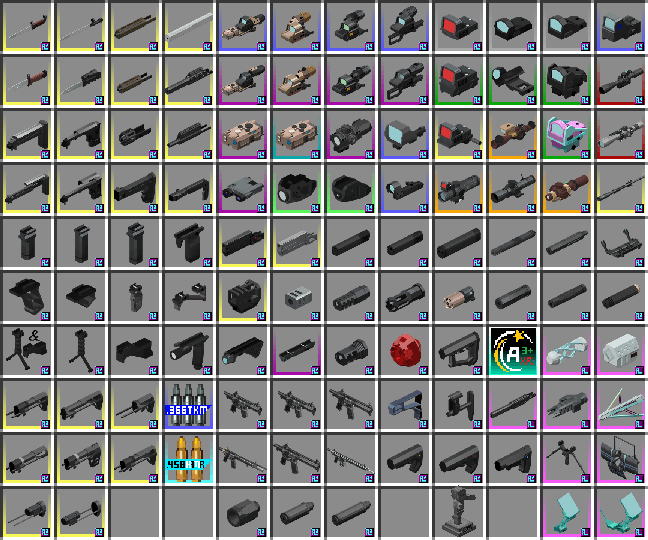
  This is a content expansion pack for "Timeless and Classic Guns: Zero" , this pack adds some new guns, ammo and attachments from real life or originality. They could be crafted in survive mode and used.

How to install(quick setting):

  (completely same as other gun packs for TaCZ 1.1.4 or later)

  Open your Minecraft game file, go to "tacz", and then put the whole .zip file you download here in (DO NOT unzip/extract).

  You will then need to reload the game using the "/tacz reload" command, or restart the game. If you still cannot find the assets in this pack, please check that the file path of the pack is correct.

How to use(quick setting):

  In the game, make sure you have attachments in your backpack, hold the TaCZ gun and press "Z" (default) to open the modification interface. Click the slot in the upper right corner to switch attachments.

Warning:

  With the update of TaCZ, the application methods and adaptation specifications of each version of the expansion pack are different, please pay close attention.
  If the expansion pack declares to match 1.1.5 but not 1.1.4, it may be due to the new mechanism adopted. Although it can still be loaded in 1.1.4, such as the aiming position switching function between the sights, when it adopts this function, it will cause the unexpected normal display of the tube wall and the reticle.
  When using the auxiliary package for creation and public release, the author name of the auxiliary package (preferably @ to or the corresponding account profile page of the same website) and the original release webpage should be indicated in the introduction or comment area. At the same time, it should not and must not be distributed in other forms (including but not limited to re-uploading, restoring, etc.). This is mentioned or quoted in the original public distribution webpage, so when you use the expansion pack, these matters are followed by default. You have been properly informed again.
  When using assets in the expansion pack (including but not limited to models, textures, etc.) for direct use or modification, the original author or original distributor of the asset should be consulted for direct consent or authorization. If it is disclosed to the public without authorization, severe accountability may be pursued. I, AstralLin, represent only myself as an independent individual and support secondary creation, but I strongly disapprove of and do not support the unauthorized use of original assets.
  In particular, for the mobile, because they inherently lack a rendering pipeline and TaCZ is not designed for mobile phones, we are not responsible for them and do not provide any help for their use.
  If the "Invalid Player Data" problem occurs and you are unable to enter the archive, it is because the total amount of data packets mounted on your current client is too large. This can be solved by installing one of the following mods: Packets Fixer / XL Packet / XXL Packet. This is for reference only.
  In addition, because TaCZ is not yet fully developed, the side flip combo sights cannot realize its switching logic, so it is separated. Users who need it should prepare the corresponding variant of the item in their backpack for modification at any time.
 

How to install on your client:

  First, TaCZ expansion packs are mainly datapack (1.1.4+) or configuration (1.0.3-) files loaded in a special format. A small number of them are mods, which will be mentioned later. The former is in .zip format. At this time, it is neither an expansion packs specially for TaCZ nor a mod, nor a global data pack (datapack), nor a resource/texture pack (resourcepack). Do not apply TaC's experience to it.
  Secondly, when the expansion pack does not declare that it needs to be unzipped, do not unzip it. For those that declare that they need to be unzipped, you should choose "unzip to the current folder" instead of "unzip to the xxx folder" (generally). If there are further guidance documents, please read and follow them.
  In particular, if you find that the expansion pack cannot be loaded due to CEN invalid problems during the startup process, you can try to unzip it, but at this time you should choose the opposite unzip option to the above.
  Finally, the expansion pack will take effect in TaCZ within the matching version range, regardless of the version, forge or farbic.
 
  Obviously, the TaCZ expansion pack requires the TaCZ mod to be loaded, and the TaCZ mod does not have any necessary prerequisites except the forge core (the farbic branch is not discussed here). Please prepare the appropriate Minecraft version and forge version by yourself, and then put the TaCZ mod into the mods folder and start it once for subsequent operations.
 
  To apply the expansion pack for TaCZ 1.1.4 and later, please follow the steps below: When not playing the game, open the directory corresponding to your Minecraft version, find the tacz folder, move the compressed package you downloaded from here into it, and then start the game. The folder should be listed with the mods folder, config folder, etc., instead of the config/tacz folder.
  If it matches the expansion pack of TaCZ version 1.0.3 and earlier, it should be moved to the config/tacz/custom folder, and the rest of the operations remain unchanged; if you want to use it in the context of TaCZ version 1.1.4 and later, please place it in the above location and start the game of that version and enter any world that allows cheating. The chat box will remind you whether to convert the old version of the gun package to the new version format. Click [Convert]. After the conversion is completed, you can delete the old format package. You must restart the game to enable the converted new format package. If it is not reminded, it is because the format itself is not strict or you placed it incorrectly.
  In particular, for the expansion pack that matches TaCZ version 1.1.4 and later in mod form (.jar format), it should be placed in the mods folder of the corresponding version. Make sure that the debug mode is turned off, enter the archive or command reload, and it will be effective. The expansion pack it carries will be created in the tacz folder, and then the mod can be optionally deleted (currently deleting the mod will not have any effect).
 

Extended operations:

  • You can completely remove certain items/remove only recipes by deleting certain folders in the data of this expansion pack.
  • data/tacz folder contains the compatibility of this expansion pack with TaCZ's universal tags which make this expansion pack can be used for most expansion pack guns, so that it should not be modified under normal circumstances;
  • data/apdf/recipes folder contains the recipes of the reality firearms of this expansion pack,
  • data/arip/recipes folder contains the recipes of the high-performance fictional items of this expansion pack,
  • data/asos/recipes folder contains the recipes of the reality sights of this expansion pack,
  • data/atea/recipes folder contains the recipes of the reality muzzle devices (including bayonets), grips and stocks of this expansion pack;
  • data/.../index folder contains the corresponding item core. If you want to remove this series of items, it is recommended to delete the parent of this folder directly.

————————————————————

  这是一个适用于"永恒枪械工坊:零"的附属包,添加了一些来自于现实生活或原创的枪械及配件。在生存模式下也可以制造并使用它们。

如何为您的游戏安装(概略性):

  (同其他匹配TaCZ-1.1.4或更高的枪包的使用方法完全一致)

  打开你的Minecraft游戏文件目录,找到对应版本中的tacz文件夹,将您从此处下载得到的压缩包移入其中(无需解压)。

  随后您需要在游戏内使用/tacz reload指令重载,或重新进入存档,最后手段是重启游戏,若尚不能寻得包内资产,请检查您的该包文件路径是否正确。

如何在游戏内使用(概略性):

  在游戏存档内确保背包内拥有配件,手持TaCZ的枪械并默认按"Z"打开改装界面,在右上角处点击槽位切换配件。

警示:

  随着TaCZ本体的更新,各版本的附属包应用方式和适配规格有所不同,请严格注意。

  若附属包声明匹配1.1.5而不匹配1.1.4,则是可能由于其采用了新机制所致,虽仍能在1.1.4中加载,但如瞄具(Sights)的镜组间瞄准位置切换功能,其采用该功能时,会导致预期之外的筒壁遮罩与分划板(divisions)常态化显示。

  当使用附属包进行创作并公开发布时,应当在简介或评论区中标明附属包作者名(以@到或相同网站的对应账户资料页为佳)以及原始发布网页,同时不应且不得以其他形式进行分发(包括且不限于重新上传、转存等),这在原始公开分发网页中有被提及或引用,故当您使用附属包时默认遵循这些事项。您已经被正当地再次告知了。

  当使用附属包内的资产(包括且不限于模型、贴图等)进行直接使用或修改时,应当首先征求该资产原作者或原始分发者的直接同意或授权,若未经授权即对外公开之,或将严厉追责。我,AstralLin,仅代表我独立个人,支持进行二次创作的行为,但非常不认可也不支持对原创资产未经授权即使用的行为。

  特别的,针对手机(移动端),因其固有地缺乏渲染管线,且TaCZ并非为手机端设计,故而不对手机端负任何责任,也不对手机端的使用提供任何帮助。

  若出现“无效的玩家数据”问题导致无法进入存档,系你当前端挂载数据包总量过大的问题,安装以下mod之一可以解决: Packets Fixer / XL Packet / XXL Packet,此处仅供参考。

  另外,因TaCZ开发尚不完全,侧翻组合瞄具无法实现其切换逻辑,故分立之,请有需求的用户在背包中另备其对应物品变体以供随时改装。

前期准备:

  首先,TaCZ附属包主要是以特殊格式加载的datapack(1.1.4+)或configuration(1.0.3-)类文件,少部分为mod,将在后文提及,而前者为.zip格式,此时既不是整合包,也不是mod,还不是全局数据包(datapack),更不是资源/材质包(resourcepack),不要用TaC的经验套用之。

  其次,当附属包未声明需要解压时,请勿解压,对于声明需要解压的,应选择“解压到当前文件夹”而非“解压到xxx文件夹中”(通常而言),其中若有进一步的指导文件,请查阅并遵循之。

  特别的,如果在启动过程中发现该附属包出现CEN invalid问题导致无法加载,可以尝试将其解压,但是,此时应当选择与前文所述相反的解压选项。

  最后,附属包在匹配的版本范围内的TaCZ都能生效,不论版本高低,也不论forge或farbic。

  显而易见的,TaCZ附属包需要TaCZ的mod本体才能加载,且TaCZ的mod本体除forge核心外无任何必需前置(此处不讨论farbic分支),请自行准备适合的Minecraft版本和forge版本,然后将TaCZ本体mod放入其中的mods文件夹(若为PCL2启动器,从PCL2下载该mod到指定版本亦可)启动一次,以便后续操作。

具体操作:

  应用匹配1.1.4版本及以后的TaCZ的附属包请遵循以下步骤:在不进行游戏时,打开你的Minecraft版本对应的目录(若为PCL2则可点击版本设置-版本文件夹按钮立即跳转;若为HMCL则可点击左侧游戏版本-浏览-游戏文件夹按钮立即跳转),找到其中的tacz文件夹,将您从此处下载得到的压缩包移入其中,随后启动游戏,该文件夹应当与mods文件夹、config文件夹等并列,而非config/tacz文件夹。

  若其匹配1.0.3版本及以前的TaCZ的附属包,则应移入config/tacz/custom文件夹,其余操作不变;若想要在1.1.4版本及以后的TaCZ背景下使用,请放置于前述位置后启动该版本游戏并进入任意允许作弊的世界,聊天框中将提醒检测到旧版枪包是否转换新版格式,点击[转换]即可,转换完成后可以删掉旧格式包,必须重启游戏来启用转换后的新格式包,若发生未被检索到的情况,系其本身格式不严格或你错误放置的问题。

  特别地,对于mod形式(.jar格式)匹配1.1.4版本及以后的TaCZ的附属包,应放至对应版本的mods文件夹中,确保debug模式关闭的情况下,进入存档或指令重载,均可使其有效作用,将会在tacz文件夹创建其携带的附属包,随后可选地将该mod删除(目前删除mod不会有任何影响)。

拓展操作:

  • 你可以通过删除本附属包的data的某些文件夹来实现完全移除某些物品/仅移除配方的效果。
  • data/tacz 文件夹内包含本附属包对TaCZ泛用tag兼容,使本附属包能供大多附属包枪械改装,通常情况下不应改动;
  • data/apdf/recipes 文件夹内包含本附属包的现实拟似枪械的配方,
  • data/arip/recipes 文件夹内包含本附属包的高性能虚构物品的配方,
  • data/asos/recipes 文件夹内包含本附属包的现实拟似瞄具的配方,
  • data/atea/recipes 文件夹内包含本附属包的现实拟似枪口装置(包括刺刀)、握把和枪托的配方;
  • data/.../index 文件夹内则包含对应的物品表示核心,若想移除该系列物品,则建议直接将该文件夹的上级删除。

其他:

  TaCZ开发之初并未考虑farbic端,现存的farbic版TaCZ系第三方制作,后被TaCZ制作组归纳为外编,现在该第三方作者由于个人问题在可预见的将来一段时间内无法继续开发。

  TaCZ本体默认Alt+T开启游戏内配置界面,你可以在此处快捷地跳转到附属包存放文件夹、开关debug模式、设置瞄准按键逻辑、设定是否破坏玻璃、变更屏幕准星(需要将格内删空,便能看到可选配置)等,需要mod:Cloth Config API

  /tacz reload,热重载TaCZ本体及附属包的资产,并更新本体以及mod形式携带的附属包。

  /tacz overwrite false,使得在进入存档和/tacz reload时不再更新包,或许当你需要修改本体包内的文件时会用到。或者装Cloth Config API这个mod默认按Alt+T进tacz配置界面把debug模式打开,再或者去本地文件里config/tacz-common.toml里把DefaultPackDebug后面的false改成true,效果相同。

  /tacz overwrite true,前者的逆操作,或许你在本体更新时会用到。overwrite为false实际上对应debug为true。

The [TaCZ] ARIPS Content Expansion Pack Team

profile avatar
  • 25
    Followers
  • 1
    Projects
  • 302.9K
    Downloads