
Command Showcase
Description

VC Admin Tools (VCAT)
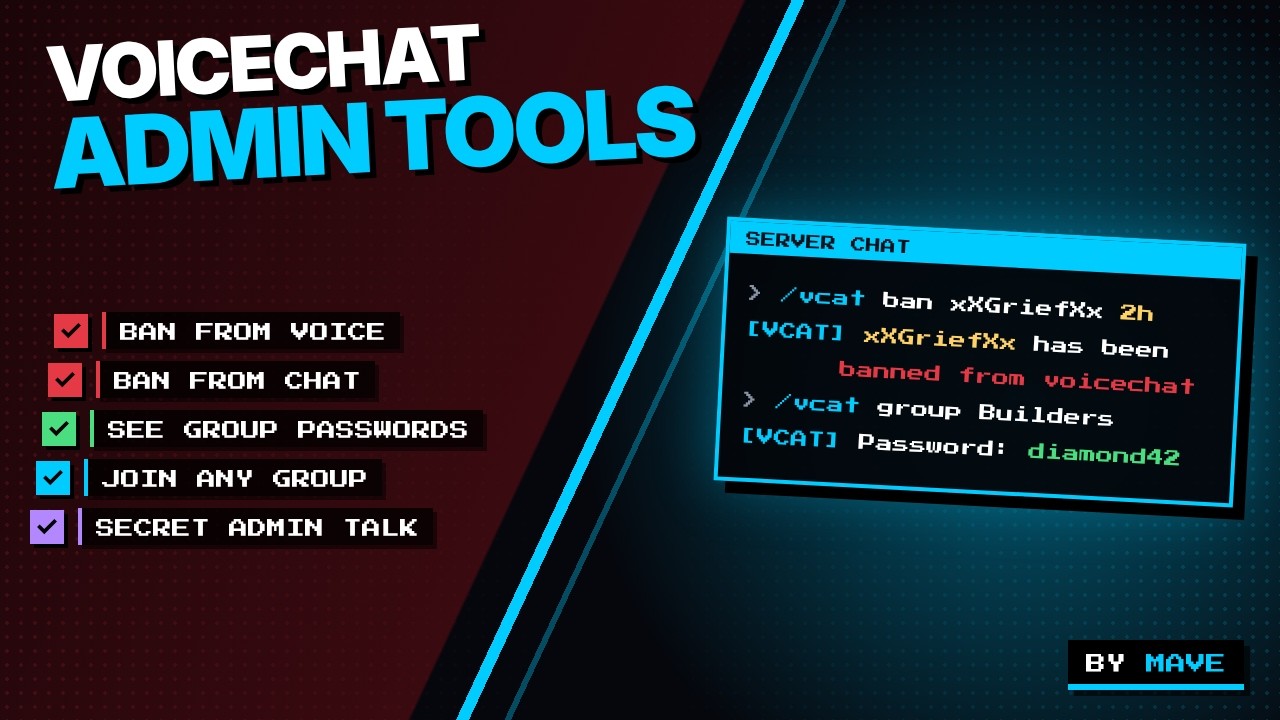
A simple yet powerful admin mod/plugin for Simple Voice Chat that gives you full control over VoiceChat groups, bans and admin communication.
Available for Fabric and Paper.
📥 Downloads
- Paper (1.21.10 / 1.21.11) - this page
- Fabric (1.21.10 / 1.21.11) - [VoiceChatAdminTools (VCAT) Fabric CurseForge] (https://www.curseforge.com/minecraft/mc-mods/voicechatadmintools-vcat)
✨ Features
Complete Group Management:
/vcat list- Lists all VoiceChat groups with members and passwords/vcat group <name>- Shows detailed information about a group including password/vcat join <group>- Join a group (ignores password)/vcat join <group> <player>- Send a player to a specific group/vcat leave- Leave your current group/vcat leave <player>- Remove a player from their group
Group Editing (NEW in 5.2):
/vcat group <name> edit- Opens a clickable edit menu in chat[Set password]- Puts the command into your chat bar, just type the new password[Random password]- Sets a new random password and shows it[Remove password]- Removes the password, the group becomes open[Kick all members]- Removes all members from the group
/vcat group <name> password set <password>- Sets a new group password (max. 32 characters, spaces allowed)/vcat group <name> password reset- Sets a new random 8-character password/vcat group <name> password remove- Removes the group password/vcat group <name> clear- Removes all members from the group (they get notified)- Changes are applied instantly and synced to all players
- Players already in the group stay in it, the new password only applies to new joins (use
clearto reset a group completely) - All changes are logged in the console and shown to other admins
VoiceChat Ban System:
/vcat ban <player> <duration> <reason>- Ban a player from VoiceChat (supports offline players)- Duration formats:
5m,10m,30m,1h,2h,6h,12h,1d,3d,7d,perm(permanent) - Example:
/vcat ban Steve 30m Spamming - Works for online and offline players (player must have joined the server before)
- Banned players cannot speak (microphone is blocked server-side)
- Banned players cannot join VoiceChat groups
- Banned players receive notifications when trying to speak or join groups
- Banned players show
[VCB](VoiceChat Banned) prefix in tablist and chat
- Duration formats:
/vcat unban <player>- Unban a player from VoiceChat (supports offline players)/vcat banlist- List all current VoiceChat and Chat bans with remaining time- Ban data is saved to
bans.jsonand survives server restarts - Automatic cleanup of expired bans
Chat Ban System:
/vcat chatban <player> <duration> <reason>- Ban a player from chat (supports offline players)- Duration formats:
5m,10m,30m,1h,2h,6h,12h,1d,3d,7d,perm(permanent) - Example:
/vcat chatban Steve 30m Spamming - Works for online and offline players (player must have joined the server before)
- Banned players cannot send chat messages
- Banned players receive notifications when trying to send chat messages
- Banned players show
[CB](Chat Banned) prefix in tablist and chat
- Duration formats:
/vcat unchatban <player>- Unban a player from chat (supports offline players)- Chat ban data is saved to
chatbans.jsonand survives server restarts - Automatic cleanup of expired chat bans
Spectalk Mode:
/vcat spectalk toggle- Toggle spectalk mode for private admin communication- Allows vanished admins to talk to each other within a VoiceChat group
- Normal players in the same group cannot hear spectalk-enabled players
- Perfect for admin coordination without other players noticing
- Works great in combination with a vanish mod/plugin
- Only players with spectalk enabled can hear each other
- Requires being in a VoiceChat group to use
F3 Server Info (NEW in 5.2):
- Players can see in the F3 debug screen that the server is running VCAT, e.g.:
"Using VCAT 5.2 by Mave on Paper 1.21.11/26.3" server - Works without any client mod
Optimized Admin Tools:
- Colored and clear chat outputs
- Clickable buttons and hover texts with additional information
- Tab-completion for group names, players and durations
- Password display for all groups
- Automatic member counting
⚠️ Important Notes
Requires Simple Voice Chat: This mod works ONLY with Simple Voice Chat installed. Without VoiceChat, the mod will not function (on Paper the plugin disables itself).
Recommendation: Vanish For the best experience, use VCAT together with a vanish mod/plugin (e.g. Vanish on Fabric). This way you can be invisible to other players in VoiceChat groups and monitor the group unnoticed.
Server-Side Only: VCAT only needs to be installed on the server. Clients don't need it, everything works completely server-side.
🎨 Color Scheme
The mod uses a consistent color scheme for all chat messages:
- Cyan (#00ccff) - Main color for commands, headings and buttons
- White - Highlighted values (names, passwords, durations)
- Gray - Normal text
- Red - Errors and ban notices
📋 Requirements
| Version | Server | Java |
|---|---|---|
voicechatadmintools-1.21.10-fabric |
Fabric 1.21.10 + Fabric API | 21+ |
voicechatadmintools-1.21.11-fabric |
Fabric 1.21.11 + Fabric API | 21+ |
voicechatadmintools-1.21.11-paper |
Paper 1.21.11 | 21+ |
voicechatadmintools-26.3-paper |
Paper 26.3 | 25+ |
- Simple Voice Chat (required) on all versions
Data folder:
- Fabric:
config/VCAT/ - Paper:
plugins/VCAT/(old data fromconfig/VCAT/is migrated automatically)
🔧 Permissions
By default, players with OP level 2 or higher can use the commands. Optionally, the permission node permissions.vcat can also be used.
📝 License
Copyright (c) 2026 by Mave - All rights reserved
VoiceChatAdminTools for PAPER (VCAT) Team