UltimateChestShop Plugin
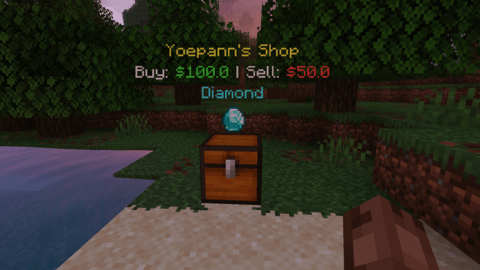
UltimateChestShop is a streamlined player trading plugin that allows users to create efficient, two-way market shops. By utilizing a single chest for both buying and selling, it saves significant space and simplifies the server economy.
Key Features
- Intuitive Trading Mechanics: Players simply Left-Click the chest to buy items from the owner, and Right-Click the same chest to sell items.
- Dynamic Holographic Display: Automatically spawns a spinning, floating item above the shop alongside clean holographic text that clearly displays the buy and sell prices.
- Claim Protection Compatibility: Transactions function perfectly even when the shop is placed inside protected regions managed by plugins like WorldGuard, Towny, or GriefPrevention.
- Accident Prevention & Security: Shop owners must use Shift + Left Click to break their own shops, preventing accidental destruction. All transactions are securely handled via Vault, ensuring owners receive their funds even when offline.
Commands & Permissions
Players can easily create a shop by placing a Chest, holding the item they want to sell in their main hand, looking at the chest, and typing the command below.
Player Commands:
/cs create <buyPrice> <sellPrice> - Creates a two-way shop (Players can buy from you or sell to you).
/cs create <buyPrice> 0 - Creates a Buy-Only shop.
/cs create 0 <sellPrice> - Creates a Sell-Only shop.
/cs help - Opens the help menu in-game. (Aliases: /chestshop or /cshop)
*(Permissions: ultimatechestshop.limit.<number> to set max shops per player, and ultimatechestshop.admin to bypass limits/manage any shop)
Requirements
- Vault (Required for economy integration)
- Any Economy Plugin like EssentialsX (recommend)




