*** Due to unwise and scummy decisions by Curse, my Bukkit Dev account will be inaccessible starting March 1st, 2018. Thus, I can no longer update any of my plugins here on the Bukkit Dev site. Please find the new repo for this plugin at the excellent SpigotMC site: https://www.spigotmc.org/resources/simplereport-tf.53324/ ***
What is it?
SimpleReport is a plugin that provides useful, simple server information in an instant. Minecraft/Bukkit/Spigot has no ingame command for listing info about entities on the server - that problem is what this plugin grew out of. Filling this gap, SimpleReport will provide handy info on the entities, players, and worlds of your server.
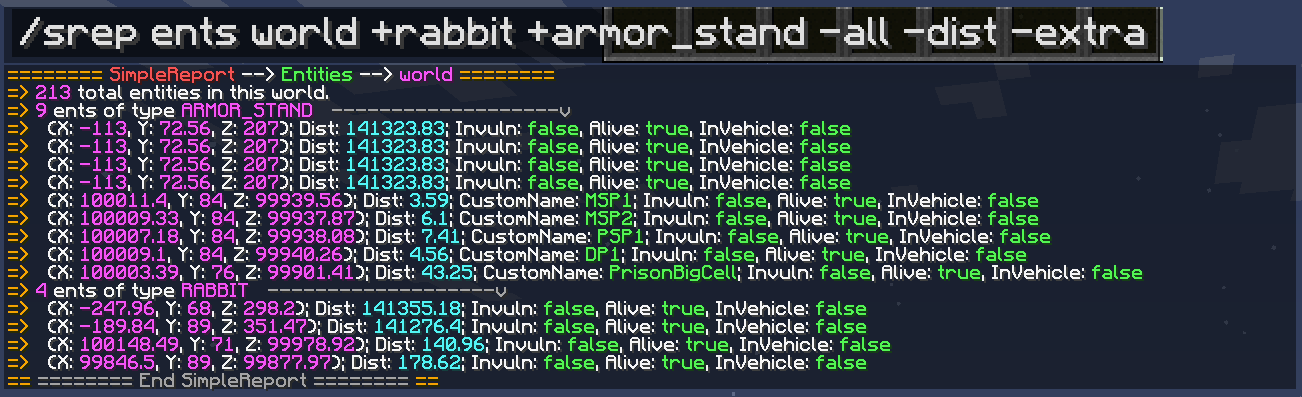
SimpleReport in action:
------------------------
Built for CraftBukkit/Spigot 1.12.X. It should be compatible with all 1.9+ versions.
------------------------
Setup
- Download the JAR to your plugins directory. Self explanatory for GUIs. For those using an Ubuntu/Debian terminal, use "wget jarurl" with the url to the jar file (go to the Files tab) in quotes. If you don't have access to the terminal the host is managing, you can try to use an FTP program to connect via SFTP and upload the jar file.
Configuration
- The only file in the data folder is the standard config.yml
- Config is very basic because it is virtually unneeded. You can use it to enable or disable certain types of information reporting.
Commands/How to Use
| Command |
Description |
Permission |
| /srep <ents|players|worlds> [opt:selector] [opt:flags] |
Outputs the information you requested to your chat or console |
simplereport.srep (default is OP) |
| /srepReload |
Reloads the configuration in memory from the config.yml file |
simplereport.reload (default is OP) |
How to use the /srep command:
There are 3 distinct parts to the /srep command: /srep (1: choice of info) (2: object selector) (3: flags & filters). The (2) and (3) parts are optional, used to narrow down the information reported.
(1) Choice of Info:
SimpleReport can inform you of entities, players, and worlds. Thus, the options here are entities (or ents), players, and worlds.
(2) Object Choice:
Select a more specific target for information. You can select a world or player by name.
(3) Flags & Filters:
Flags add more information to your report and filters limit what is reported so that you can focus in on the data you need. Only the players and ents choices allow flags. Only the ents choice allow filters.
To use a flag, add it to the end of your command with a dash, like so: /srep players -all
To use a filter, add it to the end of your command with a plus, like so: /srep ents world +villager
You can use as many flags and filter in a single command as you want, in any order (it does not matter), but they all must be at the end of the command!
List of flags:
| Flag |
Compatible Selectors |
Purpose |
| -all |
ents, players |
Reports objects individually, instead of as generalized groups. By default (without the -all flag), objects are reported in groups to save chat space. |
| -dist |
ents, players |
Tells how far an object is from you when you execute your command.
|
| -vitals |
ents |
Tells an object's health and maxhealth if it has such properties.
|
| -extra |
ents |
Tells an object's status on: invulnerability, aliveness, and vehicle occupation
|
| -perms |
players |
Tells all the effective permissions a player has. BE VERY CAREFUL WITH THIS AS IT MAY COMPLETELY FILL YOUR CHAT!
|
List of filters:
| Flag |
Compatible Selectors |
Purpose |
| +ENTITY_TYPE |
ents |
When used, your command will only show entities of the specified type. Replace ENTITY_TYPE with the type of entity you wish. You can use this filter multiple times in one command (for a group of entity types). |
Example usages:
- /srep worlds gives a summary of all worlds
- /srep worlds world gives details on the world named "world"
- /srep ents gives a summary of all entities
- /srep ents world gives a summary of entities in the world "world"
- /srep ents world +zombie +skeleton -all -vitals gives information on each individual zombie and skeleton in world "world", including health info
- /srep players world_nether gives a summary of all players in the world "world_nether"
- /srep players -all -dist gives individual details on all players across all worlds, including their distance to the command executor
- /srep ents world +cow +pig +sheep +rabbit +chicken -all -vitals -dist -extra gives individual details on every cow, pig, sheep, rabbit, and chicken, including their health, distance to the command executor, and extra entity properties