


SuperSign image
SuperSign image
Description
SuperSign is informative plugin for player. It facilitates the admins work with long creating signs with server rules and instructions for playing on the server. It is fully configurable, supports color codes and includes the ability to configure the language.
Config
#delay time the use of sign (in seconds)
Cooldown: 1

#Appearance settings signs
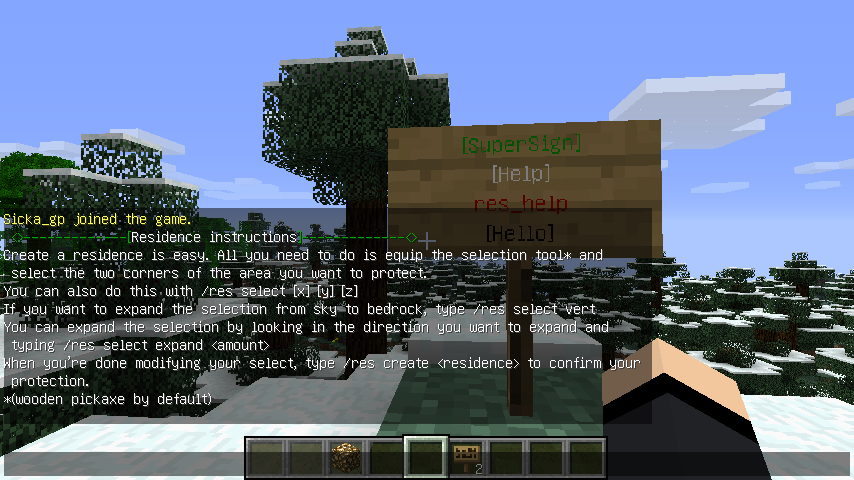
sign_line_0: '&2[SuperSign]'
sign_line_1: '&f[Help]'
sign_line_2: '&0'
sign_line_3: '[Hello]'

#Only the color code
sign_line_2: '&0'
Messages configuracion
#List of instructions for command /instruction
instruction_list:
 - '&2<>-------------[&f SuperSign - List of instructions&2 ]-------------<>'
 - '&2Residence instructions &f- &2/instructions res_help &for &2/inst res_help '

#sign name
res_help:
  #messages
   - ' &2<>-------------[&fResidence instructions&2]-------------<>'
   - 'Create a residence is easy. All you need to do is equip the selection tool* and select the two corners of the area you want to protect.'
   - 'You can also do this with /res select [x] [y] [z] '
   - 'If you want to expand the selection from sky to bedrock, type /res select vert'
   - 'You can expand the selection by looking in the direction you want to expand and typing /res select expand <amount>'
   - 'When you’re done modifying your select, type /res create <residence> to confirm your protection.'
   - '*(wooden pickaxe by default)'
Language
Do you have translated into your language? Please give the download link to the PM. Thanks

Commands
- /sps or /supersign - base command.
- /sps reload - reload configuration.
- /sps set <sign-name> - Easy set sign
- /instruction or /inst - List of instructions
- /instruction <sign-name> or /inst <sign-name> - Prints instruction to chat.
Permissions
- supersign.* - Allow all permission
- supersign.use - Allow use sign
- supersign.create - Allow create and use sign
The SuperSign Team

