💬 Support & Contact
Do you have questions, feedback, or want to report bugs?
Join my Discord and chat directly with the author:
👉 Join Discord server: https://discord.gg/TJgzq9aCxN
✨ What is SoulBurstFX?
SoulburstFX turns every kill into a visual spectacle:
When a player defeats another player or mob, stunning particle effects appear at the exact death location. These effects are fully customizable, unlockable, and stylishly animated — from flames and explosions to flowers and spirals.
🎮 Features
- ✅ Toggle kill effects on/off per player
- ✅ Wide selection of particle effects (flame, explosion, heart, angry villager, …)
- ✅ Style effects like “circle”, “spiral”, “flower”, “helix” and more
- ✅ Unlock & lock system for effects and styles
- ✅ Effects appear precisely at the enemy’s death point
- ✅ JSON-based storage: settings persist across server restarts
- ✅ Simple commands with tab-completion and permission control
🛠 Commands & permissions
- /killeffect on - Enables kill effects (killeffect.use)
- /killeffect off - Disables kill effects (killeffect.use)
- /killeffect effect <name> - Sets the particle effect (killeffect.use)
- /killeffect list [page] - Lists all available effects (killeffect.use)
- /killeffect style <name|on|off> - Configures style effects (killeffect.style.use)
- /killeffect styles - Lists all available styles (killeffect.style.use)
- /killeffect unlock <effect|style> <name|all> - Unlocks effects or styles (killeffect.unlock)
- /killeffect unlock player <player> <effect|style> <name|all> - Unlocks for another player (killeffect.unlock)
- /killeffect lock <effect|style> <name|all> - Locks effects or styles (killeffect.lock)
- /killeffect lock player <player> <effect|style> <name|all> - Locks for another player (killeffect.lock)
- /killeffect reload - Reloads kill effect data from JSON (killeffect.reload)
- /killeffect help - Shows help menu (killeffect.use)
⚙️ Configuration & storage
Java (persistent – permanently stored)
All player settings are automatically stored in plugins/SoulburstFX/soulburstfx_playerdata.json.
Format (JSON structure):
{
"player-uuid": {
"enabled": true/false,
"effectType": "effectname",
"style": "style",
"styleEnabled": true/false,
"unlockedEffects": [
"effectnames/*"
],
"unlockedStyles": [
"styles/*"
]
}
}
The file is loaded at startup and saved when changed/stopped.
📸 Showcase
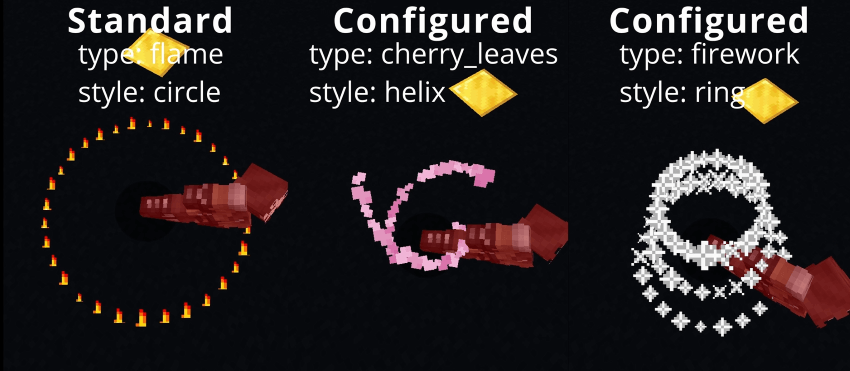
📂 Installation
- Download SoulburstFX-<pluginversion>-<minecraftversion>.jar.
- Place it in your server's plugins folder.
- Restart the server.
📜 Terms of Use – FootstepsFX
✅ You may
- Use SoulburstFX free of charge on private and public servers.
- Modify or extend the code as long as the credits remain intact.
- Include the plugin in server packs if “wolfwriter” is named as the author.
❌ You may not
- Sell SoulburstFX or distribute it for money.
- Pretend to be the author of the plugin.
- Upload manipulated versions as “official.”
⚠️ Disclaimer
- SoulburstFX is provided without warranty.
- Use at your own risk.
- No liability for data loss or server problems.
ℹ️ License
License: GNU General Public License version 3 (GPLv3)


![SoulBurstFX [Paper] logo](https://media.forgecdn.net/avatars/thumbnails/1421/458/64/64/638920961804059414.png)

![DreamSkip [Paper] project image](https://media.forgecdn.net/avatars/thumbnails/1445/319/256/256/638937370449996424.png)
![FootstepsFX [Paper] project image](https://media.forgecdn.net/avatars/thumbnails/1409/624/256/256/638913382647776651.png)
![OreLoot [Paper] project image](https://media.forgecdn.net/avatars/thumbnails/1435/178/256/256/638929943573071900.png)