





Safe, scheduled resource-world regeneration for Spigot and CraftBukkit servers.
ResourceWorldResetter schedules resets, evacuates players, regenerates through the matching world plugin, then verifies the result. Operators get status, history, and an admin GUI. Players get a teleport menu with permissions and reset-phase protection.

Reset automation
- Daily, weekly, monthly, and interval schedules.
- IANA time-zone support.
- Same, fixed, or random seed policies.
- Configurable warning times, safe retries, and completion broadcasts.
- Guarded evacuation, provider regeneration, verification, and history.
Operator tools
- Administration GUI for worlds, schedules, global settings, teleport destinations, and history.
- Transactional /rwr reload that keeps the previous valid configuration on failure.
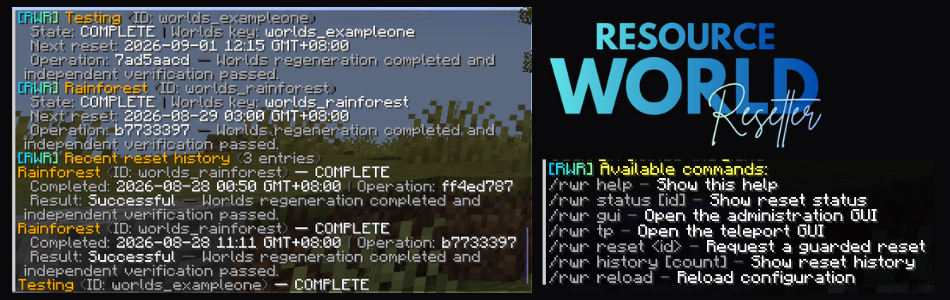
- /rwr status and /rwr history for live and persisted diagnostics.
- Asynchronous release checks that never download or install updates.
Player experience
- Paginated teleport GUI with configurable visibility and permissions.
- Reset-phase blocking for unavailable destinations.
- MiniMessage-based localized messages with English fallback.

This CurseForge listing is the Spigot / CraftBukkit artifact. Install exactly one RWR platform JAR.
| Platform |
Java |
Minecraft |
Required world provider |
| Spigot / CraftBukkit |
21+ |
1.21.4+ |
Multiverse-Core 5.8.0+ |
The Spigot build uses the Bukkit API version 1.21.
Paper, Purpur, and Folia use a separate artifact that requires Java 25+, Minecraft 26.1.2+, and Worlds 4.4.0+. Get that build from Modrinth or Hangar.

- Back up the server and every world that RWR will manage.
- Install Multiverse-Core 5.8.0+ and confirm your resource worlds are registered there.
- Download
RWR-Spigot-5.2.0-beta.1.jar from CurseForge.
- Place the JAR in the server's
plugins/ directory. Remove any Paper/Folia RWR artifact.
- Restart the server. Do not use a hot-reload plugin.
- Configure worlds with
/rwr gui; generated world definitions are stored in managed-worlds.yml.
- Run one supervised
/rwr reset <id> before enabling unattended resets.
Do not install both platform JARs. The shared core and API adapter are bundled. Current builds are pre-release until 5.2.0 is validated for public release.
RWR 5 requires config-version: 5. Version 4 configuration is not migrated automatically. Follow Operations and Migration.
Usage
/rwr gui
/rwr status resource
/rwr reset resource
/rwr history 10
A reset evacuates players, asks Multiverse-Core to regenerate the world, verifies the result, and records the terminal outcome. Ambiguous failures pause automatic resets until an operator reviews the world and configuration.

Data folder: plugins/ResourceWorldResetter/config.yml and managed-worlds.yml
Minimal daily schedule:
worlds:
  resource:
    multiverse-world: resource
    display-name: "Resource World"
    enabled: true
    managed: true
    schedule:
      type: DAILY
      time: "03:00"
    warning-minutes: [30, 10, 5, 1]
    regeneration:
      seed-policy: RANDOM
      keep-world-config: true
      keep-gamerules: true
      keep-world-border: true
    evacuation:
      enabled: true
      destination: world

| Command |
Permission |
Purpose |
/rwr help |
Relevant command nodes |
Show available commands. |
/rwr status [id] |
rwr.status |
Show reset and schedule status. |
/rwr gui |
rwr.admin |
Open the administration GUI. |
/rwr tp |
rwr.tp |
Open the player teleport menu. |
/rwr reset &lt;id&gt; |
rwr.reset |
Start a guarded reset. |
/rwr history [count] |
rwr.history |
Show recent reset history. |
/rwr reload |
rwr.reload |
Reload configuration, locale, and update-checker settings. |
/rwr version |
rwr.admin |
Show installed and latest versions. |
Administrative permissions default to server operators. rwr.tp defaults to all players. rwr.teleport.world.* lets operators bypass destination-specific permissions. Leave a destination permission blank to make it public to anyone with rwr.tp.

- Back up the plugin data folder and managed worlds before upgrading. v4.2.1 and earlier are legacy v4 releases. v5 uses a new configuration (
config-version: 5) and requires a manual migration.
- Bundled locales are
en_US, zh_CN, ja_JP, and ko_KR. Select one with locale in config.yml. Fresh installs extract only locales/en_US.yml by default; other bundled languages are extracted when selected, then restarted or reloaded. Missing keys fall back to bundled English.

RWR uses bStats for anonymous server usage statistics. The Spigot build uses plugin ID 31502. Disable collection globally in plugins/bStats/config.yml by setting enabled: false.
Add-ons and API
Links
ResourceWorldResetter is licensed under the BSD 3-Clause License. Developed and maintained by Lozaine@Tamawish.