Quote from Siguza:
The Future?
Since Spigot is still standing and Sponge is slowly getting somewhere, I'm not exactly sure what to do with my plugins, but I'll stick around.
I think I will port most of my plugins to Sponge, but some (like NBTLib) will hopefully not be necessary anymore.
For now, I've set all my projects to "inactive", except for VirtualPack, which I will keep compatible with Spigot, until I ported it to Sponge. If you really want to see any of my other plugins updated to Spigot, just comment on its project page.
RepairCost
[ Download ] [ Source ]
Items require more XP levels every time you repair or rename them using an anvil.
This plugin allows you to set up a way for players to reset the memory of the item to zero.
How it works
The idea is to build a structure into the world on which you have to right-click in order to reset the repair cost. Also see the "Configuration" section below.
Installation
- Download the Repaircost.jar and put it into your plugins folder.
- Start your server.
- Configure and reload it (if you want).
- Have fun.
Configuration
config.yml
| Node |
Explanation |
| check-update |
Whether or not to check for updates. |
shape.txt
This is where you configure the structure players have to build.
Example:
|
|
 57 |   c5  | 57
 c5 | ac133 | c5
 57 |   c5  | 57
-
|c5:2
c5:2|ca50|c5:2
|c5:2
-
-

|49
|
Using this config, the structure would have to look like this:
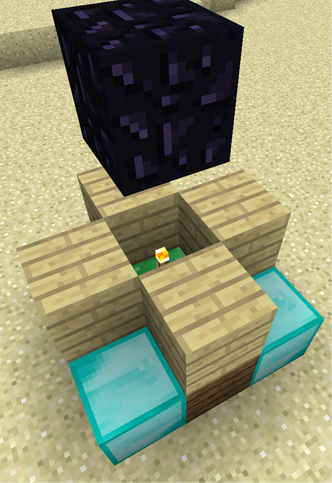
With this as bottom layer:
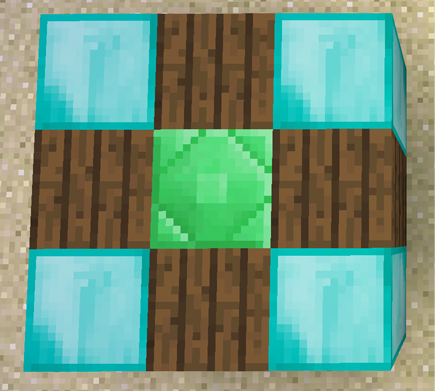
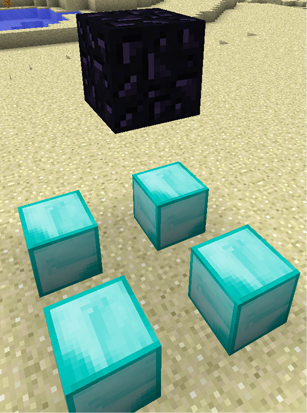
And it would look like this after activation:
Note: The spruce wooden planks could be any kind of planks but the birch ones have to be birch planks.
Now what does what?
- You specify a block using its ID (57 = diamond block, 133 = emerald block, ...)
- You can specify a meta (damage) value by appending a ":" and the value. Otherwise the damage value won't matter.
- Blocks are separated by a "|" (horizontal line), this means the next X coordinate
- Putting a "c" in front of a block definition means it will be consumed if the structure is activated.
- Putting an "a" in front of a block definition means right-clicking it will activate the structure.
- A new line means a new row (the next Z coordinate)
- A line only containing "-" (a minus) means "next layer" (next Y coordinate)
- Leaving "cells" or lines empty means that anything will match there (and won't be consumed).
- Spaces and tabs will be ignored (this means you can use as many as you want)
Commands
| Command |
Explanation |
Required permission |
/rcost
/rcost info |
Tells you at which repair cost level your current item is. |
|
| /rcost help |
Shows a list of commands with a brief explanation. |
|
| /rcost set [level] |
Sets the repair cost level of your current item to [level]. If no level is given, it will be set to 0. |
rcost.cheat |
| /rcost reload |
Reloads RepairCost. |
rcost.admin |
| /rcost update |
Manually check for updates. |
rcost.update |
| /rcost version |
Shows the of RepairCost version. |
Permissions
| Permission |
Required for |
Child nodes |
| rcost.use |
Using the structure |
|
| rcost.cheat |
Command |
|
| rcost.update |
Command |
|
| rcost.admin |
Command |
rcost.use
rcost.cheat
rcost.update |
OPs automatically have rcost.admin by default.