
This is the logo for the RedstoneJukebox Plugin

This is the second text logo for the RedstoneJukebox plugin.
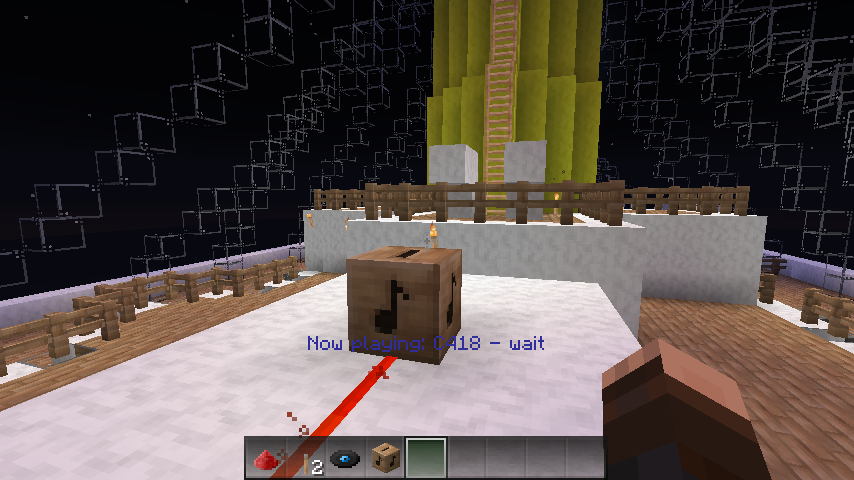
This is a screenshot of the RedstoneJukebox Plugin.

This is the text-version logo for the RedstoneJukebox Plugin.
Description

A plugin to control a Jukebox with Redstone
Welcome to my fourth bukkit project! I had made a custom resource pack for my server and added custom music to it, I thought, this was cool because now I can have my players hear awesome custom jukebox music compared to the normal minecraft music. So then I started adding music to my minigames, but then I ran into a problem. Redstone could not power a jukebox, like if someone entered a room in the minigame. So I ran into Java and I created a simple and low-resource plugin called RedstoneJukebox. RedstoneJukebox is a plugin that lets you control jukeboxs with a redstone circuit. That's it! That's what it does. Now when a player enters a room they step on a pressure plate and then the custom jukebox music begins. There are no permissions and no commands. It's that easy! I might not have been clear on this: it doesn't just power from pressure plates it will work with any type of redstone. Anyways, I hope that you enjoy my fourth minecraft plugin.

Installation
Here is how to install RedstoneJukebox.
- Step 1: Download the latest version of RedstoneJukebox
- Step 2: Drop the RedstoneJukebox.jar into your plugins folder.
- Step 3: Restart your minecraft server or use /reload to reload the plugins.
- Step 4: Create a jukebox and insert a disc add a redstone current to power it.
- Step 5: Your done! Have fun with RedstoneJukebox
Change Log
Version 1.0
- This is the first release of the RedstoneJukebox Plugin.
- Added the feature of jukeboxs to be powered by redstone (lol)
Server List
If anyone would like to do this, please Private Message me and I will add your server to this list.
Current Version
The latest version of this plugin is: Version 1.0.0 for Craftbukkit 1.6.2.
The RedstoneJukebox Team