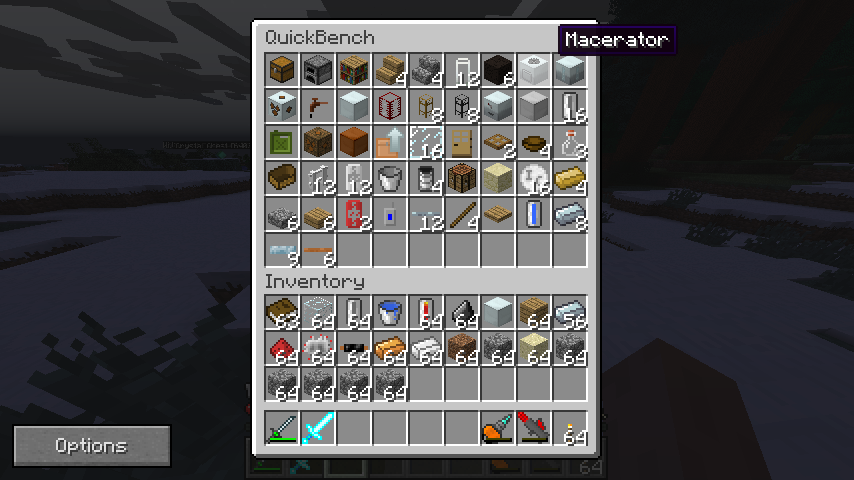
QuickBench does its best to support recipes added by plugins or mods. Most custom recipes should be supported. Like the Crafting Table II mod, QuickBench even includes explicit support for the custom recipe types (AdvRecipe and AdvShapelessRecipe) fr...
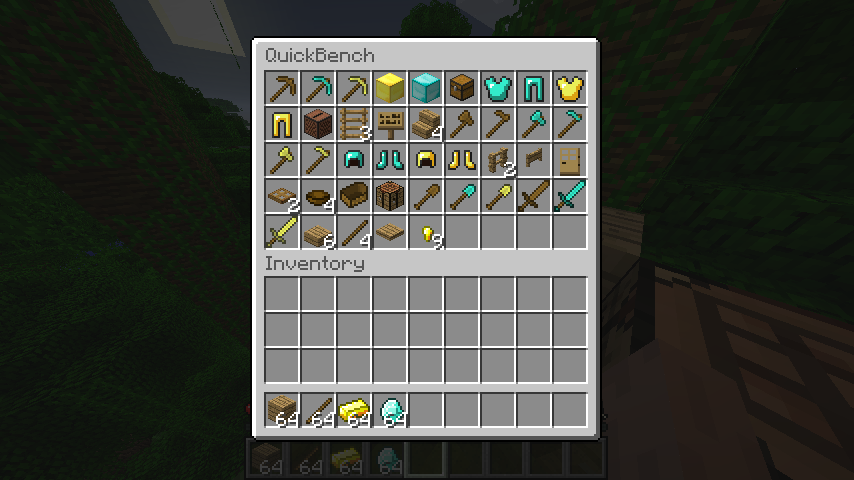
The QuickBench presents you a chest-like window with all the items you can craft from your inventory. Clicking will craft the item for you.
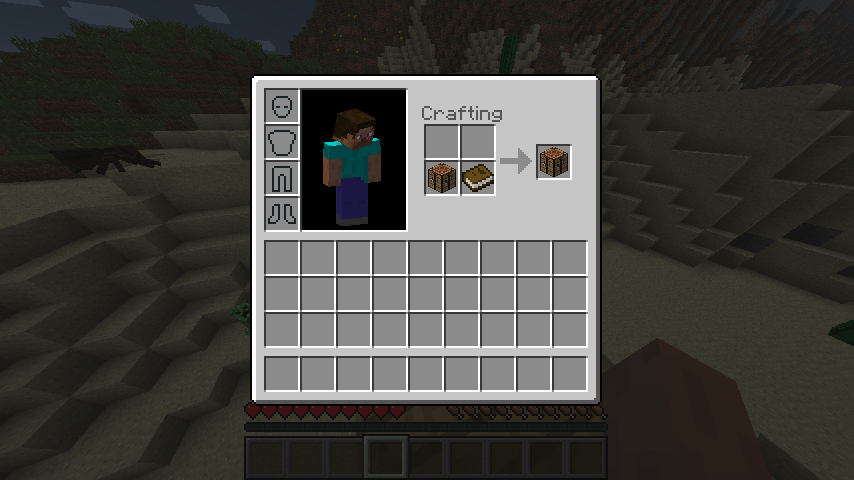
To build a QuickBench, all you have to do is craft a plain old Crafting Table with a Book. The resulting item can be placed in the world (using right-click, just as other blocks) and clicked to open for easily craft items.
Description
Important: this plugin has been developed for Minecraft 1.2.5 and may or may not work with newer versions!
If you are a developer and want to continue and update this plugin, feel free to – full source is available under a permissive license.
If you're a user or an interested developer, please see this post for further information.
QuickBench - crafting without recipes
Tired of remembering crafting recipes? Use a QuickBench! Unlike a normal crafting table which operates on a crafting grid, the QuickBench shows you a list of available items, and you simply click to craft.
Download QuickBench 3.0.4 - released 2012/08/26 for 1.2.5 - compatible with IC2 v1.103, ComputerCraft 1.4.0, and Forge 3.4.9
Features:
- No clients mods required
- Adds a craftable and placeable QuickBench item
- Open the QuickBench to show items which are craftable from your inventory
- Click item to craft
- Shift-click to craft up to a stack
- Eliminates need to remember recipes
- Supports IndustrialCraft^2 recipes
- Supports Forge ore dictionary recipes
- Supports computed recipe outputs
- Supports post-craft recipe hooks
- Works with IC2 electric items (preserves charge)
- Works with RedPower2 drawplate/woolcard (properly takes damage)
- Doesn't lose tagged item data (NBT, added by mods/plugins)
- Permission support
Usage
Create a QuickBench by crafting a Crafting Table + Book.
Right-click to place the QuickBench in the world.
Right-click the QuickBench to open a list of craftable items.
Click the items you want to craft. The crafting inputs will be taken from your inventory and the result will be added.
Repeat as desired.
Configuration
verbose (false): Enable for extra logging for diagnostic purposes.
quickBench.*:
blockId (22): Block ID for QuickBench placed in the world. Default is Lapis Lazuli Block to differentiate from crafting tables. Note that the blockData below must also match; not all Lapis Lazuli Blocks will become QuickBenches.
blockData (1): Data value for block to be identified as a QuickBench, used in conjunction with blockId.
alternateBlockId (0) and alternateBlockData (0): An alternate block ID/metadata to additionally recognize as a QuickBench. This block won't be placed by the item, but will be usable when right-clicked and drop the item when broken. Useful in case you change the block ID and want to preserve your existing QuickBenches. Set ID to 0 (default) to disable.
itemId (58): Item ID for QuickBench when held as an item. Default is Crafting Table.
title (QuickBench): Title for QuickBench inventory windows.
enableCrafting (true): Add crafting recipe, Crafting Table + Book = QuickBench. You can disable this if you want to use a custom crafting recipe added by another plugin or provide some other way to acquire QuickBenches (item is identified by itemId + Fire Aspect I enchantment).
minSizeRows (0): Minimum number of rows to show in QuickBench output inventory window. The default of 0 will cause a blank inventory to be shown if there is nothing to craft. Note that if during crafting additional items become available beyond what can be shown in the window, the player must close and reopen the QuickBench to see them - to mitigate this problem, you can set minSizeRows to a higher value to provide extra room. 6 is equivalent to a large chest.
showOtherRoutes (false): If true, other recipes which craft to the same output (different 'routes' to the same end) will be shown and can be chosen. Otherwise, only the first recipe will be available and used.
craftStack (true): If true, shift-clicking will craft up to a stack of the item. Player must also have quickbench.craftStack permission. Note that crafting a full stack is server-intensive, so you may want to limit it.
maxStackSize (64): Maximum stack size to craft when shift-clicking. This is normally the natural stack size of the item, but can be limited further with this option.
useDeniedMessage, placeDeniedMessage, destroyDeniedMessage: Messages to send to player if attempts to use, place, or destroy a QuickBench without permission (see nodes below). Set to null to not send any message.
Permissions
All permission nodes default to true:
quickbench.use (true): Allows you to use a QuickBench
quickbench.showHidden (true): Allows you to craft secret recipes from IC2
quickbench.craftStack (true): Allows you to craft stacks of items at once
quickbench.place (true): Allows you to place a QuickBench
quickbench.destroy (true): Allows you to destroy a QuickBench
Limitations
If more than 6 inventory rows are shown, the client will display the dividing line between the inventories incorrectly (client bug?). However, the items in the slots can still be picked up as you would expect.
If there are too many craftable items, not all can be shown. Close and reopen the QuickBench or temporarily drop items as a workaround.
Some unusual recipes or those added by mods may not behave as expected; please report any problems. Known:
- RedPower 2 cover recipes are not supported (eloraam.core.CoverRecipe)
- EnderStorage chest recipes are not supported (codechicken.enderstorage.EnderChestRecipe)
- Nuclear Control storage array recipes are not supported (nuclearcontrol.StorageArrayRecipe)
See also
-
Crafting Table III - an updated client/server mod with recursive crafting
-
Crafting Table II - a client/server mod which heavily inspired QuickBench
-
Crafting Plus - a new independently-developed plugin for Bukkit 1.3.1+ inspired by QuickBench
QuickBench Team