Orewartch
- By
4fb12deae8724cc46badc589d6c6747ca2f5510a.png
9ae7630236e7e88b206872189f079bc0553403cb.png
997cd2e93ff5116d141a223dd33ec8e5439f6c3b.png
Description
# OreWatch
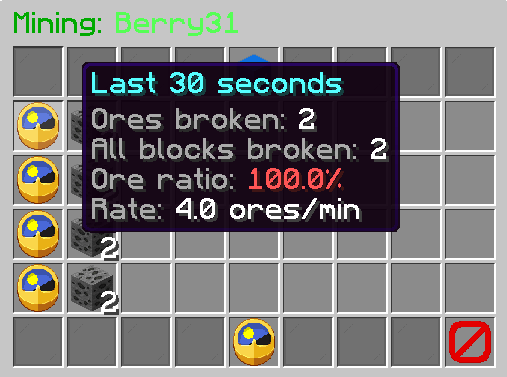
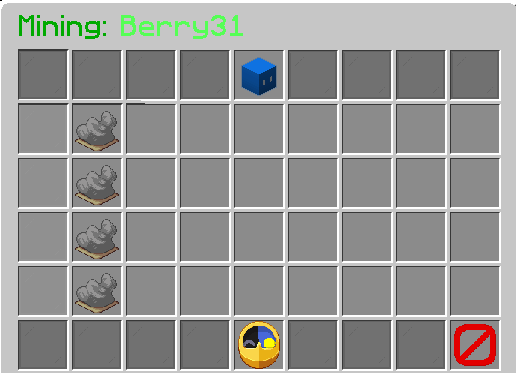
Click a player to see what ores they've mined in the last 30 seconds, 1 minute
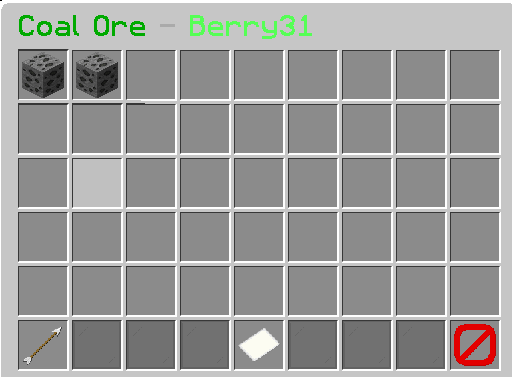
and 5 minutes (changeable in config) with the coordinates of every ore, and click-to-teleport to any of them.
Standalone. No database, no dependencies, no other plugins required.
## Using it
`/orewatch` toggles inspect mode. Then either click a player in melee range (left or right click both work, and the hit is cancelled so you don't actually punch them), or Look at a player up to 30 blocks away and click empty air. A ray trace finds them, so you can check someone you're watching from across a cavern.
`/ores <player>` skips the clicking. It works on players who have already logged
off, as long as their history hasn't aged out, which is exactly when you want
it.
### Commands
`/orewatch` → Toggles inspect mode
`/orewatch rload` → reloads config, including, windows, ore list and teleport settings
`/ores <player>` → Opens the GUI without having to click the player
`/oreback` → Returns you to the location you were at before teleporting to the ore/s
With the commands you can also use `/ow` and `/ob`
### Permissions
`orewatch.use` → Inspect Player and open the GUI
`orewatch.teleport` → Teleport to logged positions
`orewatch.reload` → Reload the config
`orewatch.exempt` → Players with this permission will never be recorded
### Config
These are the default config settings incase you break something refer to this.
```# OreWatch configuration
# Reporting windows shown in the GUI, one row each. Maximum 4.
# Accepts s / m / h, e.g. 30s, 90s, 1m, 5m.
windows:
- 30s
- 1m
- 5m
# How far the look-and-click ray trace reaches, in blocks.
ray-trace-range: 30
# Count every block broken, not just ores. This is what makes the ore-ratio
# figure possible. Turning it off saves a little memory and loses the ratio.
track-all-breaks: true
# Do not record mining by players in creative mode.
ignore-creative: true
# Do not record mining by players with the orewatch.exempt permission.
ignore-exempt-permission: true
# Safety caps on the in-memory log, per player. Entries older than the widest
# window are dropped anyway; these only bound pathological cases.
max-ore-records-per-player: 2000
max-break-records-per-player: 20000
teleport:
enabled: true
# Look upward from the ore position for two clear blocks to stand in,
# rather than dropping you inside stone or lava.
safe-landing: true
max-safe-scan: 10
# Save where you were so /oreback can bring you home.
remember-return-location: true
# Blocks counted as ores. Unknown names are ignored, so the deepslate entries
# are harmless on servers older than 1.17.
ores:
- COAL_ORE
- DEEPSLATE_COAL_ORE
- COPPER_ORE
- DEEPSLATE_COPPER_ORE
- IRON_ORE
- DEEPSLATE_IRON_ORE
- GOLD_ORE
- DEEPSLATE_GOLD_ORE
- NETHER_GOLD_ORE
- REDSTONE_ORE
- DEEPSLATE_REDSTONE_ORE
- LAPIS_ORE
- DEEPSLATE_LAPIS_ORE
- DIAMOND_ORE
- DEEPSLATE_DIAMOND_ORE
- EMERALD_ORE
- DEEPSLATE_EMERALD_ORE
- NETHER_QUARTZ_ORE
- ANCIENT_DEBRIS```
Orewartch Team