Summary
The goal of this plugin is to bring CTF to Minecraft without limiting the players imagination. I do not like reapeating, prebuilt maps and I do not like limiting the players abilities to create their own strategy from everything Minecraft offers. In most plugins an administrator builds a map, sets two bases and you have to fight in there. Open CTF allows you to choose a new game area everytime you play a new game! In addition you can freely choose the position of your base within this area to hide it from your enemies and place smart traps on the path to it.
Procedure
The first player who joins a game is supposed to choose a game area. They can fly around and have to place a block to mark the center of the area. They are not able to modify the world. As soon as the area is set everyone on the server can choose a team and class.
Both teams are supposed to build their bases now by placing the flag - a colored block of wool - wherever they find it suitable. A base is built around the flag and a countdown gets started to mark the end of the building phase. The bases are indestructible.
As soon as the building phase is over both team have to capture the enemy's flag by right clicking on it and carry it back to their own base. If you carry the flag you are not able place or break blocks anymore but you are able to defend yourself by using your weapons.
Currently, the game ends if a restart vote is succesful or a /reset is issued. Vicotry conditions are work in progress.
Classes
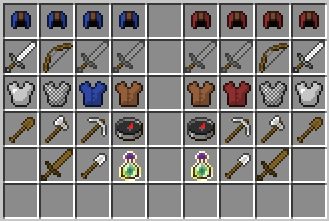
All players are marked with a colored leather helmet. Currently available classes are:
- Fighter
- Iron Sword
- Iron Armor
- Wooden Shovel
- Archer
- Bow with infinite Arrows
- Chain Armor
- Iron Axe
- Wooden Sword
- Pioneer
- Stone Sword
- Colored Leather Armor
- Iron Pickaxe
- Iron Shovel
- Spy
- Stone Sword
- Leather Armor
- Compass that points to enemy base
- Ability to get invisible while sneaking
This is how the team/class selection chest looks like:

Commands
<arg> - necessary argument
[arg] - optional argument
- /all <message> - Send a message to all teams
- /ctf join - Switch from current world to CTF world and participate
- /ctf leave - Restore last location and inventory and leave CTF
- Permission: openctf.ctf (set by default)
- /score - Show a scoreboard
- /team - Change team
- /vote restart - Start a vote for starting a new game
- /vote kick <name> [reason] - Start a vote for kicking a player
- /yes|/no - Vote yes or no
Permissions necessary:
- /config <setting> <value> - Change settings
- /performance - Show computation time; for debugging purposes
- /reset - Start a new game
Install
- Download OpenCTF.jar
- Download PatPeter's SQLibrary
- Put them both into your plugins folder
- Start the server
Special Features
MySQL/SQLite Support
Thanks to PatPeter's SQLibrary v4.2, statistics of the game are saved locally into a SQLite database or optionally into a MySQL database. I am planning to create a simple web interface to show how one could present stats of the games, rankings and much more.
Customizable Structures
Open CTF uses schematic files in mcedit format to make various objects customizable. So if you do not like the bases included, just change them! Create your own bases and export them with WorldEdit as schematic files or do the same in MCEdit. Here is a description of how to customize structures.
Configuration
This plugin has many configurable values such as respawn time, dimension of the game area and other options. We are working on making everything configurable.
Translation
Currently there are only bad phrased english messages in the game. We are working on improving that. Despite that, you can freely change every message that is send through the plugin and translate it in your language for example. All messages use a simple color code you can use.
Beta Stage
At this point, I would like to point out that this plugin is quite complex and has not been tested by a larger amount of players yet. If you would like to test it, please feel free to join us at our server dev.wrenchbox.de:25575 or download the beta version and follow the installation instructions.
Metrics
In order to determine some statistics about popularity of versions and the plugin itself I am using the Metrics plugin. If you do not want your server to be tracked, please turn Metrics off on your server.
From Hidendra:
"As a server owner, you are free to question the service, welcome it, or deny it. All plugins that support Metrics use the same opt-out and as such you may opt out of further data at any time. You may ask myself any question and I will do my best to answer it - I am as open as possible with Plugin Metrics / MCStats and hope this will help you understand what exactly it is.
Opting out of this service can be done by editing plugins/Plugin Metrics/config.yml and changing opt-out to true. If this folder does not exist, you do not have any metrics-enabled plugins installed :)"
Contact Us
If you have any questions or concerns feel free to contact us on IRC or leave a comment below.
- Host: irc.esper.net
- Channel: #wrenchbox
- Webchat