Broadcast after Voting for the Server

Sending Chat Message from my Phone to the Server!

Reward Players for Voting with Money and or Items!

MineTube Logo
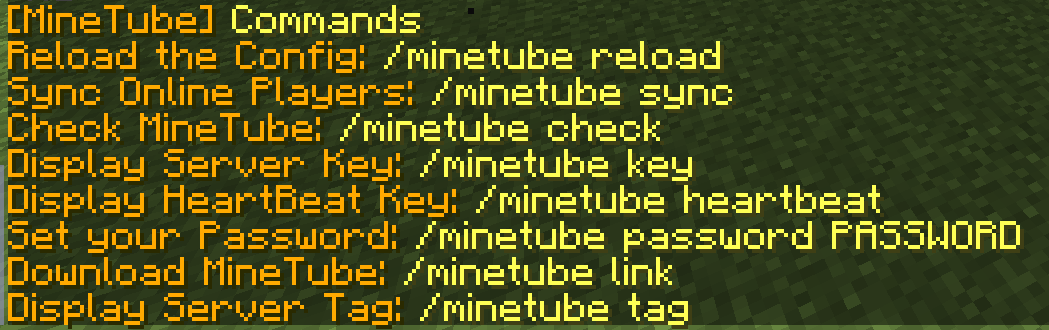
A list of all Commands
Description

Welcome to MineTube for Bukkit!
!!! Problem with Server Keys fixed! You can now request your working Key @ GETSERVERKEY !!!
 |
 |
 |
What is MineTube?
MineTube will collect Informations about your Server to distribute them to MineTube iPhone Clients and Minecraft Server Listing Websites. The MineTube Clients are released on September 20th 2013 for iPhone, iPad and iPod.

MineTube Features:
- Let your Players be part of your Server ANYTIME and ANYWHERE!
- Help Server Listings update your Server Information with more details!
- Show your Server to Millions of Apple App-Store Customers!
- Reward Players for voting on Minecraft Server lists with:
- Money
- Items
- Or run any command. ex: (pex user %s group set voted)
- Let your Players Chat on your Server with MineTube Client Apps
- Let Minecraft Server Lists pass Votes to your Server
- Monitor your Server from anywhere
- Share your Chatlog with the World or keep it only for you
- Kick/Ban hackers and Spammers even if you're not on your PC
- Run Tasks from your iPhone on your Minecraft Server
- Share your Server Screenshots with everyone using a MineTube Client
- Show your Server Chat on your Website!
- and more

Useful Links:
- User Commands
- MineTube API for Server Listing Websites
- Plugin Configuration
- Permissions
- DOWNLOAD MINETUBE APP @ APP-STORE
- MineTube Website
- App-Store Apps Rules
How do i install MineTube?
- Download the last MineTube.jar from Bukkit Dev
- Visit www.bukkit-minetube.com and register your Server, this will take 30 seconds
- Reload your Server with /reload
- Edit the config.yml located in /plugins/MineTube/
- Enter the Command /minetube reload, to reload the configuration
- Give your Users the Permission: minetube.user
- Give your Administrators the Permission: minetube.admin
- To check if MineTube is running and working, enter the Command /minetube check
- Sync MineTube for the first time with /minetube sync
- Make also sure you edit your Server Data, Admins, Title, Description at: EDITSERVER
Does someone connect to my Minecraft Server?
No, nobody will connect to your Server, your Server will be linked to the MineTube Service and every request will be send and handled by the MineTube Servers. MineTube will not use much Bandwith or Server load.
The MineTube Team