MinecraftTrainSimulator
- By
Drive minecarts like you drive trains in MicrosoftTrainSimulator, TrainZ or Railworks.
The new logo.
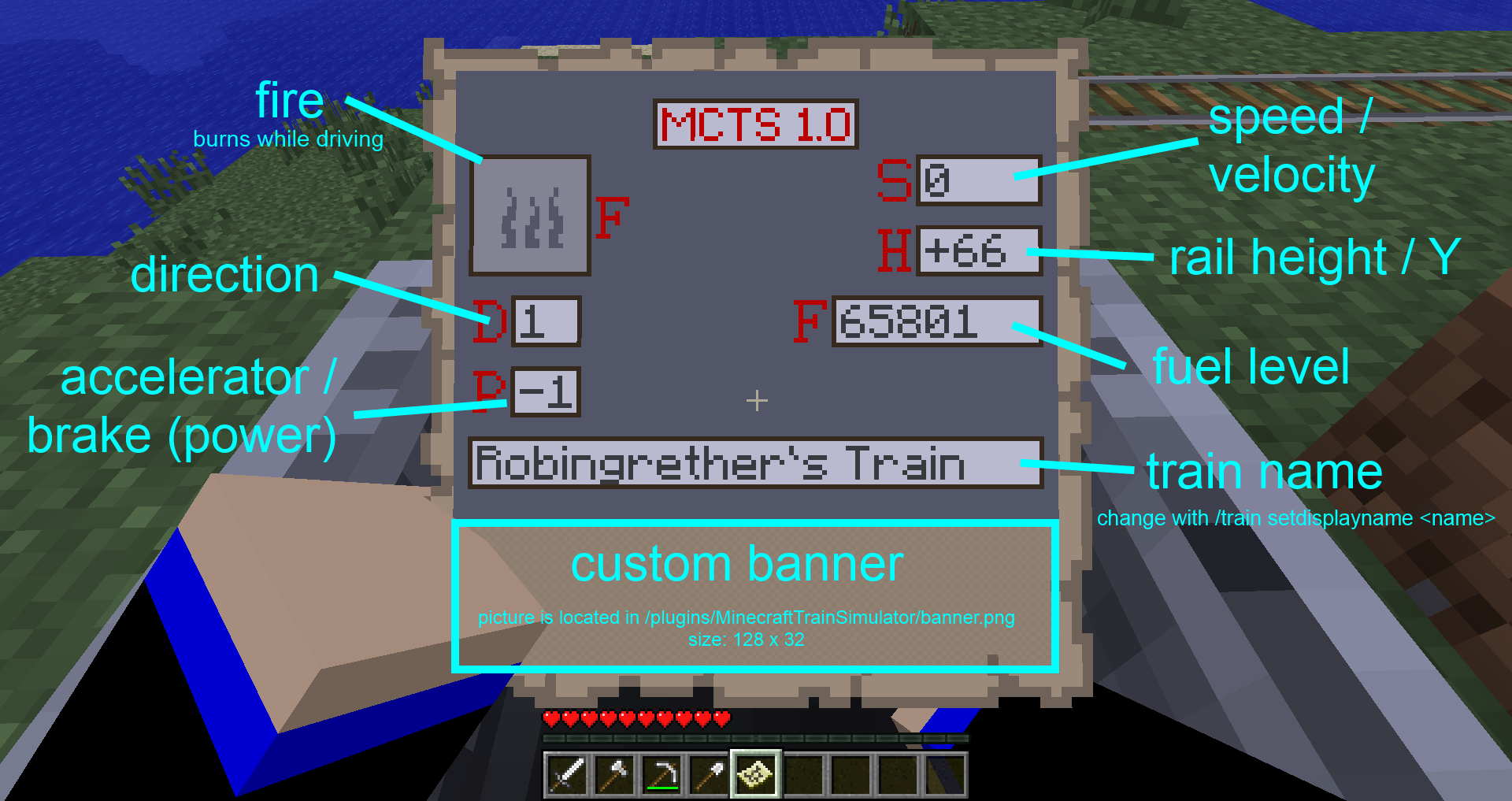
The status panel map
Description
MinecraftTrainSimulator
Have you ever played a game like Microsoft Train Simulator, Trainz or Railworks? You liked it and want to drive trains in Minecraft like in those simulators? Then this is for you.
Finally, after almost two years, a new update is released!
Commands
Quick Start Guide
| Command | Description | Permission - MCTS.* |
|---|---|---|
| /mcts create <coal/electric> | Create a train (steam or electric) | MCTS.control |
| /mcts control | Control a train | MCTS.control |
| /mcts addfuel | Add fuel to a train | MCTS.control |
| /mcts fuel | See a train's fuel level | MCTS.control |
| /substation create <name> <voltage> | Create a substation for electric trains | MCTS.substation |
| /substation list | Lists all existing substations | MCTS.substation |
| /substation remove <name> | Remove an existing substation | MCTS.substation |
| /df | Direction forward | MCTS.direction |
| /dn | Direction neutral | MCTS.direction |
| /db | Direction backward | MCTS.direction |
| /p4 /p3 /p2 /p1 | Accelerate | MCTS.accelerate |
| /neutral | Set the accelerator neutral | MCTS.accelerate |
| /b1 /b2 /b3 /b4 | Brake | MCTS.accelerate |
Installation
- Install BKCommonLib and TrainCarts
- Install MinecraftTrainSimulator
- Have fun
Special Features
This plugin includes an update checker, which automatically checks whether an update is available every time you restart/reload your server. This feature is enabled by default and can be disabled by changing updates.check to false in the config.yml. (update/version informations come from curse.com which provides a secure API for this)
This plugin also includes an auto-update function, which automatically downloads every update available. This feature is disabled by default and can be enabled by changing updates.download to true in the config.yml. Of course, this feature only works if updates.check is enabled as well. (updates are downloaded directly from bukkit.org so you are safe from malicious content)
This plugin integrates bStats Metrics to collect and evaluate some statistics. Visit the Plugin Metrics page to find more information about what stats are collected from your server, where they are sent to and how you can disable this if you don't want it.
%2526business%253ddonation%2540robingrether.de%2526bn%253dPP-DonationsBF%253abtn_donateCC_LG.gif%253aNonHosted%2526lc%253dUS%2526item_name%253dRobinGrether%2b(author%2bfrom%2bBukkit.org)%2526cmd%253d_donations%2526rm%253d1%2526no_shipping%253d1%2526currency_code%253dUSD)
The MinecraftTrainSimulator Team


Owner