LockClock
- By
Displays Minecraft time in a scoreboard and allows players to lock blocks for a set amount of time.
LockClock
Description
Displays Minecraft time in a scoreboard and allows players to lock blocks for a set amount of time. This can be useful for example, on an RPG server where you can lock doors on shops at night and have the doors be accessible during the day.
Created in response to this plugin-request: Digital clock and locks
The scoreboard clock
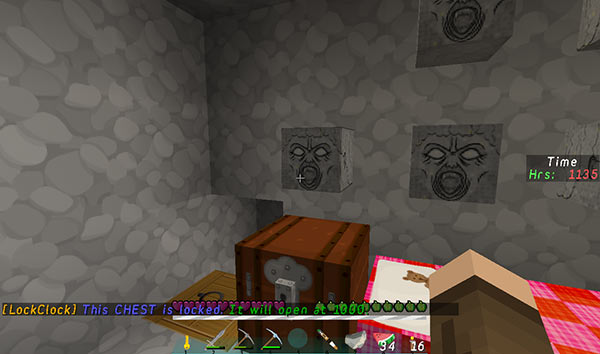
The scoreboard clock is displayed in the sidebar and shows Minecraft time in a quasi-military format, i.e. 24-hour time (without leading zeroes). The clock can been hidden/shown with a command (see Commands below).
Players with the permission lockclock.clock get the clock automatically at login.
Commands
There are four in-game commands:
| Player Command | Description | Usage | Alias(es) |
|---|---|---|---|
lock [from_time] [to_time] |
Lock a door, chest, furnace etc for a specified time. | lock 10:30pm 6:00am or in server ticks lock 16500 0, then click a block |
timelock, lockclock, lockblock |
lockmsg [message] |
Add a message to a time locked block. | lockmsg No! Go away., then click locked block |
lockmessage, timemessage, timemsg |
unlock |
Remove a time lock from a block. | unlock, then click locked block |
- |
clock |
Toggles the clock scoreboard on and off. | clock |
- |
Two commands are also available to use from the console:
| Console Command | Description |
|---|---|
lock |
Toggle the lock_for_owner config option between true and false. |
lockmsg [message] |
Set the default_message in the config. |
Permissions
lockclock.lock - Allow players to add/remove time locks.
lockclock.message - Allow players to add time lock messages.
lockclock.clock - Allow players to have a clock scoreboard.
Configuration
The default configuration is shown below:
lockables:
- CHEST
- TRAPPED_CHEST
- ENDER_CHEST
- ANVIL
- BEACON
- BREWING_STAND
- DISPENSER
- DROPPER
- ENCHANTMENT_TABLE
- FURNACE
- HOPPER
- IRON_DOOR_BLOCK
- TRAP_DOOR
- WOODEN_DOOR
plugin_name: LockClock
default_message: '&9This %s is locked. &2It will open at %s.'
lock_for_owner: false
lockables
The lockables list allows you to configure which blocks can be locked in-game. Only blocks appearing here will be lockable. Check https://hub.spigotmc.org/stash/projects/SPIGOT/repos/bukkit/browse/src/main/java/org/bukkit/Material.java for valid lockable names.
plugin_name
You can change the string that appears before the plugin's in-game messages. It defaults to the plugin name, but you could for example, change it to TimeLock.
default_message
This is the message that is used, if a custom message is NOT specified for the locked block. In-game the message looks like:
[LockClock] This CHEST is locked. It will open at 2130.
It supports colour codes in the form of &1 etc. It has two place holders (%s) that are formatted when the message is sent:
- the first will receive the locked block type e.g. CHEST
- the second will receive the time the block will be unlocked
lock_for_owner
This setting determines whether the time lock applies to all players (true) or all players except the lock owner (false).
Source code
https://github.com/eccentricdevotion/LockClock
Dev builds
Development builds of this project can be acquired at the provided continuous integration server. These builds have not been approved by the BukkitDev staff. Use them at your own risk.
The LockClock Team


Owner