
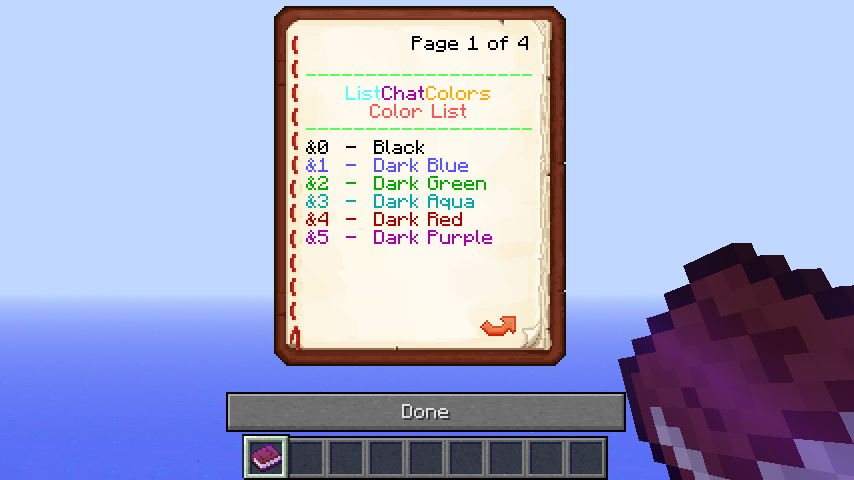
This shows what the ListChatColors Book looks like!
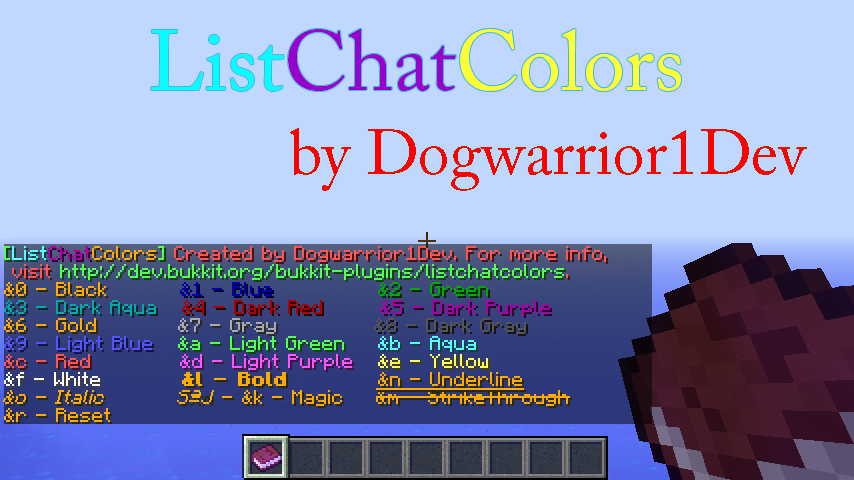
This is the new look of ListChatColors.
Description


WOW guys, thanks for 4000+ downloads!
Ever get tired of constantly switching back and forth between a color codes page in your browser and Minecraft? If so, then this plugin is perfect for you! ListChatColors makes it so that whenever you say /listchatcolors or /lcc, it will send you a message with all the color codes right there in front of you! Also, if you would rather have a book, now you can get a book with all the chat colors in it to carry around with you when you say /listchatcolorsbook or /lccb! Or, if you like signs better, you can now create a ListChatColors sign by setting the first line as [lcc]! To use your created sign, just right click on it! ListChatColors is a simple, lightweight plugin that is very useful to have!
Need help using ListChatColors? Want ListChatColors to be explained more in-depth? Click Here!
Commands

Currently, the commands are:
- /listchatcolors
- /lcc
- /listchatcolorsbook
- /lccb
Installation

Simply drag and drop into your \plugins directory and reload or restart your server and you're good to go!
Permissions

So far, there are 6 permissions:
- listchatcolors.*
- listchatcolors.listcolors
- listchatcolors.getbook
- listchatcolors.searchcolors
- listchatcolors.createsign
- listchatcolors.usesign
Configuration

Currently, this plugin has no configuration because I feel there is no need for one at this time.
Changelog

NOTE: This section only shows the 5 most recent updates! For more, go to the in-depth changelog!
- V1.3.2 - Recoded ListChatColors! Added more searchable colors as well, now what you can search is: &0,&1, &2, &3, &4, &5, &6, &7, &8, &9, &a, &b, &c, &d, &e, black, blue, green, dark_aqua, dark_red, dark_purple, gold, gray, dark_gray, light_blue, light_green, aqua, red, light_purple, and yellow.
- V1.3.3 - Finished adding the rest of the colors that can be searched! You can now search all colors in minecraft by using /listchatcolors <color code / color name> or /lcc <color code / color name>
- V1.4 - Added a new ListChatColors Sign! All you have to do is put down a sign, then on the first line put [lcc], and then you can right click on the sign to see all the colors! New permissions with this update are listchatcolors.createsign and listchatcolors.usesign.
- V1.5 - Added PluginMetrics
- V1.6 - Added a cool new noise whenever you use the main ListChatColors commands! A config is coming soon with the option to change these sounds or turn them off!
To view a more detailed changelog with all updates, click here!
Future Plans

- If enough people request it, then I will work on adding the functionability for the plugin to actually have people talk in colored chat with the "&" symbol in front of text. So, if you want me to add it, then feel free to ask away!
Ability to be able to say /listchatcolorsbook or /lccb and get a book with all the color codes that you can carry around with you!Added in v1.1!- Automatic update searching!
Sign support!Added in v1.4!Neater Layout!Added in v1.2!- Support for British and American speakers!
Searchable colors/color codes!Added in v1.3!Sounds whenever you use commandsAdded in v1.6!- Also, if you want to see anything else added to this plugin, just write a comment or PM me! :D
Pictures/Videos


To see a video done by EpicTimoZz, Click Here! The only thing that he does not mention in his video is that you can search colors by using /lcc <color code / color name> Example: /lcc &c or /lcc red
Goals

500 downloads1000 downloads2000 downloads3000 downloads4000 downloads- SPECIAL UPDATE COMING AT 5000 DOWNLOADS!
Additional Notes

- I had to make the part of the message that says &0 - Black in gold color because black was not noticable enough. Hope it doesn't mess you up too much!
- In the ListChatColors Book, I had to make &e - Yellow and &f - White in Black color because they were too bright to see against the white backround of books. Once again, hope it doesn't mess you up too much!
- I want to know your feedback! If possible, please respond to some polls that I have created so that I know what to do with the plugin in the future! Thanks in advance!
- IMPORTANT: This plugin includes the PluginMetrics Feature. To opt out, go in the PluginMetrics folder in your \plugins folder, open up the config, and set opt-out to true. However, before you disable it know that it does not collect any information that is harmful to you. ;)
BukkitColors
Like my work? Donation link coming soon!
ListChatColors Team

