


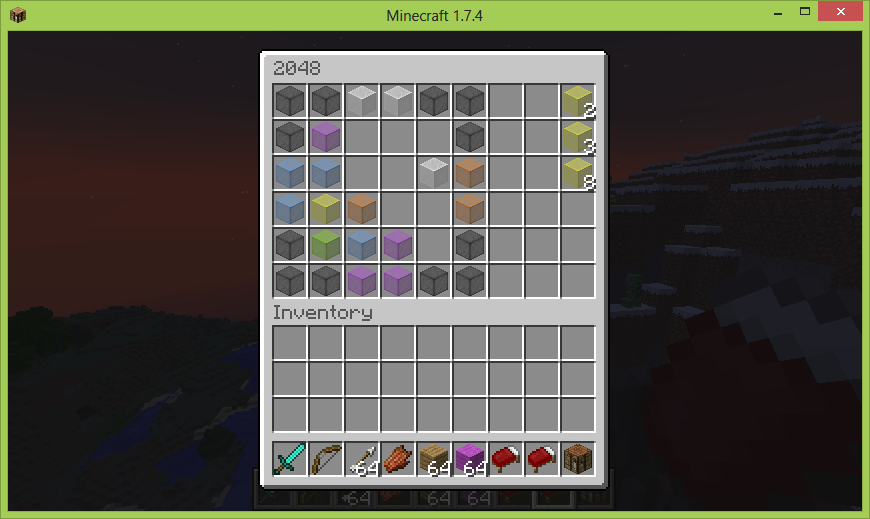
A fun image showing the new config options

Gameplay Image On the left hand side of the inventory is the play field. The arrows (hopper, carrot, flint, arrow on the borders) can be used to push the wool items to the different sides of the inventory. On the right hand side of the inventory is t...

Gameplay Image On the left hand side of the inventory is the play field. The arrows (hopper, carrot, flint, arrow on the borders) can be used to push the wool items to the different sides of the inventory. On the right hand side of the inventory is t...

Logo
Description
2048
2048 game playable in minecraft
Current Gameplay Image

Gameplay
On the left hand side of the inventory is the play field. The arrows (hopper, carrot, flint, arrow on the borders) can be used to push the wool items to the different sides of the inventory.
On the right hand side of the inventory is the score display. The current score on the image is 2326. (Eggs are used to represent 0s)
Wukkit made a great plugin review: https:www.youtube.com/watch?v=4ESJ88eQJR0
Commands
- Play game using /2048
- Start new game using /2048 new
- Show highscores using /2048 stats
Permissions
There's a single permission at the moment, which is needed to execute all of the commands above: thejp.2048.play
Configuration
misc:
  #Defines, how many entries are shown in the highscore print (/2048 stats)
  stats-max-count: 10
  #Defines the game-mode, which is used to play (2048=>Original Game, 64=>Adapted)
  game-mode: 2048

storage:
  #This path is used to store the game and highscore data
  path: plugins/JP2048/
  #The filename of the highscore file
  highscore-file: highscore.csv

#This section defines command names
#(DONT CHANGE THEM, unless you know exactly what you do!)
cmd:
  #Main Commands
  play: 2048
  #Sub Commands to play
  new: new
  stats: stats

#In the following section defines the translations in different languages
#Feel free to change the values or add new languages
lang:
  #Currently selected language
  lang: enUs
  deCh:
    cant-play-on-console: 2048 kann momentan nicht auf der Serverkonsole gespielt werden
    game-title: 2048
    game-over: Game Over. Verwende "/2048 new" um ein neues Spiel zu starten.
    new-highscore: <player> hat einen neuen Highscore in 2048 erreicht. Highscores mit "/2048 stats" anzeigen.

    #hs = highscore
    hs: Rangliste
    hs-rank: Rang
    hs-score: Punkte
    hs-name: Name

    #tooltip messages (hover over)
    display-up: Auf
    display-right: Rechts
    display-down: Ab
    display-left: Links
  enUs:
    cant-play-on-console: 2048 can't be played on the server console
    game-title: 2048
    game-over: Game Over. Use "/2048 new" to start a new game.
    new-highscore: <player> has reached a new highscore in 2048. See highscores using "/2048 stats".

    #hs = highscore
    hs: Highscore
    hs-rank: Rank
    hs-score: Score
    hs-name: Name

    #tooltip messages (hover over)
    display-up: Up
    display-right: Right
    display-down: Down
    display-left: Left

#This section allows to change displayed inventory items
#If no custom materials are specified here, defaults will be used
display:
  #Custom border material
  border-material: stained_glass
  border-metadata: 15
  #Custom score materials
  score-material: #default: stick
  score-metadata:
  zero-material: #default: egg
  zero-metadata:
  #Custom arrow materials
  arrow:
    up-material:
    up-metadata:
    right-material:
    right-metadata:
    down-material:
    down-metadata:
    left-material:
    left-metadata:
  #Custom tile materials
  tile:
    2-material:
    2-metadata:
    4-material:
    4-metadata:
    8-material:
    8-metadata:
    16-material:
    16-metadata:
    32-material:
    32-metadata:
    64-material:
    64-metadata:
    128-material:
    128-metadata:
    256-material:
    256-metadata:
    512-material:
    512-metadata:
    1024-material:
    1024-metadata:
    2048-material:
    2048-metadata:
    4096-material:
    4096-metadata:
2048 Team
