


GemShop
- By
e93f59a2-ada1-456f-b008-58b38ae85b20.png
Description
GemShop is a lightweight and easy-to-use shop plugin for Minecraft servers. It removes the need for complicated sign formats or annoying commands. Players can create and manage shops using only a chest and a renamed diamond.
This guide explains how to use the GemShop plugin on your server. It is designed to be simple so that any player can set up a shop in seconds.
1. How to Create a Shop
You do not need to type any commands to start a shop. You only need a chest, an anvil, and some diamonds.
Step 1: Place a Chest or Barrel where you want your shop to be.
Step 2: Put a Diamond into an Anvil.
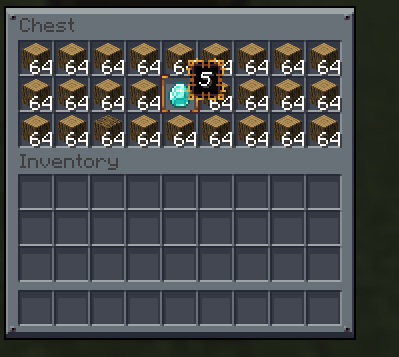
Step 3: Rename the diamond to a number (for example: 5). This number is the price players will pay in diamonds.
Step 4: Put that renamed diamond into your chest. The plugin now knows this is your shop.
Step 5: Fill the rest of the chest with the items you want to sell.
2. How to Buy Items
If you are a customer looking at someone else's shop, follow these steps:
Step 1: Open the chest or barrel.
Step 2: Look at the "Price Tag" diamond to see how much each item costs.
Step 3: Make sure you have enough regular diamonds in your own inventory.
Step 4: Left-click the item you want to buy.
Step 5: The diamonds will leave your inventory, and you will get the item.
3. Managing Your Shop
If you are the owner of the shop:
Collecting Money: When someone buys an item, the diamonds they paid for will appear in the chest in the exact spot where the item was. You can pick them up whenever you want.
Changing Prices: If you want to change the price, take the "Price Tag" diamond out, rename it to a new number in an anvil, and put it back.
Adding Stock: Just drop more items into the chest.
4. Safety and Protection
The plugin protects your shop automatically so people cannot steal from you.
Anti-Stealing: Customers cannot take your "Price Tag" diamond or the diamonds that people have already paid you. They can only click items to buy them.
Explosion Proof: TNT, Creepers, and Fireballs will not break your shop chests.
Breaking the Shop: Only you (the owner) or a server Admin can break your shop chest. If a stranger tries to break it, nothing will happen.
5. Commands
If you get stuck, you can use these simple commands:
/gs help – Shows these instructions in the game chat.
/gs reload – (For Admins only) Restarts the plugin settings if changes were made to the config file.
GemShop Team
