A GUI for creating a recipe with some content.
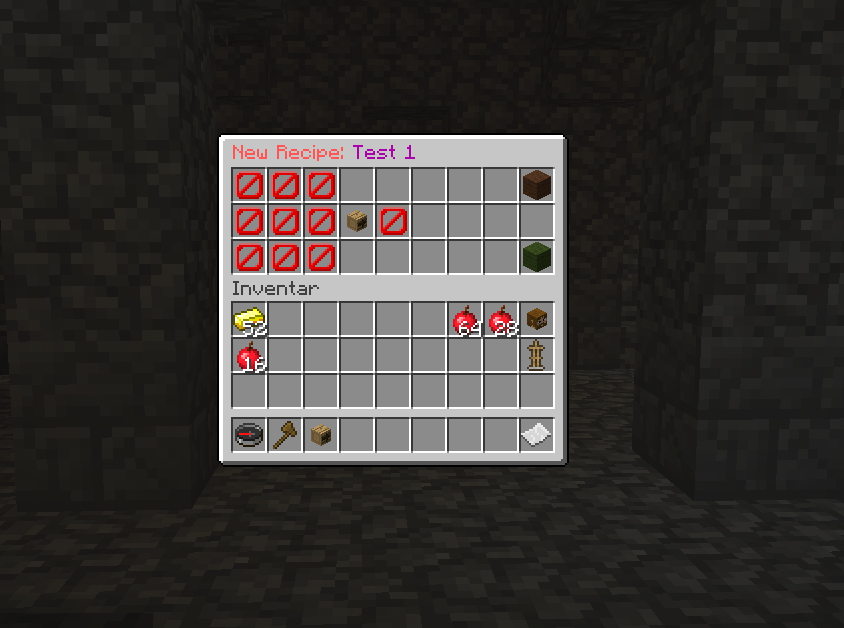
An empty GUI for creating a recipe.

Here an example how an Apple Sword looks (example from the page).
Description
What is it?
This plugin is light-weight plugin for creating new Recipes.
It can create Crafting-Recipes using name, lore and enchants of an Item.
It's tested and created for Bukkit 1.8.8
THIS PLUGIN NEEDS JAVA 8!
Configuration:
The Configuration is pretty simple. You can declare your Items in a seperate yml file.
This file has to be in the folder: 'plugins/ExtendedRecipes/recipes'.
In such a file you can create as many recipes as you like.
You can also make as many yml files in this folder (including subfolder).
To the configuration of a recipe:
A recipe consists of many parts:
- result (Item you get at the end)
- needed items (the items you need for crafting)
- shaped (if the recipe is shaped)
- commands (to execute after created)
- money (to pull of the player when crafting)
- permission (to check when crafting)
Here a small demo, what can be done:
recipe1:
  name: 'TestRecipe42'
  shaped: true
  permission: 'craft.applesword'
  money: 10
  commands:
  - 'broadcast @p has a applesword'
  needs:
    0:
      type: APPLE
      damage: 0
      amount: 3
      name: '&aApple'
      lore:
      - '&cMade by Apple'
    4:
      type: APPLE
      damage: 0
      amount: 3
      name: '&aApple'
      lore:
      - '&cMade by Apple'
    8:
      type: WOOD
      damage: 0
      amount: 3
  result:
    type: STONE_SWORD
    damage: 0
    name: '&aApple Sword'
    lore:
    - '&aThink different'
    enchants:
    - 'DAMAGE_ALL:3'

See the screenshot for the example.
To the content:
A recipe always needs (not optional!):
- name
- result
- items for building
As seen in the Example above, the root name is not relevant.
recipe1:
  ....
This can be anything.
The next part is the needs.
Here are the parts that are needed for the recipe.
It is important to know if you are doing a shaped recipe or a shapeless recipe.
If you are doing a shapeless recipe, the names for the items are not important (here item1, item2, ...).
Example:
recipe1:
  needs:
    item1:
      ...
    item2:
      ...
If you are doing a shaped recipe, the name of the items is important. They have to be 0,1,2,...,8. They stand for the place in the crafting matrix.
Crafting-Matrix:
0 1 2
3 4 5
6 7 8
Here is an example (look also at the example at the start):
recipe1:
  needs:
    0:
      ...
    2:
      ...
    4:
      ...
    6:
      ...
    8:
      ...
The above would make a cross. (... are item definations. See below).
Item definitions:
Items are defined as following (no matter if needs or result):
....
  item:
    type: APPLE  #The type of the Item. Can be the names (see below) or the itemID
    damage: 0      #The damage value of the item. For damagable items (swords, armor, ...) please use -1
    amount: 1       #The amout of the item needed / given away.
    name: '&aApple' #The name of the item.
    lore:                  #The lore of the Item that is used / needed
    - '&cMade by Apple'  #A line of the Lore
    enchants:             #The enchants needed
    - 'DAMAGE_ALL:4' #The enchants. Consistent of name:level. For enchantment name (see below).
Item names can be found here: item names.
Enchantments can be found here: enchantment names
The next category is the result.
The result is the item shown in the Crafting table.
Example:
recipe1:
  result:
    type: APPLE
    amount: 2
    ..... (see item declaration above)
There are furthor parameters to set.
- shaped: if the recipe is a shaped recipe
- name: the name of the recipe
- permission: the permission needed for the recipe
- commands: commands executed when creating item.
To the parts:
recipe1:
  name: 'Fancy Recipe'   #The name of the recipe. NEEDED!
  shaped: true                #If the recipe is a shaped recipe. (default: false)
  permission: 'craft.something' #The permission needed for crafting. If none present, no permission is needed.
  commands:                                #The commands to execute
  - 'tell @p You got a fancy sword!'  #a command. @p is replaced by the playername
  needs:
    ....
  result:
    ...
That's most of the stuff you need to keep this going.
Have fun!
Create Recipe by GUI
I created a small GUI for creating recipes in game.
A recipe can be created with /createrecipe <recipename>.
Then you have the GUI:

There you can put items in the left 3x3 matrix for ingredients.
You have to set a result on the right side of the PlayerHead (arrow), the barrier.
The wool block in the upper right corner tells if the recipe should be a shaped or a shapeless recipe.
When you added all your stuff, you can create the recipe by clicking on the bottom right green wool.
This will also create a file in the plugin data folder (plugins/ExtendedRecipes/recipes/ByPlugin/<RecipeName>.yml).
For an example of how a recipe looks, check out the Image section.
THIS PLUGIN NEEDS JAVA 8!
FAQ
F: I get an Error: Unsupported major.minor version 52.0 (or any other version).
A: Update to java 8!
F: The Gui does not show up correctly?
A: Use Bukkit 1.8.8+.
ExtendedRecipes Team