


EssentialPads
- By
Have you ever wanted interactive blocks in your server? This is the solution!
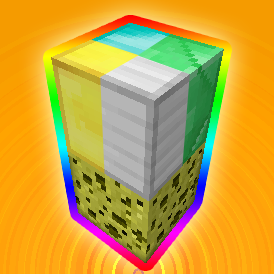
An example of how to use the plugin.
Description

Have you ever wanted to create hospitals to heal players? Have you ever wanted to create undergrounds without need of minecarts? And what about your own teleportation pads or some incredible parkour events? This plugin is just for you! This plugin allows you to create blocks, that add a potion effect to players whenever they walk over them. You can choose from all of the potion effects!

First of all, you can try how it works with 2 default blocks. One of them is a diamond block, the seconds is a lit glowstone lamp. Glowstone lamps allows you to turn the effects on or off whenever you want by triggering the lamp. Now, when you have your plugin ready on the server, place a sponge block and a diamond block on top of it. If you have the permission (EssentialPads.use) or you are op, you should get a potion effect when you walk over the diamond block, that has a sponge below it. If you don't get any effects, make sure to op yourself or add yourself the permission.

Legend: [Required] (Optional)
- /ePads add [potion | command | vector | effect] - assigns an effect you specify to a block you're holding in your hand
- /ePads remove - detaches a potion effect from a block you're holding in your hand
- /ePads list - shows all used blocks
- /ePads reload - reloads the block effects
- /ePads version - shows the current version
PotionEffects
This is used to add a potion effect to a player walking over a block.
- To assign a potion effect to a block, type command: /ePads add potion [EffectID] (Strength) (Length)
- For example: /ePads add potion 8 3 - assigns a jump boost potion effect level 3 with length of 4 (default) seconds to a block in your hand
- or: /ePads add p 1 2 60 - assigns a swiftness potion effect level 2 with length of 60 seconds to a block in your hand
Potion Effect ID List
- Swiftness (1) - Great for events or amazing underground transport!
- Slowness (2)
- Haste (3) - Mining boost for the win!
- Mining Fatigue (4)
- Strength (5)
- Instant Health (6) - Why not have a hospital?
- Instant Damage (7) - Warning: Strong effect, may kill players!
- Jump Boost (8)
- Confusion (9)
- Regeneration (10)
- Resistance (11)
- Fire Resistance (12) - Great for hidden lava passages!
- Water Breathing (13) - Disguise as a fish!
- Invisibility (14) - Make yourself a hiding spot!
- Blindness (15)
- Night Vision (16) - The high overseer's dream!
- Hunger (17) - Radiation is bad!
- Weakness (18)
- Poison (19) - Make the players suffer!
- Wither (20) - Drain the health out of 'em!
Block Commands
This is used to execute a command whenever a player walks over a block.
- To assign a command to a block, type command: /ePads add command [Command]
- For example: /ePads add command tell %PLAYER% Hello, %PLAYER%! - assigns a console command "/tell playerWalkingOnTheBlock Hello, playerWalkingOnTheBlock!" to the block you're holding in your hand
Vectors
This is used to "move" the player the direction you specify.
- To assign directions to a block, type command: /ePads add vector [X] [Y] [Z]
- For example: /ePads add vector 3 0.8 -2 - assigns the ability to throw the player North-Eastern.
Block Effects
Used to play an effect at the player's location.
- To assign a block effect to a block, type command: /ePads add effect [EffectID] (Data) (Multiplier)
- For example: /ePads add effect 17 0 3 - will create flames above the block.
Block Effect ID List
- Sound: Dispenser Filled (1)
- Sound: Dispenser Empty (2)
- Sound: Bow Fire (3)
- Sound: Door Toggle (4)
- Sound: Extinguish (5)
- Sound: Play a Music Disc (6) - The data has to be the item ID of the disc.
- Sound: Ghast Shriek (7)
- Sound: Ghast Shoot (8)
- Sound: Blaze Shoot (9)
- Sound: Zombie Chew Wooden Door (10)
- Sound: Zombie Chew Iron Door (11)
- Sound: Zombie Destroy Door (12)
- Visual: Smoke (13) - The direction is set by data.
- Sound and Visual: Step Sound (14) - The data is the block ID of the sound.
- Sound and Visual: Potion Break (15) - The potion colour is the block ID.
- Visual: Ender Signal (16)
- Visual: Mobspawner Flames (17)

- EssentialPads.use - a permission for players, that will be able to use the pads.
- EssentialPads.admin - a permission for admins, to allow them the use of /ePads.

http://dev.bukkit.org/server-mods/essentialpads/files/


EssentialPads Team

