Setup
The plugin is easy to use. Place the Connect4 jar in the plugins folder and launch the server.
First build a board. The board must be 6 wide and 5 high with a row of blocks beneath it with buttons facing the players. As an example, see the image below.
To use /c4 commands the player must have the permission c4.admin. Ops have this by default.
Create a board using /c4 add <board name>.
Select the board region using WorldEdit and then set the region for your board using /c4 set region <board name>. The selection should look like this: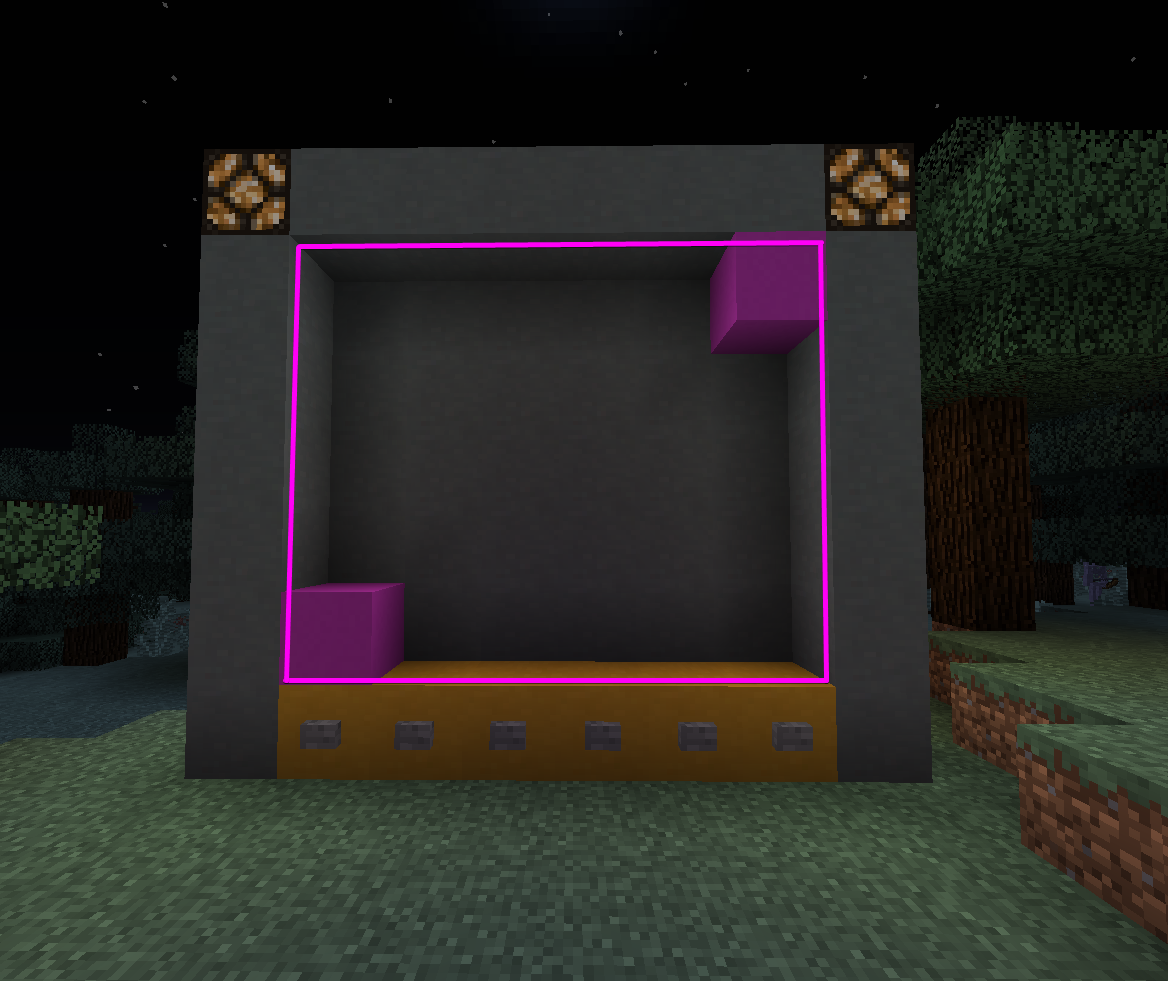
Face the board as the player in the picture is. Set the board facing direction using /c4 set face <board name>. This determines the direction that the buttons face.
The board will automatically load and be available for play.
Play
To start a game simply press one of the buttons. Two players are required to start a game.
The objective of the game is to get four blocks in a row, either in a line or diagonally. Blocks are dropped in from the top of each column and fall to the lowest available position. The first player to achieve four in a row wins.
If a player walks too far away from the board they will forfeit.
Extra commands
If for any reason you wish to reset a board you can use /c4 reset <board name>.
The config can be reloaded using /c4 reload <board name>.
A list of boards can be displayed using /c4 list.
The Connect4 Team