Logo of Collect 'n Deposit
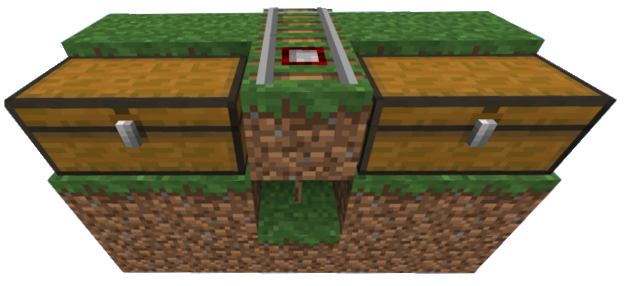
Overview, how to build an collector / depositor.
Description
Collect 'n Deposit
Collect 'n Deposit allows you to automatically transport items between chests. It makes uses of storage minecarts to transport items. You can filter on item ID's which need to be collected and which need to be deposited.
How to use

As the image explains, you need to put a detector rail with some chests next to it. The chests may be 1 lower than the detector rail itself or on the same height. The chests can be in any direction to the detector rail. It could be a small or a large chest.
Underneath the rails, you put a sign containing "[collect]" or "[deposit]" on the second row.
The third and fourth row are for specification of items.
You can specify the ID, MetaData and the amount to take out/put in.
ID:MetaData=Amount
MetaData & Amount are optional.
For ID you can use "*" or "all" to collect/deposit everything.
Permissions
- cnd.collect
- Allows players to place collect signs
- cnd.deposit
- Allows players to place deposit signs
Upcoming features
- Collect/Deposit form Dispenser
- Collect & Deposit on 1 sign.
Source
Change log
- Version 0.9.2 BETA
- Vault support
- Version 0.9.1 BETA
- Fixed bug not collecting from non-furnaces
Version 0.9 BETA
- DO NOT DOWNLOAD, CONTAINS BUG, FIXED IN 0.9.1
- Fixed rare bug
- Added furnace support
- Version 0.8 BETA
- Added Sorting on Item MetaData
- Added Item Amount limits
- Fixed bug when line ends with an ","
- Version 0.7.1 BETA
- Fixed bug, collecting all but the good ones
- Allow item id's to be on the 3rd AND 4rd line
Version 0.7 BETA
- DO NOT DOWNLOAD, CONTAINS BUG, FIXED IN 0.7.1
- Collect all feature
- Version 0.6 BETA
- Permissions to place signs
- cnd.collect - Allows players to place collect signs
- cnd.deposit - Allows players to place deposit signs
- Only collect from public/ non registered LWC chests
- More locations to look for chests
- Fixed bug ignoring data values
- Permissions to place signs
- Version 0.5 BETA
- Initial Beta Release
Bugs/tips
Please report all bugs you can find, it's still an beta release
All tips / sugestions are welcome! (here or on github)
Collect 'n Deposit Team