



The Logo for the Circleplugin
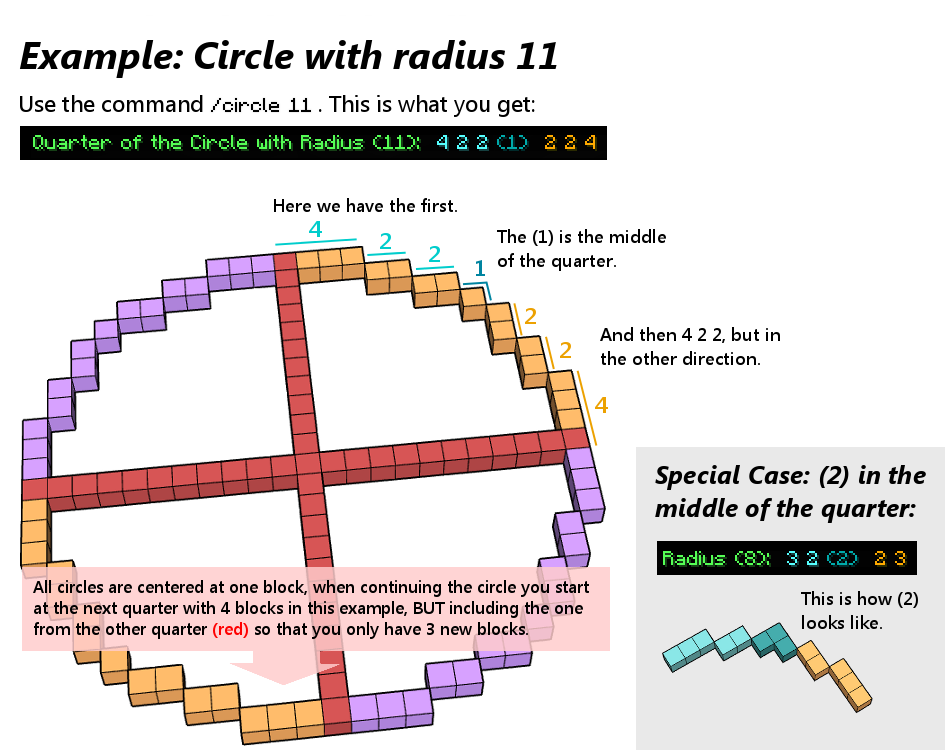
explanation of the circleplugin
Description
The Circleplugin provides you with the simple /circle <radius> command, which will give you a quarter of a circle in the serverchat. Note: It only gives you circles centered at one block!
It is pretty useful for building huge circles, which are hard to make without any plugins (like WorldEdit) or other circle calculators on the internet. The advantage of this plugin over internetcalculators is that you only have to type it in the serverchat and get a perfect circle (well you have to build it first of course) and that it gives you the block numbers you have to place, and not a picture of the finished circle (mostly reffering to this here). And its definetly useful for all servers that dont give WorldEdit to all players, because sooner or later a Minecraftplayer wants to make a circle.
Additionally since Circleplugin v1.3 you now have another command: /ellipse.
Commands
At the moment the only commands are:
/circle <radius> - Provides you with the blocks for a quarter of the circle with the selected radius.
/circle or /circle help - Provides you with the link to the Explanation Picture
/circle maxradius <new maxradius> - With this command you are able to change the max. radius the circles can have (advice: dont set it too high, because it will create lag around /circle 1000000)
/ellipse <xradius> <yradius> -Gives you one quarter of the ellipse with selected radii.
/ellipse -Gives you the link to the Explanation picture.
Recent Changes
Version 1.3.1:
- Changed Permissions so that commands now show up in /help.
Version 1.3:
- Added /ellipse command.
- Added maxradius for ellipses to the configfile.
Version 1.2:
- Added Config.yml for changing the max. radius.
- Added /circle maxradius command to change the maxradius ingame.
- Added the permission circle.all to get access to the maxradius command ingame.
Permissions
- circle.*: Allows you to use all commands of the plugin.
- circle.circle: Allows you to use /circle. Enabled by default.
- circle.ellipse: Allows you to use /ellipse. Enabled by default.
- circle.maxradius: Allows you to change the maxradius with /circle maxradius. (Only for circles. Forgot to include a command for ellipses, but it will be there in 1.4 (: )
Ideas for the future
- Adding /sphere or other geometrics like diagonal lines or polygons.
- Adding circles, which are not centered at one block.
- Adding rotated circles.
How to use it:


Other
For all people, who are interested in such things: The algorithm for the circle calculation is based off "Bresenham's circle algorithm" or the Midpoint Circle Algorithm.
Thanks to Schmidtbochum for the awesome help pictures and the logo.
If you got any suggestions or find bugs/problems, just tell me and i will try to add/fix them.
The Circleplugin Team
