
Chat Items
Type [item], [armor], [offhand], [slot1]–[slot9], [inv] or [ender] in chat to show items with full tooltips, inspect Shulker Boxes & Bundles, and share clickable read-only inventory snapshots.
A lightweight, zero-dependency plugin for Paper, Purpur, Folia and Spigot, for Minecraft 1.16.5 – 26.3.
In vanilla Minecraft there is no quick way to show other players the enchantments on your sword or what is inside your inventory, Ender chest, or Shulker Box without dropping items on the ground. Chat Items lets players link items and share live, tamper-proof inventory previews directly in chat — with zero client mods and zero protocol dependencies (no ProtocolLib required):
- Show items in chat (
[item], [i], [hand]): replaces the tag in your message with the item's name and stack count in its rarity color, with the full native Minecraft item tooltip (enchantments, durability, attribute modifiers, custom lore, potions, and components) when hovered. If your main hand is empty, it automatically falls back to your off-hand.
- Armor, off-hand & hotbar slots (
[armor], [offhand], [slot1]–[slot9]): type [armor] (or [armour]) to display all worn armor pieces inline with individual tooltips, [offhand] (or [off]) for your off-hand item, or [slot1]–[slot9] (aliases [s1]–[s9]) to link any hotbar slot without switching what you are holding.
- Read-only inventory & Ender chest snapshots (
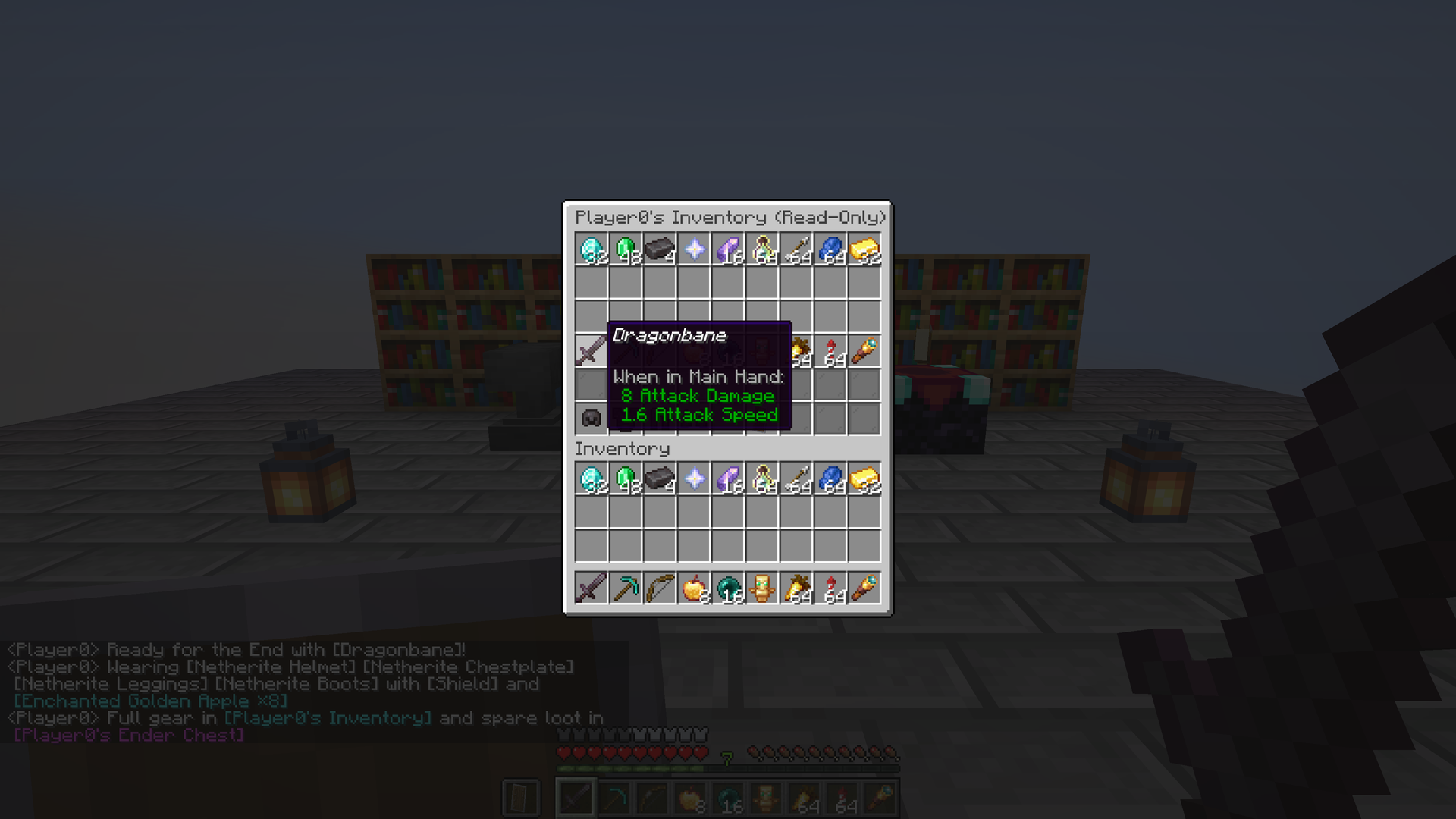
[inv] and [ender]): captures an immutable snapshot of your inventory (all 36 slots plus armor and off-hand) or Ender chest at the moment you send the message and inserts a clickable tag in chat. Clicking it opens a strict read-only chest window that blocks taking, moving, number-key swapping, dragging, or duplicating items.
- Shulker Box & Bundle inspection: hovering any Shulker Box or Bundle inside an open
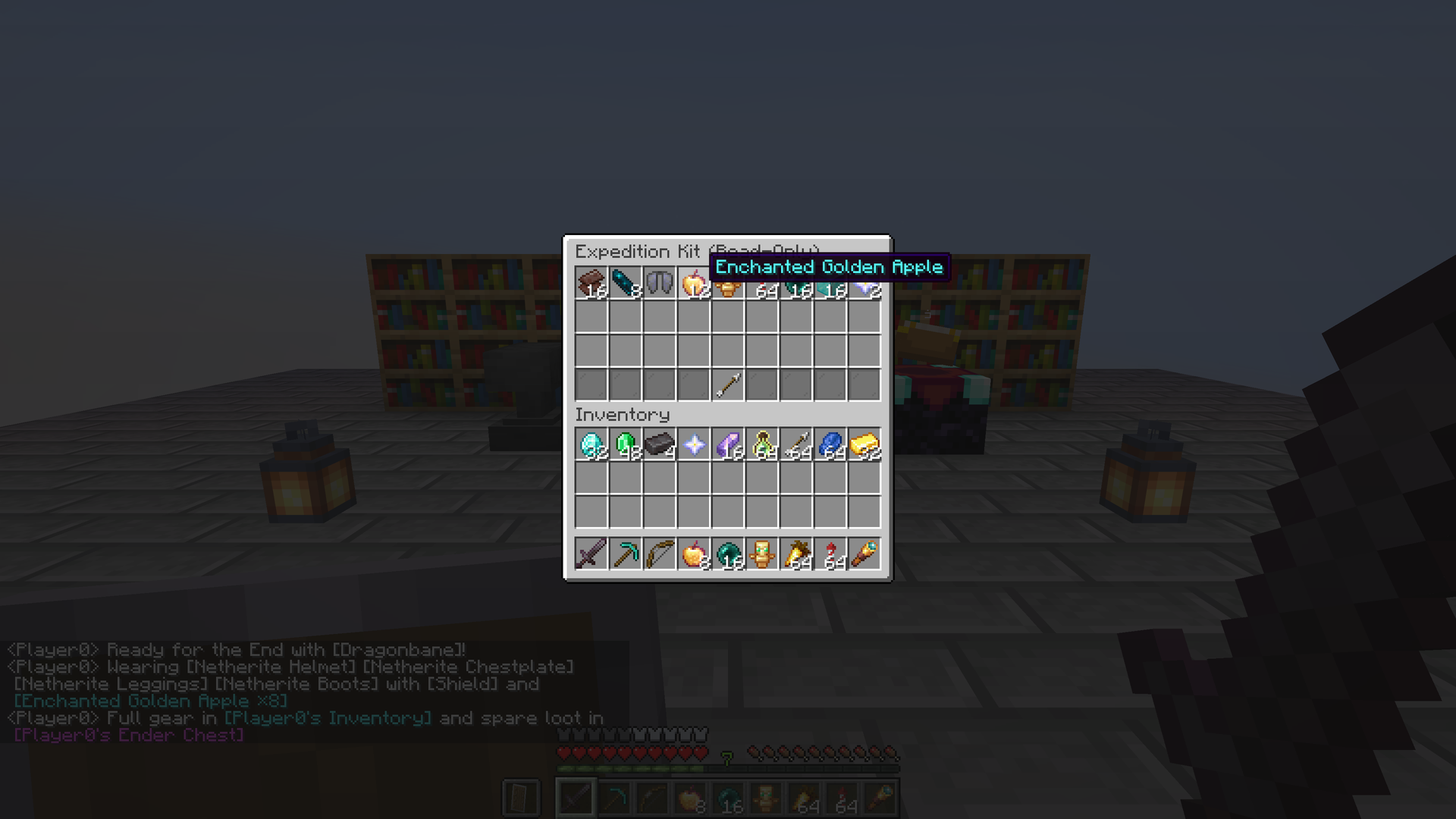
[inv] or [ender] window displays an inspection hint, and clicking opens its contents (including nested Bundles inside Shulker Boxes) in a read-only view with a ← Back arrow to step back cleanly. Linking a Shulker Box or Bundle directly in chat via [item] or [slot1..9] also makes the chat tag clickable!
- LuckPerms permissions & anti-spam: granular permissions (
chatitems.item, chatitems.inv, chatitems.ender, chatitems.bypass.cooldown, chatitems.admin), configurable token limit per message, per-player cooldown, and snapshot expiration time, all adjustable in-game via /chatitems or in plugins/ChatItems/chatitems-server.properties with live reload.
- 13 languages built in: tags, GUI titles, and command replies automatically match each player's client language.
Works as a fast, zero-dependency alternative to InteractiveChat and ShowItem for Paper, Purpur, Folia and Spigot across every version from 1.16.5 to 26.3.
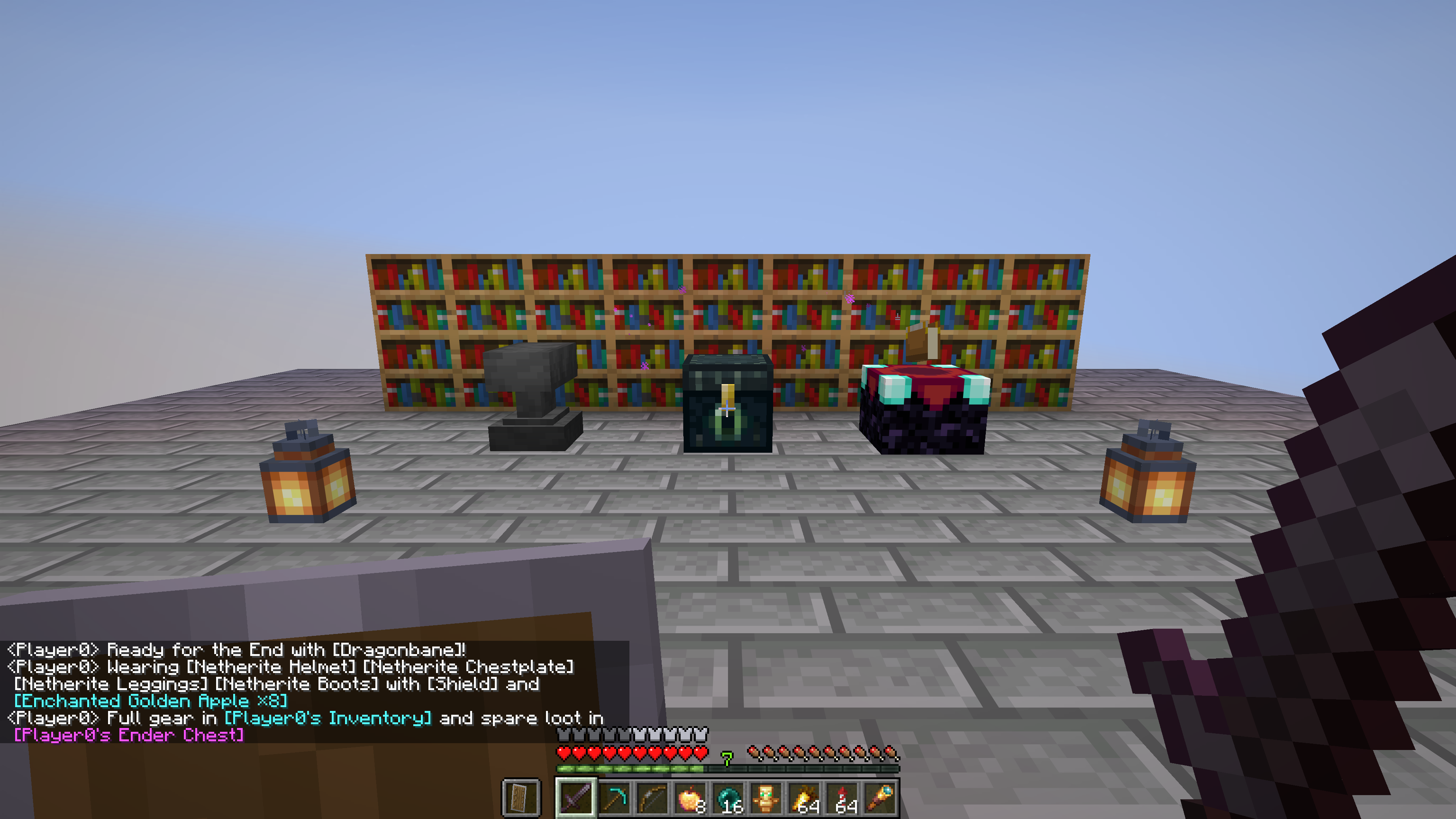
How it works
| What you type |
What appears in chat |
What happens on hover or click |
[item], [i], [hand] |
[Sword Name ×count] in the item's rarity color |
Shows the full native Minecraft item tooltip; if the item is a Shulker Box or Bundle, clicking opens its contents in a read-only chest view |
[offhand], [off] |
[Shield] in the item's rarity color |
Shows the full tooltip of the item in your off-hand (and opens it on click if it is a Shulker Box or Bundle) |
[armor], [armour] |
[Helmet] [Chestplate] [Leggings] [Boots] |
Shows all worn armor pieces inline, each with its own rarity color and full hover tooltip |
[slot1] – [slot9], [s1] – [s9] |
[Item Name ×count] from hotbar slot 1–9 |
Shows the item in that hotbar slot without switching your held item |
[inv], [inventory] |
[Player's Inventory] in aqua |
Clicking opens a read-only 6-row chest view with armor, off-hand, main inventory, and hotbar frozen at the moment the message was sent |
[ender], [enderchest], [ec] |
[Player's Ender Chest] in light purple |
Clicking opens a read-only 3-row chest view of the player's Ender chest frozen at the moment the message was sent |
Supported servers
| Server |
Minecraft |
File |
| Paper, Purpur |
1.16.5 – 26.3 |
chat-items-bukkit-….jar |
| Folia |
1.20.1 – 26.3 |
the same file (folia-supported: true) |
| Spigot, Bukkit |
1.16.5 – 26.3 |
the same file |
One file works across all supported Minecraft versions without ProtocolLib or any external dependencies. Running a modded server (Forge, NeoForge, Fabric or Quilt)? Get the mod from our CurseForge Mods page or GitHub Releases.
Commands and permissions
| Permission |
Default |
What it allows |
chatitems.item |
true (everyone) |
Use [item], [offhand], [armor], and [slot1]–[slot9] in chat |
chatitems.inv |
true (everyone) |
Use [inv] in chat to share inventory snapshots |
chatitems.ender |
true (everyone) |
Use [ender] in chat to share Ender chest snapshots |
chatitems.bypass.cooldown |
op |
Bypass the per-player cooldown between messages with chat tokens |
chatitems.admin |
op |
Change settings via /chatitems and reload chatitems-server.properties |
| Command |
Permission |
What it does |
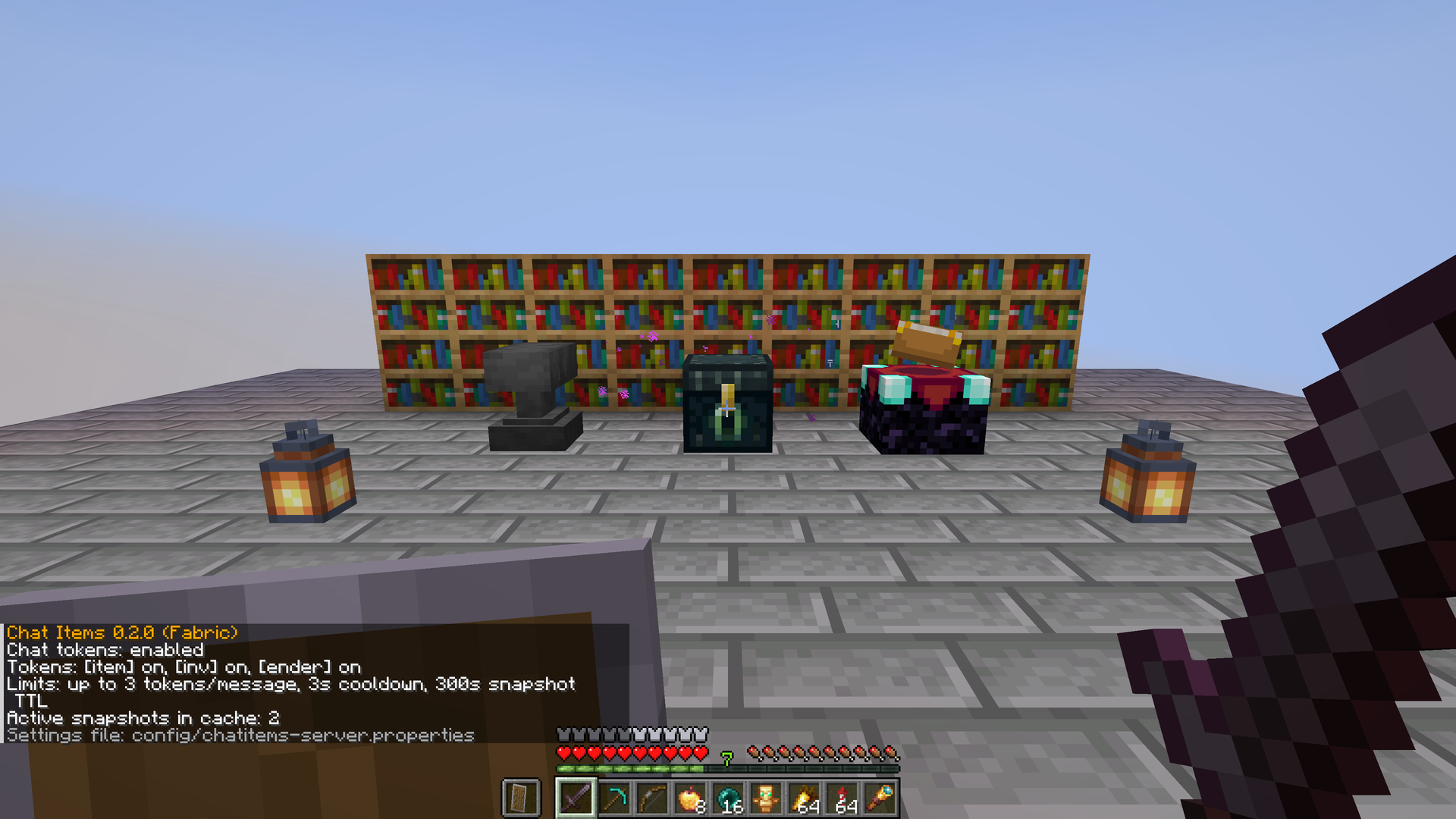
/chatitems or /chatitems status |
everyone |
Shows the version, active chat tokens, per-message limit, cooldown, snapshot TTL, and cached snapshots |
/chatitems view <id> |
everyone |
Opens a shared [inv], [ender], Shulker Box, or Bundle snapshot (triggered automatically on click) |
/chatitems enabled <true|false> |
chatitems.admin |
Turns all chat tokens on or off |
/chatitems item <true|false> |
chatitems.admin |
Turns item tags ([item], [offhand], [armor], [slot1..9]) on or off |
/chatitems inv <true|false> |
chatitems.admin |
Turns [inv] snapshots on or off |
/chatitems ender <true|false> |
chatitems.admin |
Turns [ender] snapshots on or off |
/chatitems max_tokens <1-16> |
chatitems.admin |
Sets the maximum number of tokens replaced in a single chat message |
/chatitems cooldown <0-300> |
chatitems.admin |
Sets the cooldown in seconds between messages with tokens |
/chatitems ttl <10-3600> |
chatitems.admin |
Sets how long snapshots stay viewable, in seconds |
/chatitems reload |
chatitems.admin |
Reloads plugins/ChatItems/chatitems-server.properties from disk |
/chatitems help |
everyone |
Lists all /chatitems subcommands (clickable in chat to pre-fill commands) |
<details>
<summary>
🇷🇺 Русский</summary>
В обычном Minecraft нельзя быстро показать другим игрокам зачарования на мече или содержимое своего инвентаря, эндер-сундука, шалкера или мешочка, не выбрасывая вещи на землю. Chat Items добавляет удобные теги чата, которые работают без клиентских модов и без внешних зависимостей (ProtocolLib не нужен):
- Показ предметов в чате (
[item], [i], [hand]): подставляет в сообщение название и количество предмета в цвете редкости, а при наведении курсора показывает стандартную подсказку Minecraft со всеми зачарованиями, прочностью, атрибутами и описанием.
- Броня, вторая рука и слоты хотбара (
[armor], [offhand], [slot1]–[slot9]): напишите [armor] для показа всей надетой брони, [offhand] — для предмета во второй руке, либо [slot1]–[slot9] (алиасы [s1]–[s9]) — для любого слота хотбара.
- Снимки инвентаря и эндер-сундука только для просмотра (
[inv] и [ender]): сохраняет неизменяемый снимок вашего инвентаря или эндер-сундука и вставляет кликабельную ссылку в чат.
- Просмотр шалкеровых ящиков и мешочков (Shulker Box & Bundle): клик по любому шалкеру или мешочку внутри окна
[inv] или [ender] открывает его содержимое с кнопкой ← Назад, а при отправке через [item] делает кликабельным сам тег в чате.
- Права LuckPerms и антиспам: гранулярные права (
chatitems.item, chatitems.inv, chatitems.ender, chatitems.bypass.cooldown, chatitems.admin), лимит тегов на сообщение, кулдаун и время жизни снимков с горячей перезагрузкой.
</details>
Issues · Source · License: MIT