Cape Pass
- By
Use official capes as server passes and allow only players with allowed capes to join
Description
Cape Pass is a plugin that allows you to use official Minecraft capes as an access pass to join and play on your server.
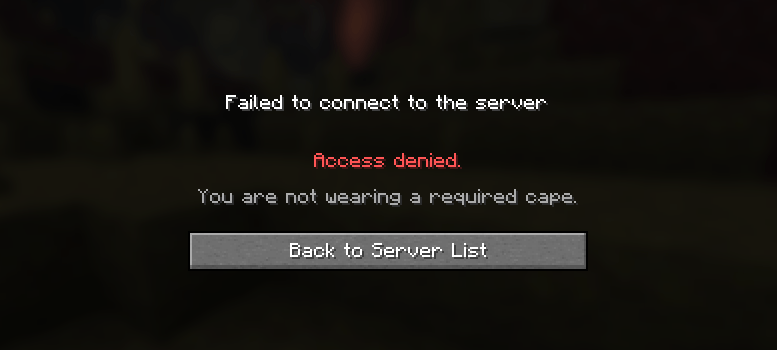
When a player connects, the plugin retrieves their profile from the Mojang Session Server and extracts the hash of the cape they are wearing. It then compares the retrieved hash against the list of allowed capes defined in the plugin's configuration. If a match is found, the player is allowed to join; otherwise, the connection is refused.
This means official capes can become more than just cosmetic items. They can represent membership in a specific group of players, a VIP community, a clan, or a team; serve as a mark of trust, or grant access to private events and servers reserved for owners of specific capes.
As a result, a player's cape can define not only their style, but also which doors are open to them.
Configuration
capepass.yml
enabled: true
kick_message: |-
  §cAccess denied.

  §7You are not wearing a required cape.
connection_timeout_seconds: 11
exempt_players: []- enabled – plugin enable/disable switch
- kick_message – message sent to a player who is not wearing an allowed cape
- connection_timeout_seconds – number of seconds to wait before canceling a request to the Mojang Session Server
- exempt_players – list of players who can join the server with or without any cape (for example, admins or moderators)
capes.toml
# Cape Pass
#
# Put cape texture hashes into "allowed_capes"
#
# Players wearing one of the capes from the list will be allowed to join the server
#

allowed_capes = [
  "PUT_CAPE_HASH_HERE",
  "OPTIONAL_HASH_HERE"
]

# :: ================================== ::
# :: Examples of several official capes ::
# :: ================================== ::
#
# :: ======= Account milestones ======= ::
#
# Migrator :: 2340c0e03dd24a11b15a8b33c2a7e9e32abb2051b2481d0ba7defd635ca7a933
# Vanilla :: f9a76537647989f9a0b6d001e320dac591c359e9e61a31f4ce11c88f207f0ad4
# Founder's :: 99aba02ef05ec6aa4d42db8ee43796d6cd50e4b2954ab29f0caeb85f96bf52a1
#
# :: ========= In-game events ========= ::
#
# Cherry Blossom :: afd553b39358a24edfe3b8a9a939fa5fa4faa4d9a9c3d6af8eafb377fa05c2bb
# Mojang Office :: 5c29410057e32abec02d870ecb52ec25fb45ea81e785a7854ae8429d7236ca26
# MCC 15th Year :: 56c35628fe1c4d59dd52561a3d03bfa4e1a76d397c8b9c476c2f77cb6aebb1df
# Yearn :: 308b32a9e303155a0b4262f9e5483ad4a22e3412e84fe8385a0bdd73dc41fa89
#
# :: ====== Twitch & TikTok drops ===== ::
#
# Purple Heart :: cb40a92e32b57fd732a00fc325e7afb00a7ca74936ad50d8e860152e482cfbde
# Follower's :: 569b7f2a1d00d26f30efe3f9ab9ac817b1e6d35f4f3cfb0324ef2d328223d350
# Home :: 1de21419009db483900da6298a1e6cbf9f1bc1523a0dcdc16263fab150693edd
# Menace :: dbc21e222528e30dc88445314f7be6ff12d3aeebc3c192054fba7e3b3f8c77b1
# Builder :: 2c579968c64c1719740fd8c2a451461879b238002574fce48f7d1a7c36a1c7d4
#
# :: ======== Promotional events ====== ::
#
# 15th Anniversary :: cd9d82ab17fd92022dbd4a86cde4c382a7540e117fae7b9a2853658505a80625
# Pan :: 28de4a81688ad18b49e735a273e086c18f1e3966956123ccb574034c06f5d336
# Common :: 5ec930cdd2629c8771655c60eebeb867b4b6559b0e6d3bc71c40c96347fa03f0
# Copper :: 5e6f3193e74cd16cdd6637d9bae5484e3a37ff2a14c2d157c659a07810b1bdca
# Zombie Horse :: a3f6e4f14801f3ea55e3d95b9b4ef3b5e8802d947f669de93d6ec4b9354a436b
#
# :: ===== Interactive live events ==== ::
#
# Minecraft Experience :: 7658c5025c77cfac7574aab3af94a46a8886e3b7722a895255fbf22ab8652434
# Moonlight Trail :: fe8a02dfe9e390e44ff33d69feef9d3943f76d3901015bbd50f0b67722d288bd
# Crafter :: 479eacefa3cdd7aca94207f36c0dd449653ddf259daf40544a5866baf05eee22
#
# :: ============ MineCon ============= ::
#
# MineCon 2011 :: 953cac8b779fe41383e675ee2b86071a71658f2180f56fbce8aa315ea70e2ed6
# MineCon 2012 :: a2e8d97ec79100e90a75d369d1b3ba81273c4f82bc1b737e934eed4a854be1b6
# MineCon 2013 :: 153b1a0dfcbae953cdeb6f2c2bf6bf79943239b1372780da44bcbb29273131da
# MineCon 2015 :: b0cc08840700447322d953a02b965f1d65a13a603bf64b17c803c21446fe1635
# MineCon 2016 :: e7dfea16dc83c97df01a12fabbd1216359c0cd0ea42f9999b6e97c584963e980
#
# :: ===== Community contributors ===== ::
#
# Realms Mapmaker :: 17912790ff164b93196f08ba71d0e62129304776d0f347334f8a6eae509f8a56
# Mojira Moderator :: ae677f7d98ac70a533713518416df4452fe5700365c09cf45d0d156ea9396551
# Translator :: 1bf91499701404e21bd46b0191d63239a4ef76ebde88d27e4d430ac211df681e
#
# :: ========= Mojang staff =========== ::
#
# Mojang Classic :: 8f120319222a9f4a104e2f5cb97b2cda93199a2ee9e1585cb8d09d6f687cb761
# Mojang :: 5786fe99be377dfb6858859f926c4dbc995751e91cee373468c5fbf4865e7151
# Mojang Studios :: 9e507afc56359978a3eb3e32367042b853cddd0995d17d0da995662913fb00f7
#
Commands
- /capepass reload :: Reloads the config, applies changes
- /capepass exempt list :: Displays the list of exempt players
- /capepass exempt add <player name> :: Adds a player to the exemption list
- /capepass exempt remove <player name> :: Removes a player from the exemption list
Permissions
- capepass.reload
- capepass.exempt
For example
capepass.yml
enabled: true
kick_message: |-
  §c§lYou have been kicked!

  §7Wear one of the following capes to join the server:

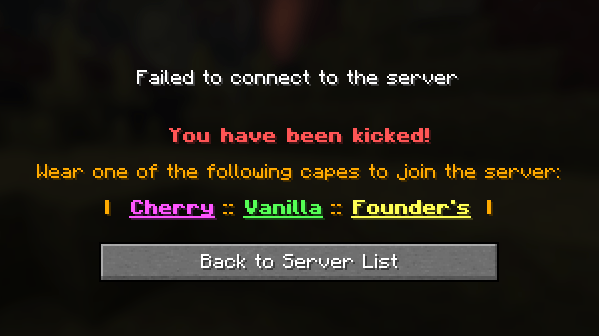
  §6§l[ §d§l§nCherry§r §6§l:: §a§l§nVanilla§r §6§l:: §e§l§nFounder's§r §6§l]
connection_timeout_seconds: 11
exempt_players:
- HizMjlkTea
- xX_RealProPlayer228_Xx
capes.toml
allowed_capes = [
  "f9a76537647989f9a0b6d001e320dac591c359e9e61a31f4ce11c88f207f0ad4",
  "afd553b39358a24edfe3b8a9a939fa5fa4faa4d9a9c3d6af8eafb377fa05c2bb",
  "99aba02ef05ec6aa4d42db8ee43796d6cd50e4b2954ab29f0caeb85f96bf52a1"
]
With this configuration:
- Cherry Blossom, Vanilla, and Founder's capes are allowed to join the server. A player must wear one of these capes to gain access.
- HizMjlkTea and xX_RealProPlayer228_Xx are exempt from cape verification. They can join the server with any cape, or without a cape at all.
- Any player who does not meet the requirements will be kicked with the following message:
bStats metrics
View Cape Pass statistics:
You can disable bStats metrics collection by editing ../plugins/bStats/config.yml on your server.
License
Cape Pass is distributed under an "All Rights Reserved" license.
For more information, see LICENSE.md included in the plugin .jar file.
Cape Pass Team