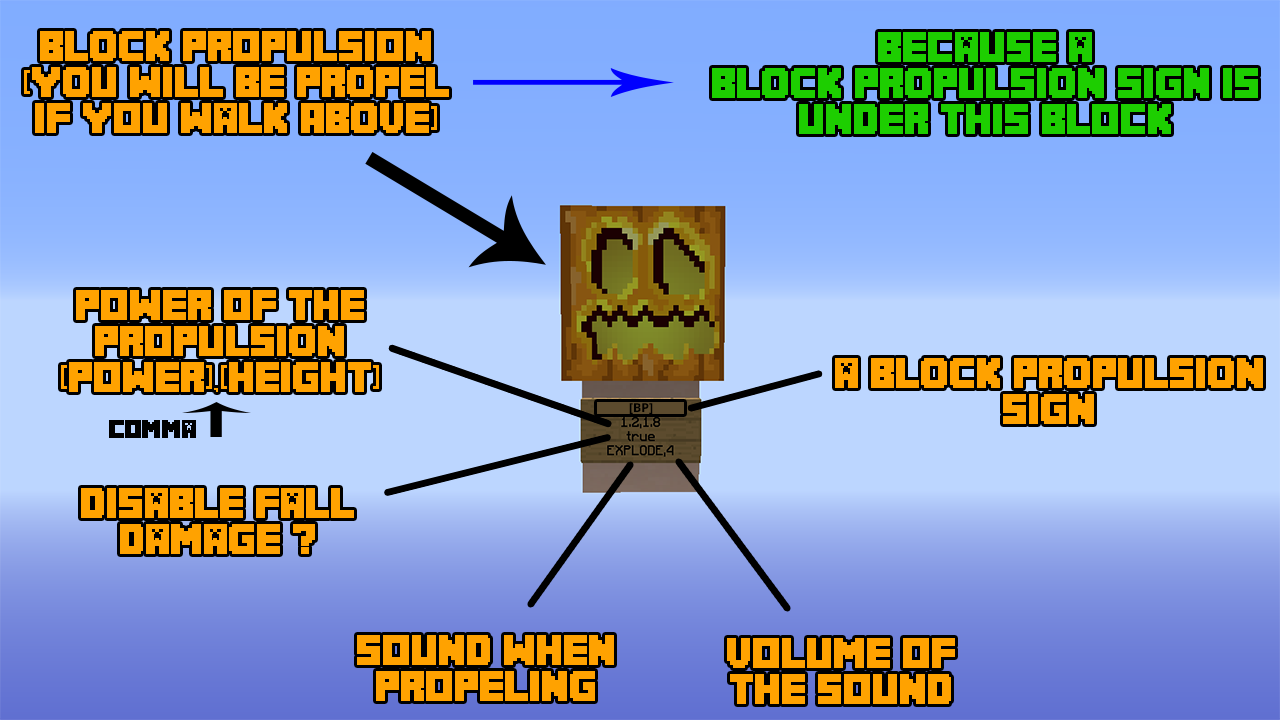
An user manual to setup a block propulsion
Description
BlocksPropulsion

BlocksPropulsion is a plugin which let you set "BlockPropulsion" which propel you far away... or not... when you walk above him !
Features
- Very simple of use
- Support color code with "&"
- Permission per block
- Configurable Language
- Use all blocks or only use certain blocks -> Define in the config.yml
- Secure plugin -> Can't destroy blockpropulsion signs and block adjacents if you don't have the permission etc...
- A reload command for config
- Support data-value !
Commands:
/bp reload || /blockspropulsion reload -> Reload the config (Only players In Game)
Setup a BlockPropulsion
Config.yml
Sounds
The files
Permissions:
bp.use:
    description: Allows to use the blocks propulsion
    default: true

// Don't forget the data_value separate by a colon ! Type the material in CAPS like in the example
bp.use.<block>:<data_value>:
    description: Allows to use BlockPropulsion created
                with the block <block>:<data_value>
    Example: bp.use.CARPET:5  ->  bp.use.STONE:0

bp.create:
    description: Allows to create a block propulsion sign
bp.destroy:
    description: Allows to destroy block propulsion sign
bp.reload:
    description: Allows to reload the config
Color Code
The files configurations support all Colors Codes ! (&l ==> Bold ¦¦¦ &o ==> Italic ¦¦¦ &m ==> Strikethrough ¦¦¦ &n ==> Underline ¦¦¦ &k ==> Magic ¦¦¦ &r ==> Reset (reset all color characters before this))
Installation
Put the BlocksPropulsion.jar in your folder plugins and restart or reload your server.
Suggestions
Post a comment or send me a PM if you want give me ideas ! :)
BlocksPropulsion Team