

Basic Fake Chat
- By
FakeMessages? Custom text commands like /slap? It's all here! Minimal configuration required!

The Official BFC logo
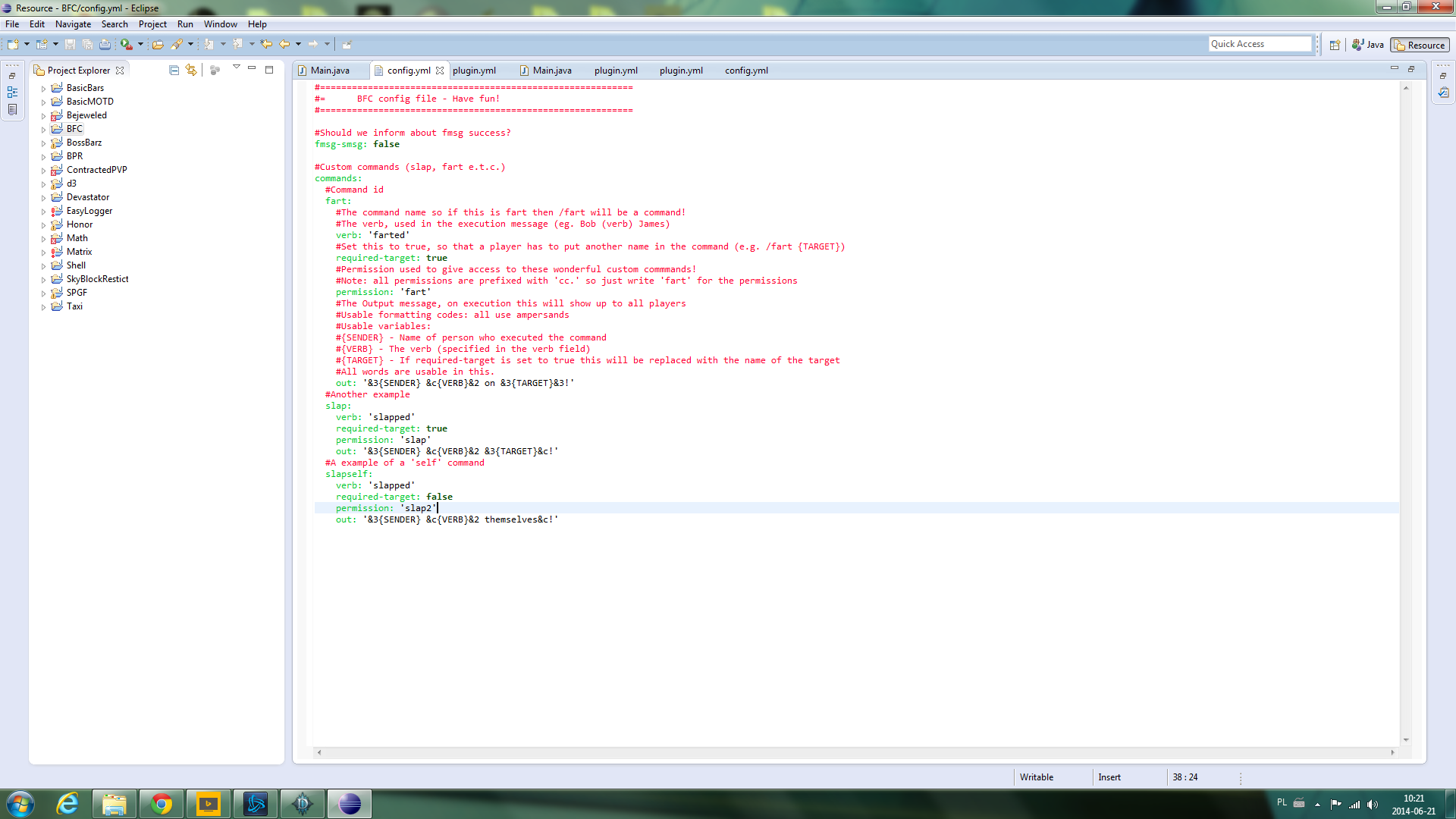
The Brief description on the main page might not be a good-enough tutorial for you on how the CC system works in BFC. This image might help.
Description
Your fun starts here.
Introduction
Basic Fake Chat (or BFC) is a small plugin made for a couple of public servers (run by my friends) that aimed to entertain staff & players on servers. One of the Owners said that this plugin should be made public; so that everyone gets more entertained on Minecraft servers (as they can be quite dull sometimes). So, here it is!
Features
- Fake Messaging ~ It's been hard before to get a solid tellraw-type plugin which has full functionality of formatting codes, spaces and a "ruin-the-fun" permission
- Custom Text commands ~ You heard me right, your config file is fitted with a some custom commands already (explained later)! You can add your own, change the existing ones or delete all of them; it's your call.
- Easy config ~ You know all those massive configs that you see from time-to-time? Here is a good thing about BFC; the config can be changed how much you want, the custom commands are easy to learn about and don't take a great deal of space
- Easy-to-remember permissions ~ A lot of permissions, why? We keep it simple, your permissions file won't have to contain a lot of permissions for this plugin!
Permissions
- bfc.* : Access to all permissions, false by default
- bfc.fmsg: Access to /fmsg, false by default
- bfc.cc: Access to the /cc command, false by default
- bfc.fmsg.see: See who dispatched fmsg in-game
- cc.(CUSTOM COMMAND NAME): Access to (CUSTOM COMMAND NAME)
- cc.* : Access to all custom commands
Custom command tutorial
This does a good job of explaining how custom commands are made, however if you can't see the image there's a tutorial below;
- verb: The action of the text command
- permission: The permission (automatically prefixed by 'cc.')
- required-target: Is there another player name required in the command (/cc (command) (target))
- out: The output message (format codes are usable, use {SENDER} for sender name, {VERB} for the verb and {TARGET} for the target) Type /cc (command) and the target (if required)
Commands
- /fmsg, The first command in the plugin; type /fmsg and words. FMSG supports formatting codes (&1 e.t.c.) and spaces!
- /cc, Is the custom command command (makes sense right?). Example:/cc slap (Optional player name, see your config for the requirements)
The Basic Fake Chat Team
