Az_Streamer
- By
Simplify Minecraft server management with easy commands for weather, time, events, countdowns, and announcements.
Az_Streamer - Simplify Your Minecraft Server Management
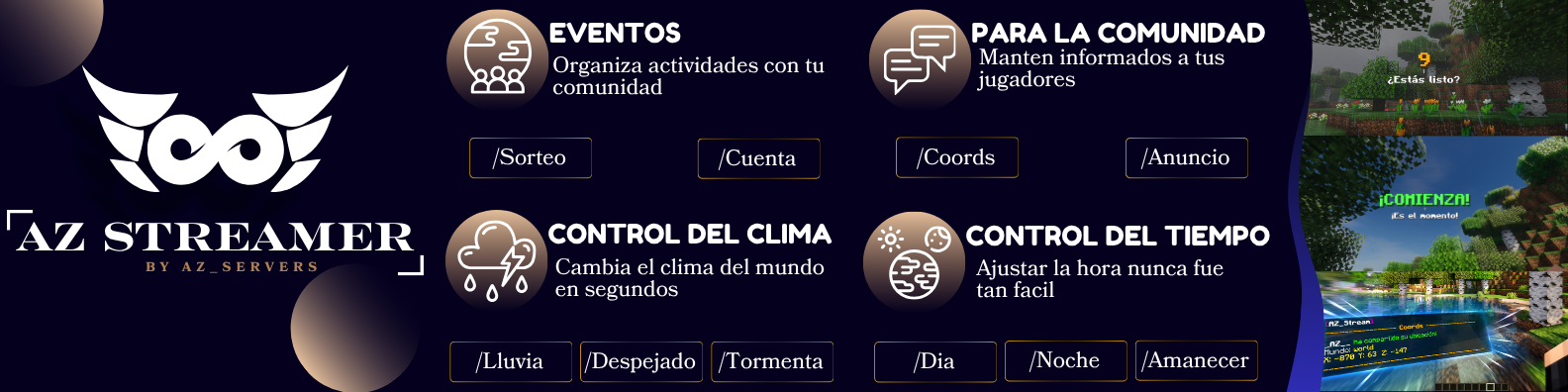
Fewer complicated commands. More time to enjoy Minecraft.
Designed for streamers, content creators, and server administrators.
Want to change the weather during an event, quickly switch from day to night, or start a countdown for your community?
With Az_Streamer, you can do all of this using simple, intuitive, and easy-to-remember commands.
Our goal is to make server management easier so you can spend more time doing what matters most: enjoying Minecraft with your community.
Main Features
Weather Control
Change your world's weather conditions with simple commands:
/lluvia— Starts the rain./tormenta— Starts a thunderstorm./despejado— Clears the weather.
You can also set the weather duration in minutes.
Time Control
Quickly change the time of day in your world:
/dia— Sets the time to daytime./noche— Sets the time to nighttime./amanecer— Sets the time to sunrise./atardecer— Sets the time to sunset.
Event Tools
Organize activities with your players without unnecessary complications:
/sorteo— Randomly selects an online player./cuenta <segundos>— Starts a server-wide countdown.
Ideal for giveaways, challenges, events, and activities during livestreams.
Community Communication
Keep your players informed:
/coords— Shares your coordinates./anuncio <mensaje>— Sends highlighted announcements to players on the server.
Why Choose Az_Streamer?
- 11 simple commands to help manage your server.
- Tools designed for streamers and content creators.
- Individual permissions to control access to each command.
- Server-side installation: players do not need to install the plugin.
- Free to use, including on monetized servers.
- Documentation and support available in Spanish.
Compatibility
Plugin version: 1.0.0
| Requirement | Compatibility |
|---|---|
| Minecraft | 26.3 |
| Server software | Paper |
| Java | 25 |
| Installation | Server-side |
The compatibility information above reflects the development and testing environment used for this release.
Installation
- Download
Az_Streamer-1.0.0.jar. - Place the file in your Paper server's
pluginsfolder. - Restart the server.
- Verify that Az_Streamer has loaded successfully.
- Configure the necessary permissions for users who will access its commands.
For detailed permission information, please visit our official documentation.
Documentation and Support
Official Wiki:
https://github.com/AzServersmx/Az_Streamer-Issues/wiki
Bug Reports and Feature Requests:
https://github.com/AzServersmx/Az_Streamer-Issues/issues
Discord Community:
https://discord.gg/zKE9MQwK6
If you encounter a problem or have an idea to improve Az_Streamer, we'd love to hear from you.
License
Az_Streamer is proprietary software distributed free of charge. It may be used on public, private, and monetized servers, subject to its license terms.
Modification, redistribution, and resale require authorization from AZ Servers.
By AZ Servers.
Practical tools for Minecraft streamers and communities.
© 2026 AZ Servers. All rights reserved.
Az_Streamer Team