Screenshot 2026-11-01 174339.png
Description
⚡ VELOCITY SHADER (Minecraft: Bedrock Edition)
Next-Gen Deferred Lighting • Real-Time Cascaded Shadows • Physical PBR Water • Atmospheric Scattering
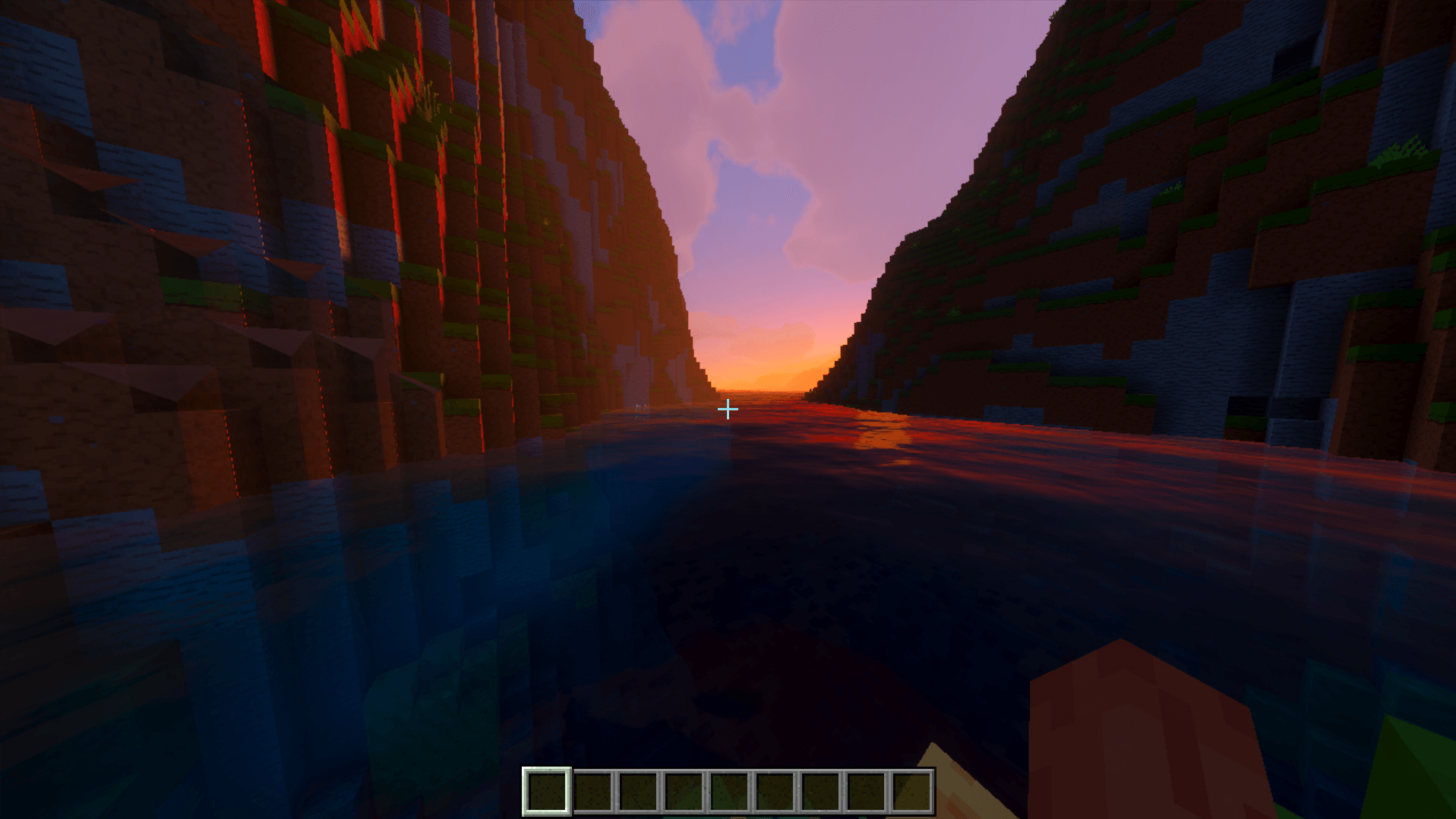
Velocity Shader brings cutting-edge deferred shading and physically-based rendering (PBR) to Minecraft: Bedrock Edition. Built on the official RenderDragon Deferred Technical Preview, Velocity Shader delivers breathtaking cinematic visuals—dynamic directional shadows, realistic water with animated caustics, volumetric atmospheric sky scattering, per-biome tonemapping, and glowing emissives—all while keeping your experience lightweight, smooth, and stutter-free.
🌟 KEY FEATURES
☀️ Dynamic Orbital Lighting & Soft Shadows
- Real-Time Cascaded Shadows: True directional shadow maps that respond dynamically to sun and moon angles, terrain elevations, and player builds.
- Realistic Diurnal Curves: Smooth solar transitions from daylight illumination to fiery golden-hour sunsets and deep lunar radiance.
- Ambient Bounce Lighting: Realistic indirect light calculations that brighten shadowed valleys, alcoves, and overhangs naturally.
🌊 Next-Gen PBR Water & Caustics
- Physical Wave Propagation: Dynamically simulated multi-octave water wave depth, speed, and frequency.
- Animated Caustic Networks: Realistic light refraction patterns projected onto ocean beds and lake bottoms (
caustics.png). - Sub-Surface Absorption: Water clarity shifts naturally from crystal-clear shallow shores to deep-ocean indigo based on depth and suspended sediments.
🌌 Atmospheric Scattering & Dynamic Horizons
- Rayleigh & Mie Scattering: Realistic atmospheric light scattering turning the sky vibrant azure at noon and deep crimson/amber at dusk.
- Horizon Glow: Natural horizon gradient blending eliminating jarring render chunk edges.
- Aurora Borealis & Polar Skies: High-latitude night skies illuminated by soft atmospheric curtains.
✨ Emissive Materials & Point Lighting (PBR / MER)
- Point Light Emission: Torches, redstone lanterns, campfires, sea lanterns, and glowstones emit real colored light radiosity.
- Glowing Entities: Emissive eye textures for Endermen, Ender Dragon, glowing squids, and soul entities.
- Metallic, Emissive, Roughness (MER): Finely tuned roughness and metallic surfaces that catch realistic specular highlights.
🎨 Per-Biome Color Grading
Custom tailored exposure, contrast, and color curves for every biome:
- Lush Caves & Jungles: Vibrant greens, soft ambient humidity, and warm sunlight penetration.
- Deserts & Badlands: High dynamic range exposure with sun-bleached warmth.
- The Nether: Menacing crimson and basalt haze with heightened emissive contrast.
- The End: Otherworldly void styling with balanced stellar contrast.
⚙️ SUBPACK OPTIONS (Choose In-Game)
Velocity Shader comes with built-in subpacks selectable directly from the pack settings:
| Preset | Description | Best For |
|---|---|---|
| Beautiful Sky (Default) | Custom realistic skybox, atmospheric clouds, and horizon fog integration. | Maximum immersion & cinematic gameplay |
| Vanilla Sky | Retains Minecraft's vanilla dynamic block cloud simulation with PBR lighting. | Classic Minecraft sky aesthetic |
To switch: Go to Settings > Global Resources > click Velocity Shader > click the Gear icon.
📋 REQUIREMENTS & COMPATIBILITY
- Platform: Minecraft: Bedrock Edition on Windows 10 / 11 (PC). (Also compatible with Android/iOS preview builds supporting the RenderDragon Deferred pipeline).
- Game Version: Minecraft Bedrock 1.20.30+ (including 1.20.80, 1.21+, 1.26+).
- Hardware: Dedicated or modern integrated GPU supporting DirectX 11/12 (NVIDIA GeForce, AMD Radeon, or Intel Arc / Iris Xe).
📥 STEP-BY-STEP INSTALLATION GUIDE
Step 1: Download & Import
- Download
Velocity-Shader.mcpack(6.89 MB). - Double-click the file (or open it with Minecraft).
- Minecraft will launch and show a top notification:
Import started...$\to$Successfully imported 'Velocity Shader'.
Step 2: Activate the Resource Pack
- In Minecraft, navigate to Settings > Global Resources > My Packs.
- Find Velocity Shader and click Activate.
- (Optional) Click the Gear icon on Velocity Shader to select your preferred cloud subpack.
Step 3: Enable Deferred Lighting in Your World
Because RenderDragon PBR is part of Minecraft's Deferred Technical Preview:
- Create a New World (or click the Pencil / Edit icon on an existing world).
- Scroll down on the left sidebar to Experiments.
- Toggle ON $\to$ Render Dragon Features for Creators (or Deferred Technical Preview).
- Launch the world and enter Video Settings to adjust deferred lighting and shadow qualities to your liking!
🚀 MAXIMUM FPS PAIRING (60 $\to$ 600 FPS)
Want maximum performance while running Velocity Shader? Pair it with our Oxygen FPS Optimizer:
- Uncaps Bedrock's 60 FPS Lock: Disables the default V-Sync clamp (
gfx_vsync:0). - Zero Overdraw: Eliminates laggy background particle simulations without changing any block/item textures.
- Recommended Video Settings:
- Render Distance: 8 – 16 Chunks
- Anti-Aliasing: 1 (Off)
- Fancy Graphics & Smooth Lighting: Set to your performance taste
❓ FREQUENTLY ASKED QUESTIONS (FAQ)
Q: Why does the world look normal without shadows?
A: Make sure you enabled Render Dragon Features for Creators in your world's Experiments tab. Without this toggle, Bedrock falls back to standard legacy rasterization.
Q: Can I use this on multiplayer servers (Hive, Cubecraft, etc.)?
A: If the server enables or supports Deferred Technical Preview, you can use it in Global Resources. On servers with experiments disabled, the pack safely falls back to standard visuals without crashing.
Q: Does this shader modify vanilla item or mob textures?
A: No. Velocity Shader is a pure lighting, water, and PBR shader pack. All non-shader asset bloat has been removed to keep the pack lightweight (~6.9 MB) and 100% vanilla-faithful.
📜 CHANGELOG
Version 1.0.0
- Initial release of Velocity Shader.
- Full RenderDragon Deferred Technical Preview PBR pipeline integration.
- Dynamic orbital directional lights & soft cascaded shadow maps.
- Multi-octave wave physics water with animated caustic reflection projection.
- Rayleigh & Mie volumetric atmospheric scattering & horizon blending.
- Multi-subpack cloud selection (Beautiful Skybox vs. Vanilla Dynamic Clouds).
- Purged all non-shader clutter, reducing pack size to a clean 6.89 MB.
Velocity shaders Team