T Button Playerlist
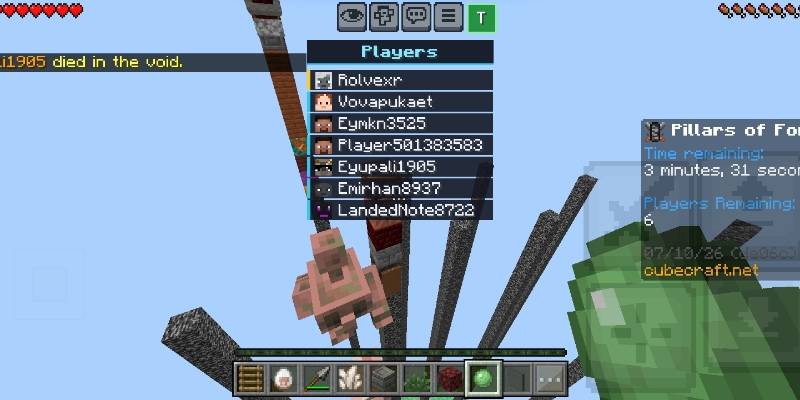
A touch-friendly player list for Minecraft Bedrock Edition. Tap the T button next to the menu button or if you are playing on keyboard press Tab or F10 to open a clean and modern UI list of everyone online. Tap it again to close.
•Features :
+ T button on the HUD: a small button sized like the chat button and placed right beside the menu button. It turns green while the list is open.
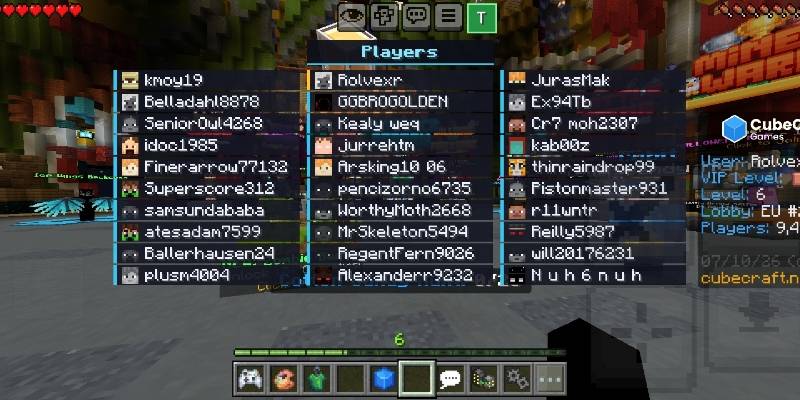
+ List that scales with the server: with one player you get a small, centered list. It grows taller as players join, then adds columns as the server fills up.
+ Pages for big servers: 30 players per page (3 columns of 10), with tabs like 1-30, 31-60 and 61-90 that appear only when you need them. Supports up to 120 players.
+ Modern look: dark card-style rows with colored accent bars, and the first row (usually you) highlighted in gold.
•Installation :
+ Download the .mcpack file and open it with Minecraft.
+ Go to Settings → Global Resources and activate T Button Playerlist.
+ Join a world or server and tap T button on the top.
+ If you are playing on keyboard press Tab or F10.
•Credits :
+ Based on Tab Key Playerlist UI by Yuka0745. Modified and extended for touch devices.
T Button PlayersList Team