Solstice Veil Visuals
- By
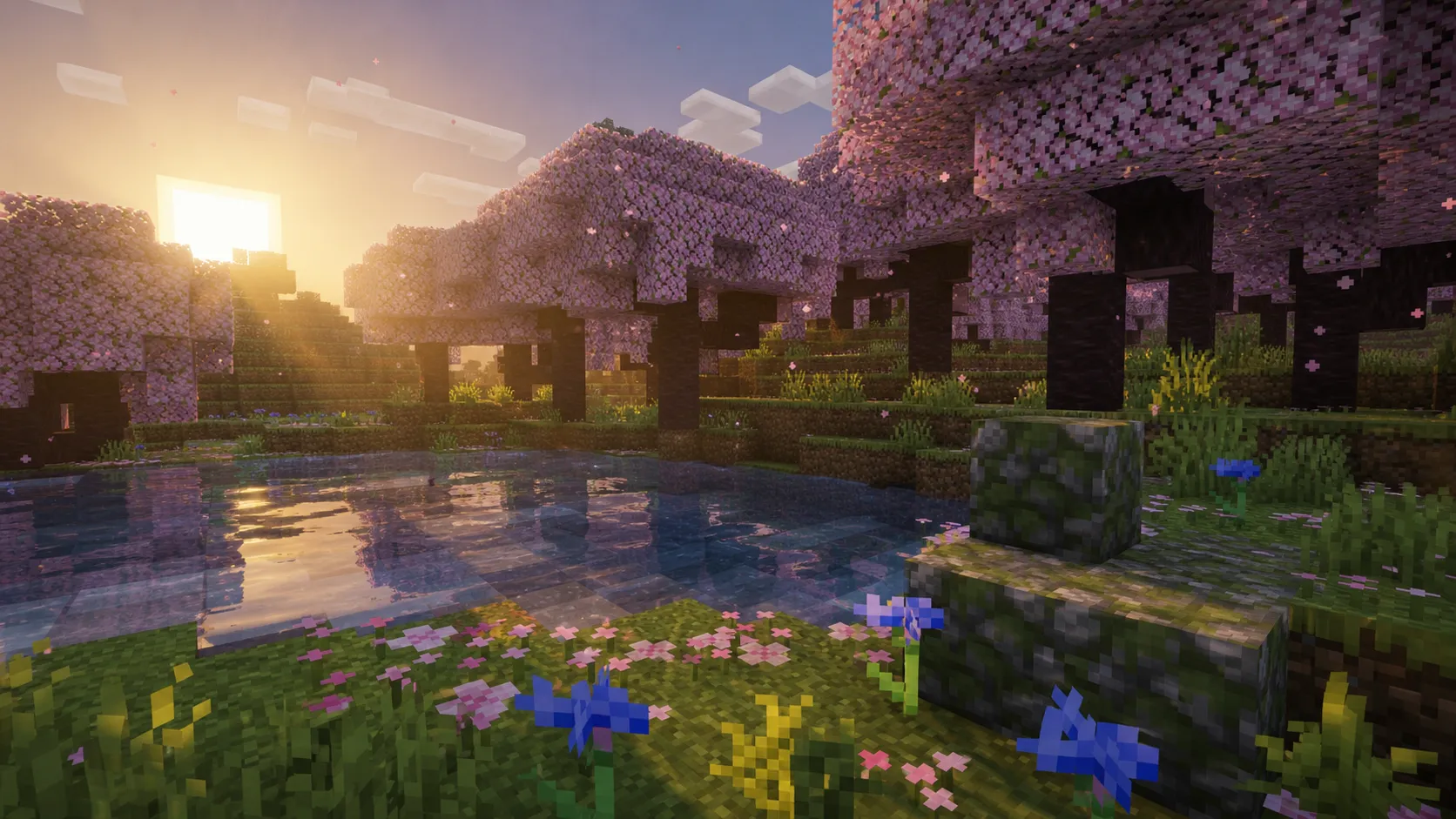
Realistic sunlight, atmospheric skies, clear turquoise water and layered foliage for Minecraft Bedrock Vibrant Visuals. Low, Medium and Ultra editions.
Solstice Veil Visuals
Description
SOLSTICE VEIL
Realistic light. Living skies. Natural worlds.
For Minecraft Bedrock Vibrant Visuals
Solstice Veil reworks how your Minecraft world is lit. Warm sunlight, deep atmospheric skies, clear turquoise water and dense layered foliage give Bedrock a natural, cinematic look, while every block stays recognisably Minecraft.
What you get
- Sunlight & moonlight — warm noon sun, amber sunrises and sunsets, cool moonlit nights.
- Sky & atmosphere — deep blue sky, soft horizon haze, natural colour changes through the day.
- Cinematic grading — controlled contrast, cool shadows, warm highlights, no neon colours.
- Water — clear blue-turquoise colour, gentle ripples and light caustics (Medium and Ultra).
- Nature — layered leaves with real gaps, furrowed bark, tree-ring tops, grass and ferns for eight tree types. Biome colours are kept.
- Clouds — redesigned shapes that sit naturally in the sky.
Designed to stay true to Minecraft: no oversaturated colours, no blurry textures and no fake effects. Everything you see comes from graphics features Bedrock officially supports, so your world keeps its identity and simply looks more natural.
Choose your edition
| Low Performance |
Medium Balanced |
Ultra Maximum quality |
| Solid leaves 16x textures Flat water |
See-through leaves 32x textures Light through leaves Waves and caustics |
Denser leaves 64x textures Surface depth maps Full waves and caustics |
Requirements
Minecraft Bedrock Edition with Vibrant Visuals turned on. Vibrant Visuals runs on Windows (DirectX 12), Xbox, PlayStation, Android and iOS devices that meet Mojang's requirements. Without it this pack has little effect. Not for Java Edition. Built for Bedrock 1.21.80 and newer; 1.21.100 or newer recommended.
Installation
- Delete older Solstice Veil packs in Settings > Storage.
- Download one edition and open the .mcpack file.
- Settings > Global Resources > activate the pack.
- Settings > Video > Graphics Mode > Vibrant Visuals.
Install only one edition at a time. Created by BR GAMERS.
Preview on a DARK site theme
SOLSTICE VEIL
Realistic light. Living skies. Natural worlds.
For Minecraft Bedrock Vibrant Visuals
Solstice Veil reworks how your Minecraft world is lit. Warm sunlight, deep atmospheric skies, clear turquoise water and dense layered foliage give Bedrock a natural, cinematic look, while every block stays recognisably Minecraft.
What you get
- Sunlight & moonlight — warm noon sun, amber sunrises and sunsets, cool moonlit nights.
- Sky & atmosphere — deep blue sky, soft horizon haze, natural colour changes through the day.
- Cinematic grading — controlled contrast, cool shadows, warm highlights, no neon colours.
- Water — clear blue-turquoise colour, gentle ripples and light caustics (Medium and Ultra).
- Nature — layered leaves with real gaps, furrowed bark, tree-ring tops, grass and ferns for eight tree types. Biome colours are kept.
- Clouds — redesigned shapes that sit naturally in the sky.
Designed to stay true to Minecraft: no oversaturated colours, no blurry textures and no fake effects. Everything you see comes from graphics features Bedrock officially supports, so your world keeps its identity and simply looks more natural.
Choose your edition
| Low Performance |
Medium Balanced |
Ultra Maximum quality |
| Solid leaves 16x textures Flat water |
See-through leaves 32x textures Light through leaves Waves and caustics |
Denser leaves 64x textures Surface depth maps Full waves and caustics |
Requirements
Minecraft Bedrock Edition with Vibrant Visuals turned on. Vibrant Visuals runs on Windows (DirectX 12), Xbox, PlayStation, Android and iOS devices that meet Mojang's requirements. Without it this pack has little effect. Not for Java Edition. Built for Bedrock 1.21.80 and newer; 1.21.100 or newer recommended.
Installation
- Delete older Solstice Veil packs in Settings > Storage.
- Download one edition and open the .mcpack file.
- Settings > Global Resources > activate the pack.
- Settings > Video > Graphics Mode > Vibrant Visuals.
Install only one edition at a time.
Solstice Veil Visuals Team