


SMC MotionShade (Animation Pack - similar to actions and stuff)
- By
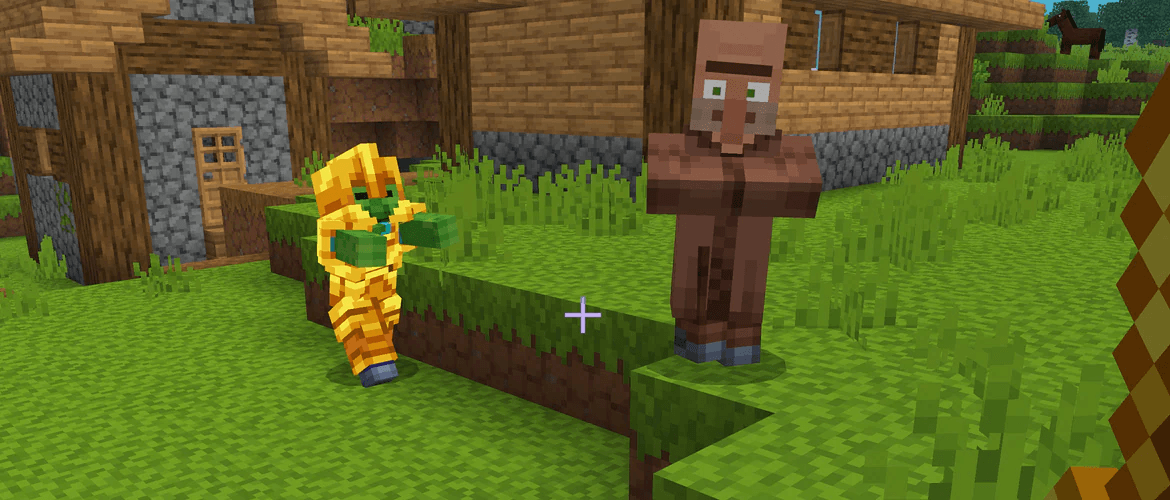
image_2026-07-05_192007524.png
Gemini_Generated_Image_cp0csbcp0csbcp0c.png

image_2026-07-09_174938169.png
Description
^^^ how to import (if something wrong) + pack preview ^^^
Warning: if there is an Import error, read below!
fixed pack: Link Removed: https://www.mediafire.com/file/lt4crqb8jvf88sy/smc-motionshade-v11.3.mcpack/file
🛠️ SMC is an extensive two-part global resource overhaul engineered to completely restructure entity motion configurations and environmental rendering visuals across Minecraft Bedrock Edition.
this pack is similar to actions and stuff, but for low-end, or RTX. It also fixes vanilla visual bugs.
🔍 Relationship to Actions & Stuff (Originality & Differences)
To comply with platform guidelines, here is a detailed breakdown of how this project relates to and differs from Actions & Stuff:
-
What is Similar: This pack shares a similar creative goal: replacing stiff, robotic vanilla movements with fluid, expressive, multi-jointed mob animations. The visual style of the walking and running cycles for primary mobs like villagers and horses is heavily inspired by the smooth aesthetic popularized by Actions & Stuff (we only copied the textures...)
-
Originality Statement: Every single file, structural layout, skeletal rigging adjustment, and animation script inside this pack was written and built independently from scratch. No code, models, or assets were ripped, copied, or re-used from the Actions & Stuff project. This is an entirely custom, standalone framework.
-
Key Technical Differences: * Unlike the original pack, SMC is built natively as a two-part split resource system to drastically lower memory usage and prevent crash loops on mobile devices- for low end and realism.
-
SMC includes a fully integrated graphical engine overhaul (Part 2) that features custom color grading maps, transparent water rendering, and native hardware-accelerated RTX pipeline hooks, which are not present in baseline animation-only packs.
-
SMC features a three-way mode slider (Full, Vanilla, and Custom) designed to allow immediate compatibility stacking with third-party visual mods and external texture packs without breaking the model structures.
-
The underlying project files are programmatically isolated into separate packages to optimize how the game client caches textures, initializes material bindings, and handles high-frequency skeletal data processing across a wide range of devices, compatible with RTX and Vibrant Visuals, and renderdragon (but trust me, it laggs ALOT) support.
-
Part 1 focuses entirely on foundational entity alterations, injecting multi-jointed, fluid skeletal animation, and first person animation (and 3D item textures) files directly into the base vanilla mob models. These dynamic movements are styled closely after advanced community animation overhauls like Actions & Stuff, completely swapping out the rigid baseline walking, running, idling, and combat interaction loops for entities such as villagers, zombie variants, horses, and llamas to give them an organic weight and presence in the world. 🎬
-
Part 2 shifts technical priority onto the graphical engine layer, modifying custom rendering materials, color grading maps, and localized environmental atmospherics. It introduces customized color lookup tables (LUTs) that expand high-contrast shading ranges, completely reworks the baseline fog distance scaling, deploys transparent custom water textures, and builds compatibility pipelines intended for hardware-accelerated, and low end environments. 📊💻
✨ Key Features and Mechanical Enhancements
Beyond the baseline visual improvements, this resource framework implements a broad array of targeted system enhancements to enrich your gameplay:
-
Dynamic Entity Skeletal Overhaul: Provides complete multi-jointed movement profiles for villagers, zombie villagers, llamas, and horses. Mobs now lean dynamically into turns, possess natural bobbing motions during locomotion, and display expressive, fluid behavior sets that eliminate vanilla rigidity. (but has bugs...) 🐎🧟
-
Premium Atmospheric Shading & Clearer Water: Completely transforms the world's lighting footprint using custom color grading parameters. Water rendering has been entirely overhauled to offer high transparency, realistic fluid surfaces, and vivid underwater saturation. 🌊🎨
-
Advanced UI Facelift: Re-engineers standard interface panels, menu screens, and HUD layouts with a modernized, polished aesthetic template that seamlessly matches the upgraded global art style of the pack- like 3D item textures in first person. 🖥️⚙️
-
Native Ray-Tracing & Vibrant Visual Integration: Features direct asset configuration maps and material shading hooks built specifically to maintain full processing stability when running alongside hardware-accelerated RTX rendering environments. 💎⚡
-
Universal Compatibility Pipeline: The structural layout of the backend code is explicitly optimized to maintain broad compatibility when stacked directly with external behavior packs or separate standalone visual modifications, ensuring it can sit in a global resource list without creating system overrides or breaking separate third-party gameplay scripts, block textures, or standalone items. 🤝🧩
⚙️ Available Operational Modes
The resource pack features an integrated configurations slider embedded natively within the pack settings menu, allowing you to cycle through three distinct operational frameworks depending on your visual preferences and current mod setup:
-
🔥 Full Experience: The uncompromised baseline setup for the resource pack. This operational mode activates the absolute entirety of the custom skeletal animations framework alongside the maximum intensity tier of visual improvements, enabling deep color grading adjustments, premium custom water rendering layers, and heavy environmental shader material modifications simultaneously.
-
⚖️ Vanilla Experience: A native-focused configuration designed for performance conservation and visual familiarity. This setting scales back the custom color rendering matrices and retains the standard, vanilla-textured look of the base game blocks and environment, while preserving the core fluid skeletal entity animations to keep the authentic Minecraft art style fully intact.
-
🧩 Custom Experience: A flexible, compatibility-driven framework intended for highly modified clients. This specific layout optimizes internal rendering passes and custom texture map assignments to cleanly accommodate third-party texture overhauls, external mod packs, or specific mobile device hardware limits without running into overlapping model failures.
! README !
📥 Technical Setup and Installation Protocol
For the entire visual engine and animation framework to compile cleanly without encountering global rendering bugs, both downloaded .mcpack files must be executed under strict global priority conditions within the game client:
-
File Importation: reaname SMC-Animation-pack(1).mcpack and SMC-Animation-pack(1).mcpack to SMC-Animation-pack(1).zip and SMC-Animation-pack(2).zip. now copy the 2 files, and paste it into mincraft/games/com.mojang/rescorce-packs. now unzip thm in the rescorce-pack folder. now restart minecraft.
-
Global Navigation: Once inside the main client interface, navigate through the pathways via Settings > Global Resources > My Packs to locate the newly imported entries. ⚙️
-
Required Dual Activation: Individually click and activate BOTH separate packages. Leaving one component deactivated will result in critical texture compilation breaks, broken geometry maps, missing model pieces, or localized UI layout crashes. ⚠️
-
Priority Stacking Order: Within your active resource pack list, check the manual placement order and verify that Part 1 is positioned sequentially directly above Part 2. This vertical loading sequence guarantees that the core skeletal animation dependencies properly override the environmental graphical baseline frameworks. 🥞
-
Mode Slider Selection: Click on the active pack entry's gear/wrench settings icon to reveal the hidden configurations slider mechanism, then manually slide the marker to select your preferred configuration framework (Full Experience (reccomended), Vanilla Experience, or Custom Experience). 🛠️
-
Graphical Cache Reset: To ensure global stability across all worlds, completely close and restart the Minecraft application. This forces the bedrock engine to entirely flush its graphical runtime cache memory, letting the custom entity models, lighting values, and animation loops index cleanly upon the next launch. 🎮🎉
🐛 Known Bugs and Technical Limitations
Because this pack alters core skeletal movement arrays and rendering layers that undergo regular engine adjustments within active Bedrock builds, a few minor layout bugs and physical tracking limitations are currently present in the framework:
-
🔄 Player Reverse Orientation Anomaly: When executing a high-speed strafe maneuver or running at an oblique angle sideways, the third-person player entity model can occasionally lock up along its directional axis. This technical tracking glitch causes the character model to weirdly face backwards relative to your actual path of travel until the momentum vector is broken or your player stops moving entirely.
-
🦓 Custom Horse Armor Layer Mapping: Due to structural shifts in the custom model matrices, certain variations of leather, iron, gold, or diamond horse armor may occasionally exhibit minor overlay clipping or texture alignment offsets during aggressive galloping or jump cycles.
-
👔 Villager Profession Texture Overlaps: On heavily crowded worlds or custom multiplayer servers, a visual desynchronization bug can occasionally cause villager biome skins to clash briefly with their specific profession overlay textures, resulting in mismatched clothing layers until the entity chunks are reloaded.
-
Import error: it says "sucsesfully imported """. to fix this, view above. or download v11 fix instaid - view files, but it may be, welp broken on the main pack.
note: to get this to work, download all files- the second file was deleted due to bugs that change your rendering sys forever, will be added back on june 10
for more info, visit smc4real.my.canvasite.cn/MotionSH-FAQ (coming soon! - FAQ in comments)
in-game preview (pack photos):

(photos may vary with devices, here we are using a low-end device)


 hi:)
hi:)
The SMC MotionShade (Animation Pack - similar to actions and stuff) Team
