About This Pack
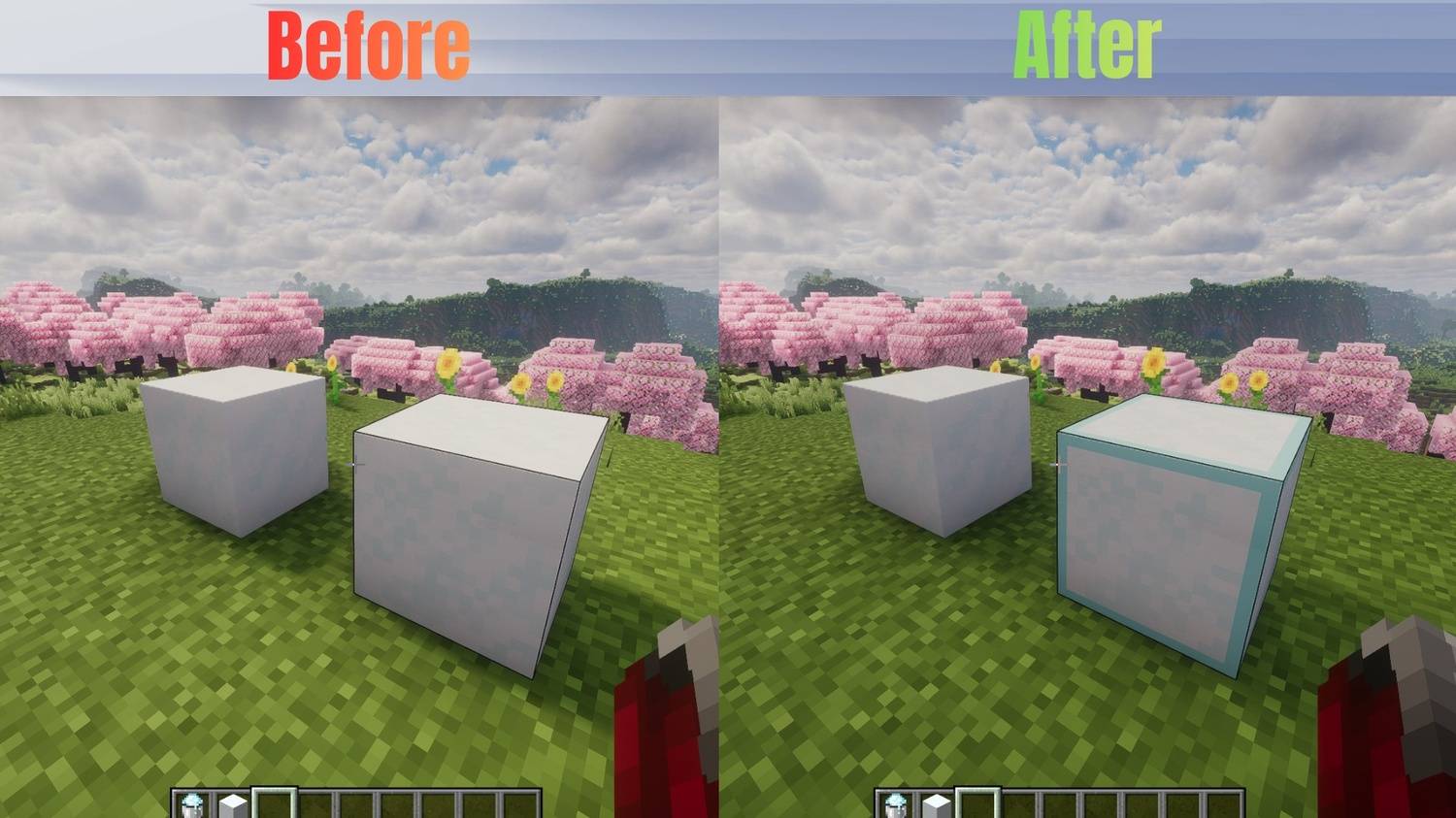
Tired of falling into hidden traps and freezing to death? This lightweight texture pack highlights Powdered Snow blocks, making them instantly visible so you can safely navigate snowy biomes, mountains, and PvP traps.
Features
- Clearly outlines/highlights Powdered Snow blocks.
- Works perfectly in Survival, Hardcore, and PvP scenarios.
- Lightweight and optimized (no FPS drops).
Compatibility
- Mod Compatibility: Works with or without OptiFine / Iris.
📥 Availability
- Java Edition: Download right here on Modrinth!
- Bedrock Edition: Available on our CurseForge page (Windows, Mobile, Xbox, PlayStation).
🛠️ How to Install
For Java Edition (Modrinth)
- Download the
.zip file from the Versions tab.
- Open Minecraft and go to Options > Resource Packs > Open Pack Folder.
- Drag and drop the downloaded
.zip file into that folder.
- Select the pack from the "Available" list in Minecraft and move it to "Selected".
For Bedrock Edition (CurseForge)
- Download the
.mcpack file from the Files tab.
- Double-click or tap on the downloaded file.
- Minecraft will open automatically and import the pack.
- Go to Settings > Global Resources > My Packs, click on this pack, and select Activate.